
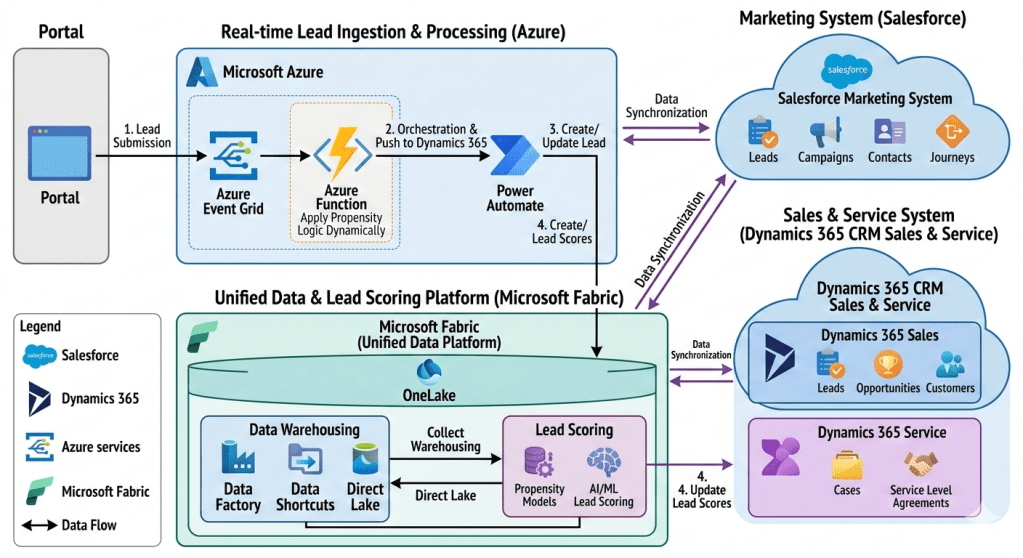
This document outlines the technical architecture of an advanced lead management and customer relationship ecosystem from one of my past implementations of an insurance company. The system integrates multiple SaaS and cloud platforms to create a seamless, real-time, and data-driven workflow for capturing, qualifying, and converting leads. At its core, it leverages the strengths of Salesforce for marketing orchestration, Dynamics 365 for core sales and service, Microsoft Azure for real-time lead ingestion and intelligent orchestration, and Microsoft Fabric as a unified data platform for comprehensive data warehousing and AI-powered lead scoring. The primary goal is to provide sales and marketing teams with a complete, 360-degree view of the customer while dynamically optimizing lead prioritization through sophisticated AI models.
Section 1: Architecture Overview
The architecture is structured into four main functional areas, connected by robust data flows and integration points:
- Lead Ingestion Point: Represented by the ‘Portal,’ this is the primary source for all incoming leads.
- Real-time Lead Ingestion & Processing (Microsoft Azure): This cloud-native layer captures lead data, applies initial dynamic logic, and orchestrates the creation of lead records in the CRM system.
- CRM Ecosystem (Salesforce and Dynamics 365): A best-of-breed CRM strategy where specialized systems manage distinct customer relationship lifecycle phases:
- Salesforce Marketing System: Handles top-of-funnel marketing activities, campaign management, and customer journey orchestration.
- Dynamics 365 CRM Sales & Service: Acts as the primary CRM for sales teams (managing leads, opportunities, and customers) and service teams (managing cases and SLAs).
- Unified Data & Lead Scoring Platform (Microsoft Fabric): The analytical heart of the system, consolidating data from all platforms into a single logical data lake (OneLake) for data warehousing and to fuel advanced AI/ML lead scoring.
Section 2: External Lead Ingestion
2.1 The Portal
The entire workflow begins at the ‘Portal’ block on the far left. The Portal is a public-facing web application, landing page, or external system where potential leads submit their information via a web form. This form captures essential details such as name, email address, company, job title, and the lead’s specific interests. This action is crucial as it creates the initial ‘digital footprint’ of the lead.
Section 3: Real-time Lead Ingestion & Processing with Microsoft Azure
Once a lead submits information via the Portal, the system transitions into real-time processing within the Microsoft Azure ecosystem. This section is designed for low-latency, event-driven operations, ensuring no lead is missed and initial classification is instant.
3.1 Step 1: Lead Submission (Portal to Azure Event Grid)
The first numbered step shows data flowing from the Portal to ‘Azure Event Grid’. When a lead form is submitted, the Portal generates a standard ‘Lead Created’ event. This event is published to an Azure Event Grid topic, which acts as a highly scalable, real-time event routing service. This decoupling is essential: it allows the Portal to submit the lead instantly without waiting for subsequent, potentially slower processing steps, making the portal highly responsive.
3.2 Intelligent Processing (Azure Event Grid to Azure Function)
Azure Event Grid routes the incoming ‘Lead Created’ event to a subscribing Azure Function. This Azure Function, the central processing unit of the ingestion layer, is serverless, running code only when triggered. It is annotated with ‘Apply Propensity Logic Dynamically.’
The Azure Function’s Role and Dynamic Propensity Logic:
This is a critical, intelligent component. The Azure Function performs several immediate tasks:
- Data Validation and Transformation: It parses the JSON payload from the Portal, validating data types and transforming it into a canonical lead format.
- Applying Propensity Logic Dynamically: This is the application of lightweight, dynamic rules or a small, pre-trained machine learning model designed for instant action. “Dynamically” implies that these rules are not hard-coded but can be updated or fetched from a configuration system on the fly.
- What this means: For example, the function could check a rule like: “If company size > 100 AND location = ‘USA’ AND product interest = ‘ILP’, then direct-route to the enterprise sales team via a special field.”
- Propensity: At this stage, it’s not the full-scale, historical data-driven scoring done later in Fabric, but rather an initial “fit” check. The logic decides how to process the lead immediately: whether to flag it for rapid follow-up, categorize it based on dynamic business rules, or prepare specific metadata. The result of this logic is embedded into the lead record’s data payload.
- Orchestration Trigger: Once initial logic is complete, the function triggers the next stage.
3.3 Step 2: Orchestration & Push to Dynamics 365 (Azure Function to Power Automate)
The Azure Function, having applied its initial logic and enriched the lead data, pushes the processed lead record to Power Automate via an HTTP connector. Power Automate is the orchestration engine for this phase, providing a low-code/no-code interface to manage the integration between Azure and the downstream CRM.
3.4 Step 3: Create/Update Lead (Power Automate to Dynamics 365 Sales)
The Power Automate flow takes the enriched lead data and performs an upsert operation (update or insert) into the ‘Dynamics 365 Sales’ module within the Dynamics 365 cloud.
The Power Automate Flow’s Role:
- Dynamics 365 CRM Connector: The flow uses the standard Dynamics 365 CRM connector to authenticate and perform actions.
- Lead Record Creation: If the lead is new (e.g., email not found in Dynamics 365), it creates a new ‘Lead’ record. The initial classification and metadata derived from the Azure Function’s dynamic logic are populated into the record.
- Existing Lead Update: If the lead already exists, the flow updates the existing lead record, perhaps adding a new campaign activity.
This step ensures that the sales team has immediate access to a centralized, validated lead record in their primary CRM (Dynamics 365 Sales), enriched with initial intelligence from the ingestion layer.
Section 4: Primary CRM Ecosystem
The core customer relationship management activities are split between Salesforce and Dynamics 365, connected by continuous data synchronization.
4.1 Dynamics 365 CRM Sales & Service
Dynamics 365 CRM, the central cloud container on the right, is the primary application suite for sales and service teams.
- Dynamics 365 Sales: This module contains essential CRM entity blocks:
- Leads: As detailed above, leads created via Power Automate are stored here. Sales reps manage the lead qualification process within this module.
- Opportunities: Qualified leads are converted into Opportunities, where sales teams manage the sales pipeline, track deals, and forecast revenue.
- Customers: Once an opportunity is won, the lead is converted into a full customer record, including primary Account and Contact details.
- Dynamics 365 Service: This module supports the customer after the sale:
- Cases: It tracks all customer support requests and issues, providing service reps with a structured workflow to resolve problems.
- Service Level Agreements (SLAs): It defines and manages the agreed-upon performance metrics for customer service (e.g., initial response time, resolution time), ensuring customer support meets predefined standards.
The combination of Sales and Service data within the single Dynamics 365 instance provides a foundational customer view for sales reps, showing them both pipeline activity and post-sales service interactions.
4.2 Salesforce Marketing System
The Salesforce cloud, in the upper right, is dedicated to advanced marketing operations. A “Data Synchronization” arrow shows continuous data exchange with the main Dynamics 365 Sales & Service container.
- Marketing Data Entities:
- Leads & Contacts: Salesforce Marketing maintains its own view of Leads and Contacts for marketing activities, synchronized from Dynamics 365. This includes historical lead behaviour.
- Campaigns: This module manages marketing campaigns across various channels (email, social, web).
- Journeys: This represents Salesforce Marketing Cloud’s “Journey Builder,” a powerful tool for designing and automating multi-channel customer journeys (e.g., welcome series, re-engagement campaigns) that deliver personalized messages at scale.
Salesforce is used because of its specialized marketing capabilities, while the actual sales process (opportunities, final customer conversion) resides in Dynamics 365. The data sync ensures that when a new lead is created in Dynamics 365, it flows to Salesforce to be nurtured; conversely, when a marketing campaign achieves a significant milestone (e.g., a lead hits a nurture goal), that information can be synchronized back to Dynamics 365 to update the lead’s status.
Section 5: Unified Data & Lead Scoring Platform (Microsoft Fabric)
This is the analytical foundation and most innovative section of the architecture. Microsoft Fabric acts as a single, unified analytics platform, consolidating data from all other systems into a single logical data lake to power both traditional reporting and advanced AI.
5.1 Data Ingestion into Microsoft Fabric (Sync Arrows and Ingestion Paths)
The diagram shows multiple arrows feeding data into Microsoft Fabric from Salesforce, Dynamics 365, and the lead ingestion stream.
- Data Synchronization (Salesforce/Dynamics 365 <-> Microsoft Fabric): Arrows indicate data synchronization from both CRM systems into Fabric’s central OneLake. This provides the unified “360-degree view” by pulling marketing, sales, service, and lead history data into a single location.
- Data Warehousing (Data Factory, Data Shortcuts, Direct Lake): These components illustrate how data is moved and unified:
- Data Factory: Used to create complex ELT (Extract, Load, Transform) data pipelines, moving large volumes of data from various sources (perhaps legacy databases or other APIs) into OneLake.
- Data Shortcuts: This is a crucial Fabric feature, allowing data to be left in its source location (like Azure Data Lake Storage Gen2 or AWS S3) while creating a “shortcut” that makes it appear as if it’s stored directly within OneLake. This eliminates the need for data duplication and extra movement.
- Direct Lake: A high-performance capability in Microsoft Fabric that enables large data volumes stored in OneLake (in Delta Parquet format) to be loaded and queried directly by analytics tools (like Power BI) without intermediate data processing or caching, ensuring performance and “freshness.”
- These tools combine to populate the unified OneLake with all relevant, normalized customer data.
- Real-time Ingestion Path (Power Automate and Azure Function -> OneLake): In addition to the main sync, the diagram implies (via “Lead Ingestion” and “Direct Lake”) that real-time data from the initial lead ingestion (from the Azure Function/Power Automate flow) can be fed directly into OneLake, making new leads immediately available for the complex scoring process.
5.2 OneLake: The Unified Data Lake
At the center of Fabric is ‘OneLake.’ This is the foundational logical data lake, acting as the single source of truth for the entire organization. By implementing ” shortcuts,” OneLake physically might span multiple cloud locations, but it looks like a single, structured file system to any analytical service within Fabric. Data from Salesforce, Dynamics 365, and the real-time ingestion stream are all stored here.
5.3 Lead Scoring within Microsoft Fabric
This module is the core application for advanced, AI-powered lead scoring, which differs significantly from the initial “Propensity Logic” in the Azure Function. The full process within Fabric involves:
- Data Unification: Aggregating data from OneLake, including:
- Historical marketing campaign engagement (from Salesforce sync).
- Sales history (closed-won/lost opportunities from Dynamics 365 sync).
- Customer service case history (from Dynamics 365 Service sync).
- Real-time lead behaviour and attributes (from ingestion).
- Propensity Models: Building and training advanced machine learning models (e.g., a predictive “propensity to buy” model) using historic data from OneLake.
- AI/ML Lead Scoring: Applying these models to new leads. These sophisticated models can process hundreds of variables and identify non-obvious patterns to generate a highly precise, predictive lead score (e.g., from 1 to 100). This provides sales reps with a truly data-driven prediction of a lead’s likelihood to convert, which is far more powerful than the rules-based “propensity check” done at the ingestion point.
5.4 Step 4: Update Lead Scores (Fabric Lead Scoring to Dynamics 365 Sales)
The final numbered step closes the loop. After the AI/ML Lead Scoring process in Fabric generates an enhanced score, it pushes this score back to ‘Dynamics 365 Sales.’ This is done via an API connector or a scheduled data pipeline within Fabric (e.g., using Data Factory or a Spark job). The updated score populates a dedicated ‘Lead Score’ field on the original lead record in Dynamics 365 Sales.
This ensures sales teams work with the absolute best intelligence. A sales rep will now see a lead, created instantly from the portal, enriched with dynamic classification from the Azure Function, and continuously optimized with an AI-driven lead score from Fabric, allowing them to prioritize high-value opportunities with incredible precision.
Conclusion and Architecture Benefits
This detailed multi-cloud and multi-SaaS architecture provides several compelling advantages:
- Best-of-Breed Specialization: It uses specialized platforms (Salesforce for marketing, Dynamics 365 for CRM core) without sacrificing data visibility, as both are integrated via bidirectional sync.
- Intelligent, Real-time Ingestion: The combination of Azure Event Grid, Azure Functions (for dynamic logic), and Power Automate ensures all leads are captured, processed, and available in the CRM instantly, while immediately receiving a first pass of classification based on business rules.
- Unified Customer View with Microsoft Fabric: The central OneLake provides a true “360-degree view,” consolidating data from Salesforce and Dynamics 365 (including sales and service) in one location, removing data silos.
- Advanced AI Optimization (Continuous Improvement): The key differentiator is the AI-driven lead scoring within Fabric. It moves beyond simple rules and leverages historic data across the entire customer lifecycle to provide highly accurate, predictive prioritization, closing the loop with a score update in Dynamics 365. This ensures sales teams are always working on the leads with the highest dynamic and predictive propensity to buy.
- Data Freshness and Efficiency: The use of Data Shortcuts and Direct Lake in Microsoft Fabric provides real-time access to large datasets without costly data movement or duplication, ensuring analytics are always based on current data.

 GM Dynamics & Agentic AI Consulting