We are mostly acquainted with What’s app but we rarely use the app released by Microsoft which is a secure chat platform.
Microsoft Kaizala is a mobile messaging (chat) app for large group communications and work management for modern workplace which enables organizations to communicate efficiently and securely with their Firstline Workforce, the value-chain outside the organization, and even their customers. It facilitates secure large group communication & discussion, message broadcast, work management, and complaint redressal, leading to better information flow and higher productivity. Please refer below link for more information.
Developers often get confused what the difference is between the three different menu item types shown in AOT and when should you use them as it appears that all menu items inside the three ‘folders’ I would say have the same set of properties and support the same object types. So, what is the difference? The answer is that there is no difference, the difference is a conceptual one rather than a functional or a technical one.
1. Display Menu item
This folder is used to contain menu items that reference runnable objects which are primarily for presenting data to the user such as forms and dialogs.
2. Output Menu item
An output menu item should have the sole purpose to print a result, mostly used for referencing classes.
3. Action Menu item
As the name says it, you should create a menu item under this folder if your runnable object has an action to perform, for example creating or updating data.
So, choosing between these three is on the developer’s sole discretion and I hope now you’ll be able to make a better choice for your scenario. A basic rule of thumb is:
Display – This type is used for opening forms in the web browser
Action – This type is used to start periodic tasks or update processes
Dynamics 365 for Finance and Operations represent every individual element of AOT such as class, table, form, and so on.
Elements in Dynamics 365 for Finance and Operations are stored on disk as XML files; these files contain the metadata and source code for the element.
The XML files are the unit of Source Control
Projects:
works the same as AX2012, but in D365 an element can be customized only once they are added to a specific Visual Studio project.
The project may only belong to one model.
Dynamics 365 for Finance and Operations model:
This is a group of elements. Standard elements are part of a standard model; you can add them into your model and do customization.
A model is a design-time concept. An example of models: warehouse management model, a project accounting model, and more.
Models can have one or more projects. Models may only belong to one package.
Dynamics 365 for Finance and Operations package:
This is a deployment and compilation unit of one or more models. It includes model metadata, binaries, cubes, and other associated resources.
One or more D365 packages can be packaged into a deployment package, which is the vehicle used for deployment on UAT and production environments.
Packages are packaged into a deployable package file for deployment to Sandbox or production environments.
A package can have one or more models. Packages can have references to other packages, just like .NET assemblies can reference each other.
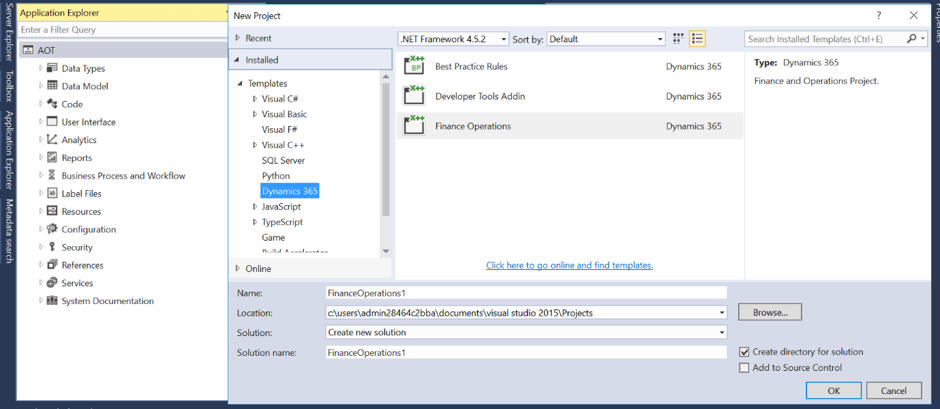
How to create a Project in Visual Studio:
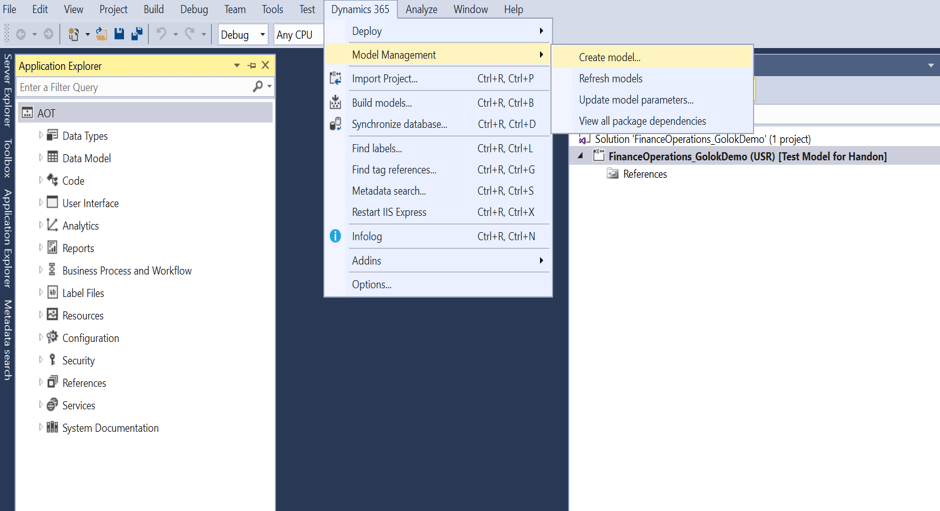
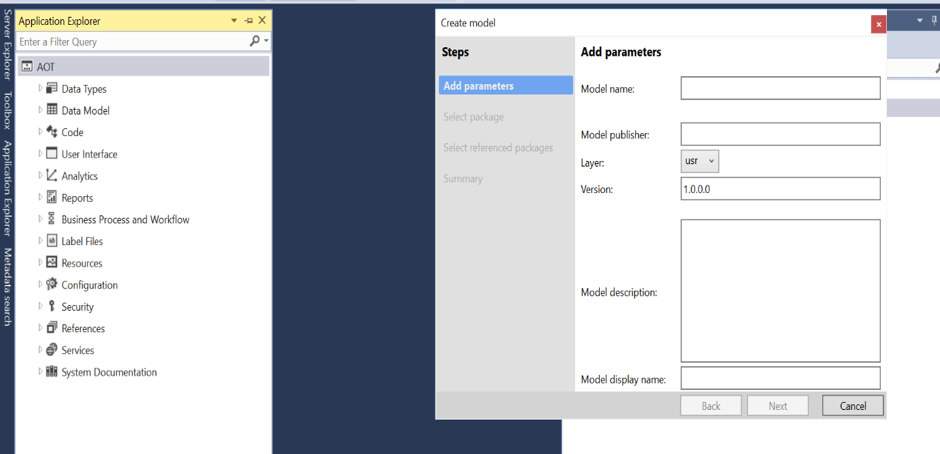
How to create a Model in Visual Studio:
There was one more step while creating a model, Select referenced packages.
When you create your own package, you can select from an existing package to add them as references in your new package. You may need to add some standard package reference if you want to add them into your customization
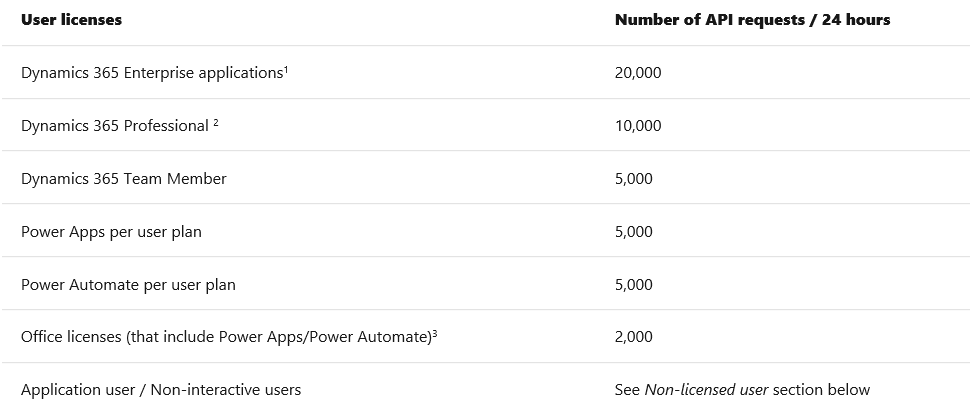
Microsoft power platform API request allocation is based on type of licensing.. normally this question comes during presales stage to know the capability of the product and its limitations which includes costing obviously 🙂
Please click on below image to know more about request limits…
Please find the below licensing guide for power platform for detailed information :


 GM Dynamics & Agentic AI Consulting