Uncategorized

Distributed System vs Distributed Computing?

Distributed system and distributed computing are two terms that are often used interchangeably, but they have different meanings and scopes.

A distributed system is a collection of independent entities that communicate and cooperate to achieve a common goal, such as a network of computers, sensors, or agents. A distributed system may or may not involve distributed computing, depending on the nature and complexity of the tasks that the entities perform. For example, a distributed system can be a peer-to-peer network that simply shares files or messages, without performing any computation.

Distributed computing, on the other hand, is a subfield of computer science that studies the design, analysis, and implementation of algorithms and protocols that enable distributed systems to perform computation. Distributed computing focuses on solving problems that require coordination and collaboration among multiple processors, such as load balancing, synchronization, consensus, distributed databases, or distributed machine learning. Distributed computing can be seen as a specific application of distributed system concepts and techniques. For example, a distributed computing system can be a cluster of servers that run a parallel algorithm to process large amounts of data.

It is the process of planning and creating a distributed system that meets the requirements and goals of a given problem or application. Distributed system design involves the following steps:

  • Problem definition: The first step is to identify and analyze the problem or application domain, such as the functionality, performance, scalability, reliability, availability, security, or cost of the system.
  • System model: The second step is to define and abstract the system model, such as the entities, components, resources, communication, coordination, failure, or fault-tolerance mechanisms of the system.
  • Algorithm design: The third step is to design and specify the algorithms and protocols that enable the system to achieve the desired functionality and properties, such as the data structures, messages, message passing, synchronization, consensus, replication, or consistency models of the system.
  • Implementation and evaluation: The fourth step is to implement and evaluate the system, such as the programming languages, frameworks, libraries, tools, platforms, testing, debugging, or benchmarking methods of the system.

It is a challenging and complex task that requires a deep understanding of the theoretical and practical aspects of distributed systems, as well as the trade-offs and limitations that arise from the inherent distributed nature of the system. Distributed system design also requires creativity and innovation to devise novel and effective solutions for different problems and applications. Some examples of distributed system design are the design of the Internet, the World Wide Web, cloud computing, peer-to-peer networks, distributed databases, or distributed machine learning systems

Uncategorized

Copilot studio implementation guide

You can download the guide from below link – https://aka.ms/CopilotStudioImplementationGuide

Success by Design ( https://learn.microsoft.com/en-us/training/modules/success-by-design/) framework, the backbone of this review process, is centered around three critical principles:

  1. Early Discovery: Identifying and dealing with potential issues at the earliest stage.
  2. Proactive Guidance: Giving robust advice ahead of issues emerging, preventing potential problems.
  3. Predictable Success: Providing a roadmap for success, using tested strategies and methods, and avoiding common pitfalls and anti-patterns.

framework, the backbone of this review process, is centered around three critical principles:

  1. Early Discovery: Identifying and dealing with potential issues at the earliest stage.
  2. Proactive Guidance: Giving robust advice ahead of issues emerging, preventing potential problems.
  3. Predictable Success: Providing a roadmap for success, using tested strategies and methods, and avoiding common pitfalls and anti-patterns.

Areas covered by the review

The Copilot Studio implementation guide covers these chapters:

  • An overview of the project
  • Architecture overview
  • Language
  • AI functionalities
  • Integrations & channels
  • Security, monitoring & governance specifications
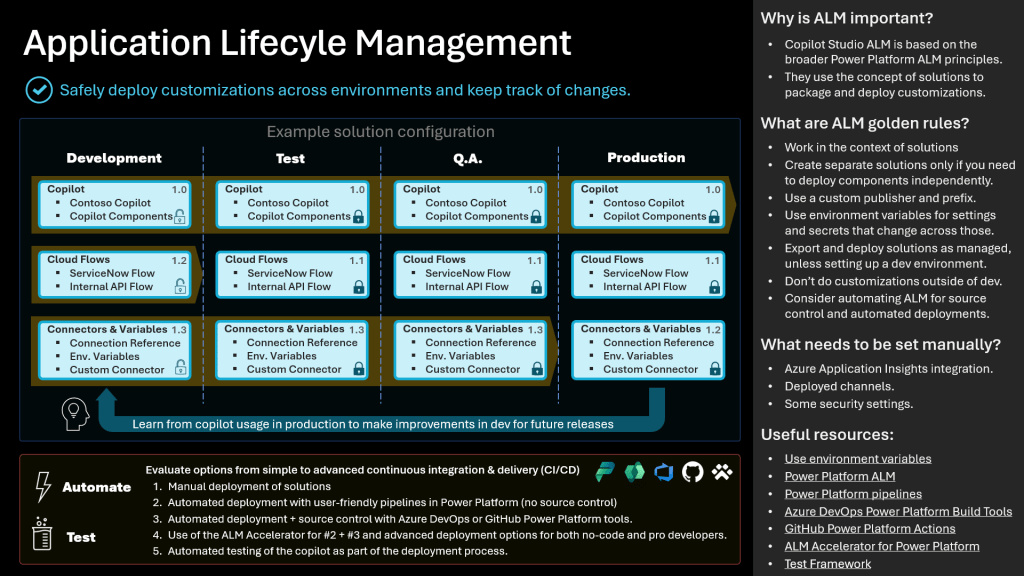
  • Application lifecycle management
  • Analytics & KPIs
  • Gaps & top requests
  • Dynamics 365 Omnichannel (optional)
Uncategorized

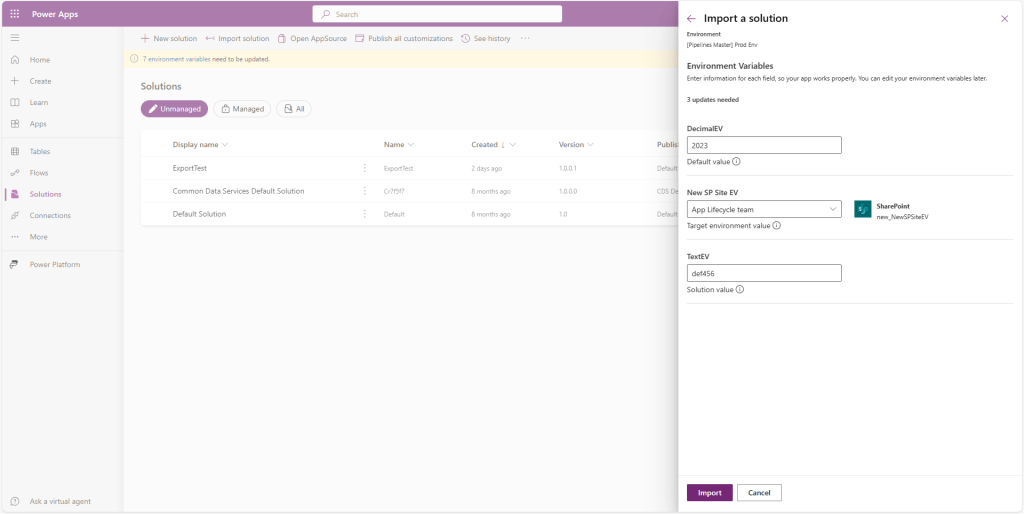
Environment Variables are now Always Visible and Editable during Solution Import and Pipeline Deployments

Now, makers will be able to validate the values that are going to be used in their components (such as their apps) in the target environment. 

See the announcement here –

https://powerapps.microsoft.com/en-us/blog/environment-variables-are-now-always-visible-and-editable-during-solution-import-and-pipeline-deployments/

Uncategorized

Approvals Kit

“Approvals kit” – a kit from Power CAT that will accelerate building your approvals faster than ever – available as a public preview. Approvals kit is a no-code ready-made kit built on top of Power Platform components that allows your organization to configure sophisticated approvals such as conditional branching, delegation, admin overrides and more – all without the need to write a single code – empowering every person in your organization to “do more with less” for your organization’s approval needs.

Approvals Kit documentation https://aka.ms/ApprovalsKit : Public landing page of the kit, describes what and where approvals kit is along with usage personas and frequently asked questions.

Learn Module https://aka.ms/ApprovalsKit/Learn : Self-guided or instructor led delivery to get started using the approvals kit.

Instructor Guide https://aka.ms/ApprovalsKit/Instructor : New automated setup experience to take a group of learners through the learn module content.

Office Hours https://aka.ms/ApprovalsKit/OfficeHours : Join our regular office hours on the second Monday of each month.

Uncategorized

Microsoft Copilot Studio

Microsoft Copilot Studio, a low-code tool to customize Microsoft Copilot for Microsoft 365 and build standalone copilots. Copilot Studio is included in Copilot for Microsoft 365 and brings together a set of powerful conversational capabilities—from custom GPTs, to generative AI plugins, to manual topics—allowing you to:

  • Easily customize Copilot for Microsoft 365 with your own enterprise scenarios.
  • Quickly build, test, and publish standalone copilots and custom GPTs.
  • Manage and secure your customizations and standalone copilots with the right access, data, user controls, and analytics.

Pls refer below link for announcement –

https://www.microsoft.com/en-us/microsoft-365/blog/2023/11/15/announcing-microsoft-copilot-studio-customize-copilot-for-microsoft-365-and-build-your-own-standalone-copilots/

If you want to learn more about Microsoft Copilot Studio, visit these resources:

Copilot studio expanded capability to various locations, including:

  • Europe
  • United Kingdom
  • Australia
  • India
  • Japan
  • Asia Pacific
  • South America
  • Switzerland