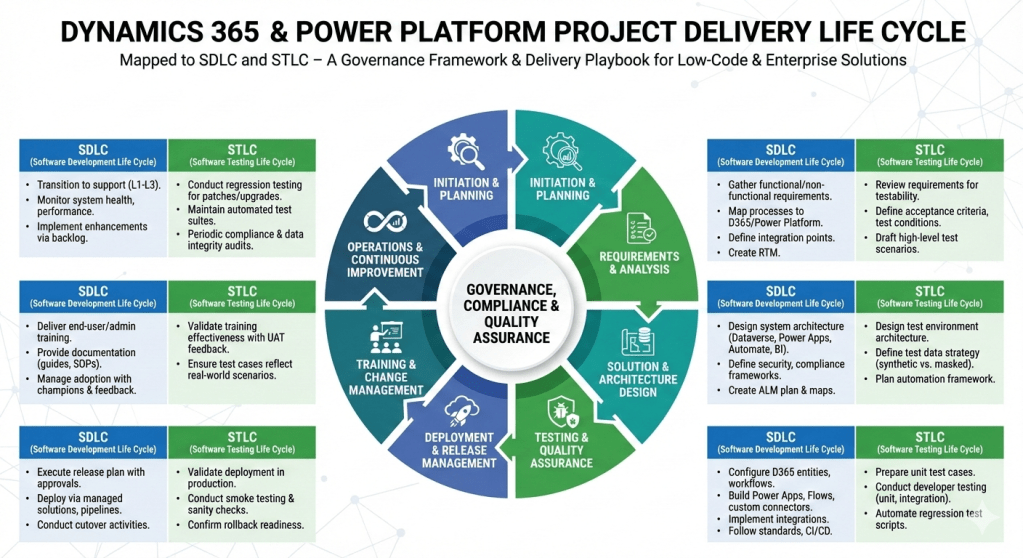
Dynamics 365 Contact Centre vs Other CcaaS Platform

Dynamics 365 Contact Centre is Microsoft’s AI‑first, cloud‑native CCaaS platform built on Azure Communication Services and deeply integrated with Dynamics 365, Power Platform, and Microsoft 365.
Compared to other CCaaS leaders, Microsoft’s strengths lie in AI, CRM context, low‑code extensibility, and ecosystem integration, while competitors often lead in telephony maturity, WEM, and global carrier options.

Dynamics 365 Contact Centre

Strengths

  • Deep Microsoft ecosystem integration (Teams, M365, Power Platform, Dynamics 365)
  • AI‑first design with Copilot and CRM‑aware automation
  • Low‑code extensibility via Power Automate and Dataverse
  • Unified agent desktop with CRM context
  • FetchXML‑based routing for compliance‑driven orgs

Weaknesses

  • Workforce engagement management still maturing
  • Telephony ecosystem not as broad as Genesys/NICE
  • Best suited for Microsoft‑aligned enterprises

Amazon Connect

Strengths

  • Highly scalable, developer‑friendly
  • Strong AWS AI/ML integration
  • Pay‑as‑you‑go pricing

Weaknesses

  • Requires heavy custom development
  • Weak CRM story
  • Limited out‑of‑the‑box WEM

Genesys Cloud CX

Strengths

  • Very mature routing, WEM, and analytics
  • Strong global telephony
  • Broad enterprise adoption

Weaknesses

  • Higher cost
  • Less native AI compared to Microsoft
  • Complex configuration

NICE CXone

Strengths

  • Best‑in‑class analytics and WEM
  • Strong compliance and global reach
  • Mature voice and digital channels

Weaknesses

  • Complex licensing
  • Less modern architecture than Microsoft/AWS
  • Limited low‑code extensibility

Cisco Webex Contact Center

Strengths

  • Strong telephony and network reliability
  • Good for Cisco‑centric enterprises
  • Solid omnichannel

Weaknesses

  • AI and CRM context weaker than Microsoft
  • Less flexible than AWS/Genesys

Best‑Fit Recommendations

Choose Dynamics 365 Contact Centre if:

  • You are a Microsoft‑centric enterprise
  • You want AI‑first customer service
  • You need CRM‑aware automation
  • You want low‑code extensibility
  • You want a unified Microsoft ecosystem (Teams + Dynamics + Power Platform)

Choose Amazon Connect if:

  • You have strong AWS engineering teams
  • You want a highly customizable CCaaS
  • You prefer pay‑as‑you‑go pricing

Choose Genesys Cloud CX if:

  • You need advanced routing and WEM
  • You run a large, global contact centre

Choose NICE CXone if:

  • Analytics and compliance are top priorities
  • You need the strongest WEM suite

Choose Cisco Webex CC if:

  • You are already invested in Cisco telephony
  • You want a stable, network‑centric CCaaS
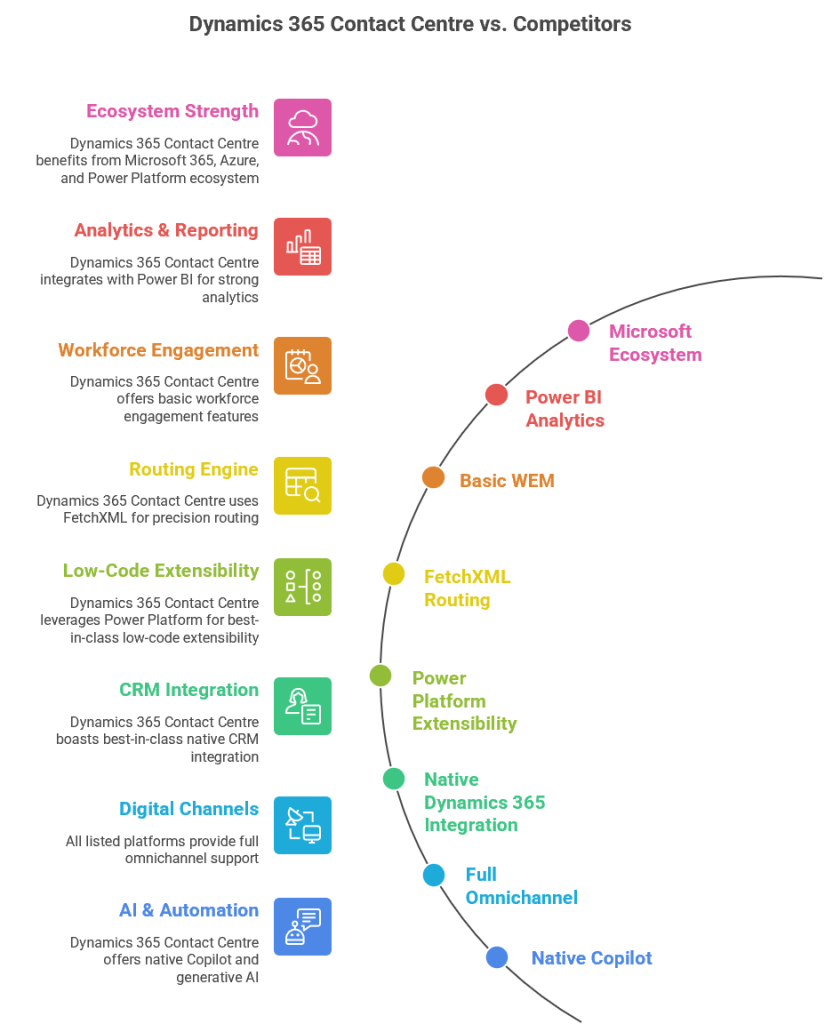
Step‑by‑step project delivery life cycle for Dynamics 365 & Power Platform projects

Here’s a step‑by‑step project delivery life cycle for Dynamics 365 & Power Platform projects, mapped to both SDLC (Software Development Life Cycle) and STLC (Software Testing Life Cycle). I’ve structured it so you can use it as a governance framework or a delivery playbook.

Dynamics 365 & Power Platform Project Delivery Life Cycle

1. Initiation & Planning

  • SDLC:
    • Define business objectives, scope, and success criteria.
    • Identify stakeholders, governance model, and compliance requirements.
    • Conduct feasibility study and ROI analysis.
  • STLC:
    • Define test strategy aligned with business goals.
    • Identify quality metrics, compliance standards, and risk areas.

2. Requirements & Analysis

  • SDLC:
    • Gather functional and non‑functional requirements (workshops, interviews, user stories).
    • Map business processes to Dynamics 365 modules and Power Platform capabilities.
    • Define integration points (ERP, CRM, CTI, external APIs).
    • Create requirement traceability matrix.
  • STLC:
    • Review requirements for testability.
    • Define acceptance criteria and test conditions.
    • Draft high‑level test scenarios.

3. Solution & Architecture Design

  • SDLC:
    • Design system architecture (Dataverse, Power Apps, Power Automate, Power BI, Dynamics 365 modules).
    • Define security, compliance, and governance frameworks.
    • Create ALM (Application Lifecycle Management) plan with environments (Dev, Test, UAT, Prod).
    • Prepare architecture maps and integration diagrams.
  • STLC:
    • Design test environment architecture.
    • Define test data strategy (synthetic vs. masked production data).
    • Plan automation framework (e.g., EasyRepro, Selenium, Power Automate test flows).

4. Development & Configuration

  • SDLC:
    • Configure Dynamics 365 entities, forms, workflows, and business rules.
    • Build Power Apps (Canvas/Model‑Driven), Power Automate flows, and custom connectors.
    • Implement integrations (Azure Functions, Logic Apps, APIs).
    • Follow coding standards, version control (GitHub/Azure DevOps), and CI/CD pipelines.
  • STLC:
    • Prepare unit test cases.
    • Conduct developer testing (unit, integration).
    • Automate regression test scripts.

5. Testing & Quality Assurance

  • SDLC:
    • Conduct system testing, UAT, performance testing, and security validation.
    • Validate integrations and data migration.
  • STLC:
    • Test Planning: Finalize test plan, entry/exit criteria.
    • Test Design: Create detailed test cases, test scripts, and data sets.
    • Test Execution: Run functional, regression, performance, and security tests.
    • Defect Management: Log, track, and resolve defects in Azure DevOps/Jira.
    • Test Closure: Document results, lessons learned, and sign‑off.

6. Deployment & Release Management

  • SDLC:
    • Execute release plan with governance approvals.
    • Deploy via managed solutions, pipelines, or release automation.
    • Conduct cutover activities (data migration, user provisioning, environment setup).
  • STLC:
    • Validate deployment in production.
    • Conduct smoke testing and sanity checks.
    • Confirm rollback strategy readiness.

7. Training & Change Management

  • SDLC:
    • Deliver end‑user training, admin training, and governance workshops.
    • Provide documentation (user guides, SOPs, governance playbooks).
    • Manage adoption with change champions and feedback loops.
  • STLC:
    • Validate training effectiveness with UAT feedback.
    • Ensure test cases reflect real‑world scenarios.

8. Operations & Continuous Improvement

  • SDLC:
    • Transition to support (L1, L2, L3).
    • Monitor system health, performance, and compliance.
    • Implement enhancements via backlog grooming.
  • STLC:
    • Conduct regression testing for patches and upgrades.
    • Maintain automated test suites for continuous validation.
    • Periodic audits for compliance and data integrity.

This framework ensures governance, compliance, and quality assurance are embedded throughout delivery. It’s especially powerful for Dynamics 365 & Power Platform projects where configuration, low‑code development, and integrations coexist with enterprise‑grade testing.