Uncategorized

Basic Components of Dynamics Finance & Operation…

Elements:

  • Dynamics 365 for Finance and Operations represent every individual element of AOT such as class, table, form, and so on.
  • Elements in Dynamics 365 for Finance and Operations are stored on disk as XML files; these files contain the metadata and source code for the element.
  • The XML files are the unit of Source Control

Projects:

  • works the same as AX2012, but in D365 an element can be customized only once they are added to a specific Visual Studio project.
  • The project may only belong to one model.

Dynamics 365 for Finance and Operations model:

  • This is a group of elements. Standard elements are part of a standard model; you can add them into your model and do customization.
  • A model is a design-time concept. An example of models: warehouse management model, a project accounting model, and more.
  • Models can have one or more projects. Models may only belong to one package.

Dynamics 365 for Finance and Operations package:

  • This is a deployment and compilation unit of one or more models. It includes model metadata, binaries, cubes, and other associated resources.
  • One or more D365 packages can be packaged into a deployment package, which is the vehicle used for deployment on UAT and production environments.
  • Packages are packaged into a deployable package file for deployment to Sandbox or production environments.
  • A package can have one or more models. Packages can have references to other packages, just like .NET assemblies can reference each other.

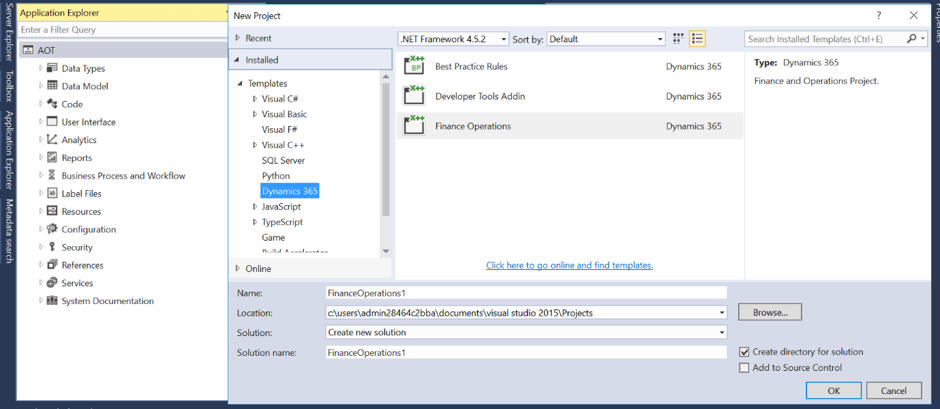
How to create a Project in Visual Studio:
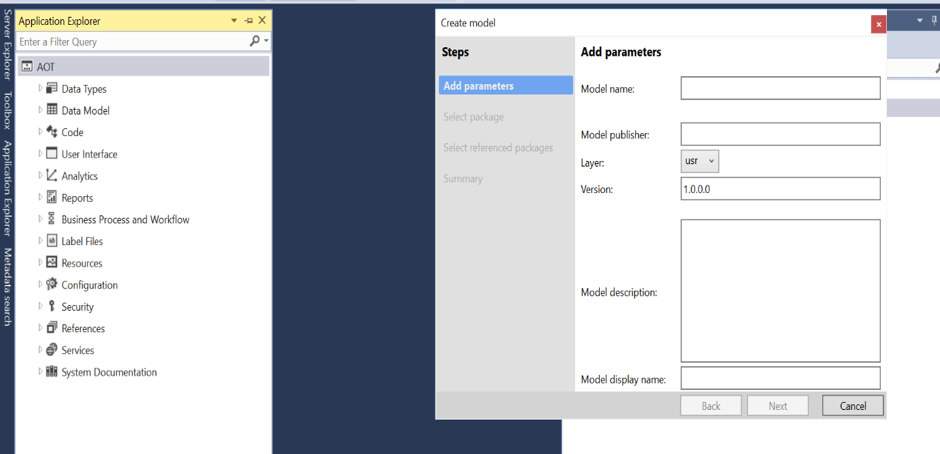
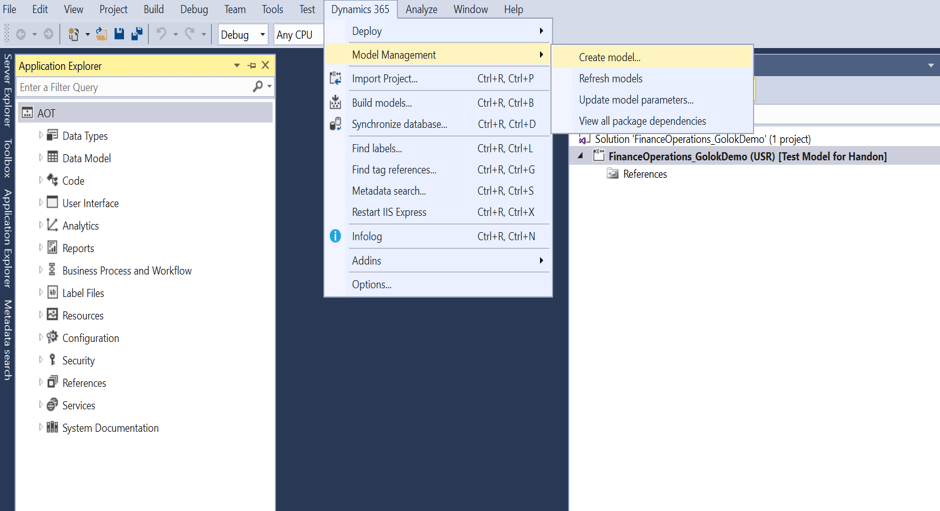
How to create a Model in Visual Studio:
There was one more step while creating a model, Select referenced packages.

When you create your own package, you can select from an existing package to add them as references in your new package. You may need to add some standard package reference if you want to add them into your customization
Uncategorized

Power Platform Request Limits and Licensing Information..

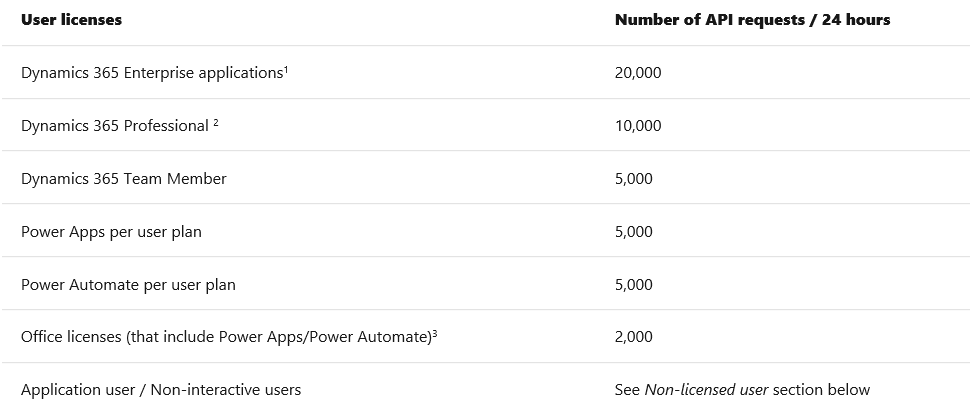
Microsoft power platform API request allocation is based on type of licensing.. normally this question comes during presales stage to know the capability of the product and its limitations which includes costing obviously 🙂

Please click on below image to know more about request limits…

Please find the below licensing guide for power platform for detailed information :

https://download.microsoft.com/download/9/5/6/9568EFD0-403D-4AE4-95F0-7FACA2CCB2E4/Power%20Apps%20Power%20Automate%20and%20Power%20Virtual%20Agents%20Licensing%20Guide%20-%20Feb%202020.pdf

Uncategorized

PowerAutomate Marching towards fully equipped RPA..

In current RPA market UiPath, Automation Anywhere and BluePrism are leaders.. Microsoft entered into RPA market by leveraging its Flow capabilities in association with Selenium driver by introducing ‘Ui flows’ in preview version and changing ‘Microsoft Flows’ to ‘Power Automate’ by bolstering PowerPlatform a new wing..

Finally Microsoft Power Automate Ui Flows will be generally available worldwide on 2nd April,2020… let’s rock and get the best out of it..

https://youtu.be/H4H_jPJWlxU

Here is the announcement link… https://flow.microsoft.com/en-us/blog/microsoft-power-automate-adds-robotic-process-automation-in-april/

Uncategorized

Microsoft Azure Private Link..

Some customers asks how to access Microsoft Azure services on premise seamlessly and here is the answer…

Use Private Link to bring services delivered on Azure into your private virtual network by mapping it to a private endpoint. Or privately deliver your own services in your customers’ virtual networks. All traffic to the service can be routed through the private endpoint, so no gateways, NAT devices, ExpressRoute or VPN connections, or public IP addresses are needed.

Please refer below link for announcement..

https://azure.microsoft.com/en-us/blog/announcing-azure-private-link/

Please refer below link for more information :

https://azure.microsoft.com/en-us/services/private-link/