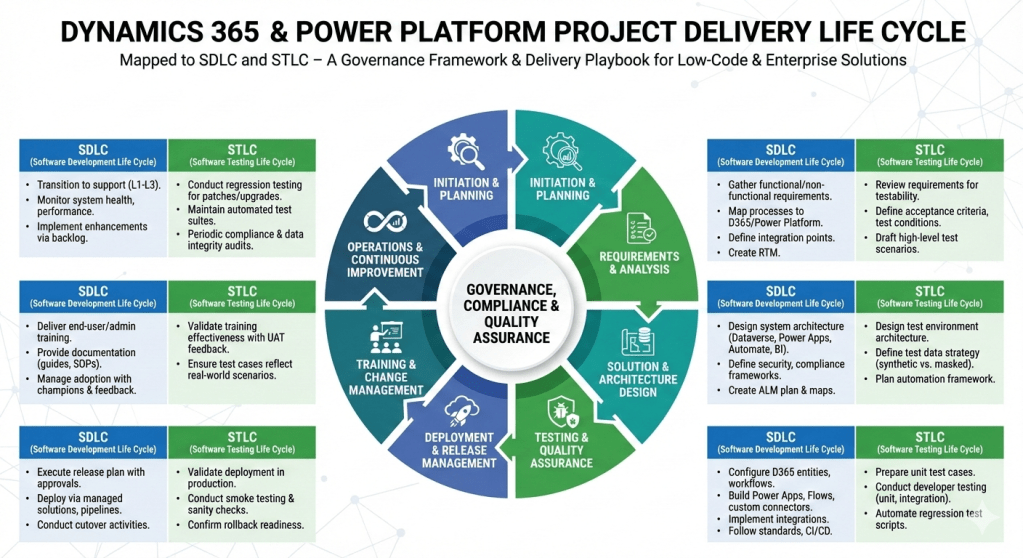
Dynamics 365 Contact Centre vs Other CcaaS Platform

Dynamics 365 Contact Centre is Microsoft’s AI‑first, cloud‑native CCaaS platform built on Azure Communication Services and deeply integrated with Dynamics 365, Power Platform, and Microsoft 365.
Compared to other CCaaS leaders, Microsoft’s strengths lie in AI, CRM context, low‑code extensibility, and ecosystem integration, while competitors often lead in telephony maturity, WEM, and global carrier options.

Dynamics 365 Contact Centre

Strengths

  • Deep Microsoft ecosystem integration (Teams, M365, Power Platform, Dynamics 365)
  • AI‑first design with Copilot and CRM‑aware automation
  • Low‑code extensibility via Power Automate and Dataverse
  • Unified agent desktop with CRM context
  • FetchXML‑based routing for compliance‑driven orgs

Weaknesses

  • Workforce engagement management still maturing
  • Telephony ecosystem not as broad as Genesys/NICE
  • Best suited for Microsoft‑aligned enterprises

Amazon Connect

Strengths

  • Highly scalable, developer‑friendly
  • Strong AWS AI/ML integration
  • Pay‑as‑you‑go pricing

Weaknesses

  • Requires heavy custom development
  • Weak CRM story
  • Limited out‑of‑the‑box WEM

Genesys Cloud CX

Strengths

  • Very mature routing, WEM, and analytics
  • Strong global telephony
  • Broad enterprise adoption

Weaknesses

  • Higher cost
  • Less native AI compared to Microsoft
  • Complex configuration

NICE CXone

Strengths

  • Best‑in‑class analytics and WEM
  • Strong compliance and global reach
  • Mature voice and digital channels

Weaknesses

  • Complex licensing
  • Less modern architecture than Microsoft/AWS
  • Limited low‑code extensibility

Cisco Webex Contact Center

Strengths

  • Strong telephony and network reliability
  • Good for Cisco‑centric enterprises
  • Solid omnichannel

Weaknesses

  • AI and CRM context weaker than Microsoft
  • Less flexible than AWS/Genesys

Best‑Fit Recommendations

Choose Dynamics 365 Contact Centre if:

  • You are a Microsoft‑centric enterprise
  • You want AI‑first customer service
  • You need CRM‑aware automation
  • You want low‑code extensibility
  • You want a unified Microsoft ecosystem (Teams + Dynamics + Power Platform)

Choose Amazon Connect if:

  • You have strong AWS engineering teams
  • You want a highly customizable CCaaS
  • You prefer pay‑as‑you‑go pricing

Choose Genesys Cloud CX if:

  • You need advanced routing and WEM
  • You run a large, global contact centre

Choose NICE CXone if:

  • Analytics and compliance are top priorities
  • You need the strongest WEM suite

Choose Cisco Webex CC if:

  • You are already invested in Cisco telephony
  • You want a stable, network‑centric CCaaS
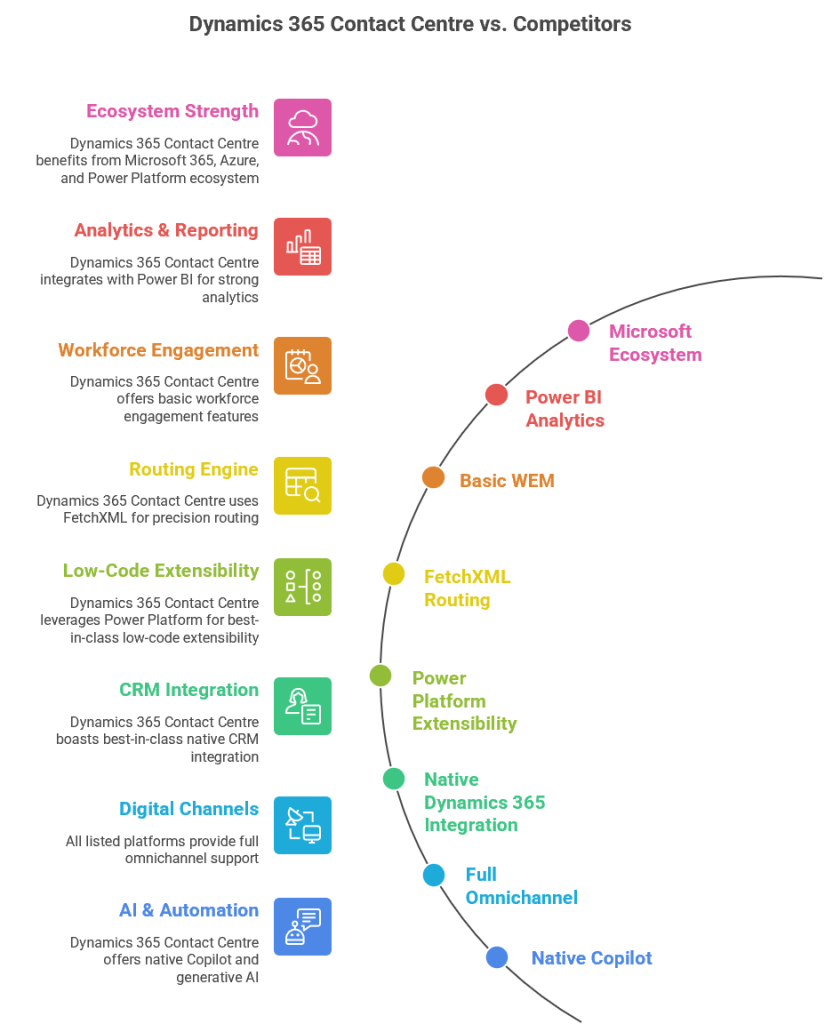
Step‑by‑step project delivery life cycle for Dynamics 365 & Power Platform projects

Here’s a step‑by‑step project delivery life cycle for Dynamics 365 & Power Platform projects, mapped to both SDLC (Software Development Life Cycle) and STLC (Software Testing Life Cycle). I’ve structured it so you can use it as a governance framework or a delivery playbook.

Dynamics 365 & Power Platform Project Delivery Life Cycle

1. Initiation & Planning

  • SDLC:
    • Define business objectives, scope, and success criteria.
    • Identify stakeholders, governance model, and compliance requirements.
    • Conduct feasibility study and ROI analysis.
  • STLC:
    • Define test strategy aligned with business goals.
    • Identify quality metrics, compliance standards, and risk areas.

2. Requirements & Analysis

  • SDLC:
    • Gather functional and non‑functional requirements (workshops, interviews, user stories).
    • Map business processes to Dynamics 365 modules and Power Platform capabilities.
    • Define integration points (ERP, CRM, CTI, external APIs).
    • Create requirement traceability matrix.
  • STLC:
    • Review requirements for testability.
    • Define acceptance criteria and test conditions.
    • Draft high‑level test scenarios.

3. Solution & Architecture Design

  • SDLC:
    • Design system architecture (Dataverse, Power Apps, Power Automate, Power BI, Dynamics 365 modules).
    • Define security, compliance, and governance frameworks.
    • Create ALM (Application Lifecycle Management) plan with environments (Dev, Test, UAT, Prod).
    • Prepare architecture maps and integration diagrams.
  • STLC:
    • Design test environment architecture.
    • Define test data strategy (synthetic vs. masked production data).
    • Plan automation framework (e.g., EasyRepro, Selenium, Power Automate test flows).

4. Development & Configuration

  • SDLC:
    • Configure Dynamics 365 entities, forms, workflows, and business rules.
    • Build Power Apps (Canvas/Model‑Driven), Power Automate flows, and custom connectors.
    • Implement integrations (Azure Functions, Logic Apps, APIs).
    • Follow coding standards, version control (GitHub/Azure DevOps), and CI/CD pipelines.
  • STLC:
    • Prepare unit test cases.
    • Conduct developer testing (unit, integration).
    • Automate regression test scripts.

5. Testing & Quality Assurance

  • SDLC:
    • Conduct system testing, UAT, performance testing, and security validation.
    • Validate integrations and data migration.
  • STLC:
    • Test Planning: Finalize test plan, entry/exit criteria.
    • Test Design: Create detailed test cases, test scripts, and data sets.
    • Test Execution: Run functional, regression, performance, and security tests.
    • Defect Management: Log, track, and resolve defects in Azure DevOps/Jira.
    • Test Closure: Document results, lessons learned, and sign‑off.

6. Deployment & Release Management

  • SDLC:
    • Execute release plan with governance approvals.
    • Deploy via managed solutions, pipelines, or release automation.
    • Conduct cutover activities (data migration, user provisioning, environment setup).
  • STLC:
    • Validate deployment in production.
    • Conduct smoke testing and sanity checks.
    • Confirm rollback strategy readiness.

7. Training & Change Management

  • SDLC:
    • Deliver end‑user training, admin training, and governance workshops.
    • Provide documentation (user guides, SOPs, governance playbooks).
    • Manage adoption with change champions and feedback loops.
  • STLC:
    • Validate training effectiveness with UAT feedback.
    • Ensure test cases reflect real‑world scenarios.

8. Operations & Continuous Improvement

  • SDLC:
    • Transition to support (L1, L2, L3).
    • Monitor system health, performance, and compliance.
    • Implement enhancements via backlog grooming.
  • STLC:
    • Conduct regression testing for patches and upgrades.
    • Maintain automated test suites for continuous validation.
    • Periodic audits for compliance and data integrity.

This framework ensures governance, compliance, and quality assurance are embedded throughout delivery. It’s especially powerful for Dynamics 365 & Power Platform projects where configuration, low‑code development, and integrations coexist with enterprise‑grade testing.

Saga Pattern in Microservices Architecture

Introduction

The Saga pattern is a design pattern used to manage distributed transactions in a microservices architecture. It offers a way to handle long-running transactions and ensure data consistency across multiple services without relying on a traditional two-phase commit protocol. This pattern is particularly useful in systems where transactions span multiple services and a failure in one service should not leave the system in an inconsistent state.

Understanding the Saga Pattern

The Saga pattern breaks down a large transaction into a series of smaller, independent sub-transactions, each of which can be managed and executed independently. Each sub-transaction has a corresponding compensating transaction that undoes its effects if the sub-transaction fails. These compensating transactions are essential for maintaining consistency and rolling back changes if necessary.

Key Concepts

  • Sub-transaction: A smaller transaction that is part of the overall saga.
  • Compensating transaction: An operation that reverses the effects of a sub-transaction in case of failure.
  • Saga orchestrator: A service or component responsible for managing the execution and coordination of the sub-transactions and their compensating transactions.
  • Saga participant: A service that executes a sub-transaction and its compensating transaction.

Types of Sagas

There are two main types of sagas: choreography-based and orchestration-based.

Choreography-Based Saga

In a choreography-based saga, each service involved in the transaction knows what to do next and notifies the next service when its part of the transaction is complete. This approach is decentralized and allows services to interact through events, reducing the need for a central coordinator.

Orchestration-Based Saga

In an orchestration-based saga, a central orchestrator manages the entire transaction, directing each service to perform its part of the transaction and, if necessary, its compensating transaction. This approach provides more control and visibility but introduces a single point of failure.

Implementing the Saga Pattern

Implementing the Saga pattern involves several steps:

1. Define the Sub-Transactions and Compensating Transactions

Identify the individual steps of the overall transaction and determine what compensating actions are necessary if any step fails.

2. Choose the Saga Type

Decide whether a choreography-based or orchestration-based approach is more suitable for your use case.

3. Implement the Saga Orchestrator (if applicable)

If using an orchestration-based saga, develop the orchestrator to manage and coordinate the sub-transactions.

4. Implement the Sub-Transactions and Compensating Transactions

Develop the services to execute the sub-transactions and their corresponding compensating transactions.

5. Test and Validate

Thoroughly test the saga to ensure that it handles failures correctly and maintains data consistency.

Advantages and Challenges

Advantages

  • Resilience: The Saga pattern enhances the resilience of a system by ensuring that failures in one service do not leave the system in an inconsistent state.
  • Scalability: By breaking down a large transaction into smaller sub-transactions, the Saga pattern can improve the scalability of a system.
  • Flexibility: The pattern allows for more flexible transaction management, as each sub-transaction can be managed independently.

Challenges

  • Complexity: Implementing the Saga pattern can add complexity to the system, as it requires careful design and coordination of sub-transactions and compensating transactions.
  • State Management: Keeping track of the state of each sub-transaction and its compensating transaction can be challenging, especially in a choreography-based saga.
  • Consistency: Ensuring data consistency across multiple services can be difficult, particularly in the face of network failures and other issues.

Use Cases

The Saga pattern is particularly useful in the following scenarios:

1. E-commerce

Managing orders that involve multiple services, such as inventory, payment, and shipping.

2. Travel Booking

Handling reservations that span multiple services, such as flights, hotels, and car rentals.

3. Banking

Processing transactions that involve multiple accounts and services, such as transfers and loans.

Conclusion

The Saga pattern is a powerful tool for managing distributed transactions in a microservices architecture. By breaking down a large transaction into smaller sub-transactions and providing compensating transactions, the pattern ensures data consistency and system resilience. While implementing the Saga pattern can be complex, the benefits it offers in terms of scalability, flexibility, and fault tolerance make it a valuable addition to any distributed system.

Types of Microservices Patterns

Types of Microservices Patterns

To effectively implement microservices architecture, several design patterns can be adopted. These patterns address various challenges associated with microservices, including service discovery, communication, data management, and fault tolerance. Here, we present an in-depth exploration of the most prevalent microservices patterns.

1. Decomposition Patterns

Decomposition patterns focus on breaking down a monolithic application into a set of microservices. This can be done in the following ways:

  • Business Capability Decomposition: This pattern involves identifying and decomposing an application based on distinct business capabilities or functionalities.
  • Subdomain Decomposition: This pattern is derived from Domain-Driven Design (DDD). It involves decomposing an application based on its different subdomains.

2. Service Discovery Patterns

Service discovery patterns are crucial for enabling microservices to find and communicate with each other. Two primary patterns are:

  • Client-Side Discovery: In this pattern, the client is responsible for determining the network locations of available service instances.
  • Server-Side Discovery: Here, a dedicated service discovery service directs client requests to an appropriate service instance.

3. Communication Patterns

Efficient communication between microservices is essential for maintaining the overall performance and reliability of the system. Common communication patterns include:

  • Request/Response: A synchronous communication pattern where the client sends a request and waits for a response.
  • Event-Driven: An asynchronous communication pattern where services communicate through events.

4. Database Patterns

Managing data in a microservices architecture presents unique challenges. The following patterns address these challenges:

  • Database per Service: Each microservice has its own database, ensuring data encapsulation and autonomy.
  • Shared Database: Multiple microservices share a common database, often leading to tight coupling.

5. Resilience Patterns

Resilience patterns are designed to handle faults and failures gracefully. Key patterns include:

  • Retry: This pattern involves retrying a failed request after a certain period.
  • Bulkhead: Isolates different parts of the system to prevent failures from cascading.
  • Circuit Breaker: Detects failures and prevents them from recurring while allowing the system to recover.

6. Observability Patterns

Observability is critical for monitoring and maintaining the health of a microservices system. Essential patterns include:

  • Log Aggregation: Collecting and aggregating logs from different services for centralized analysis.
  • Distributed Tracing: Tracing requests as they propagate through various microservices.

7. Security Patterns

Security is paramount in any architecture. In microservices, the following patterns help secure the system:

  • Access Token: Using tokens to authenticate and authorize requests.
  • API Gateway: A gateway that handles authentication, authorization, and other security concerns.

Implementing Microservices Patterns

Implementing these patterns requires careful planning and consideration of the specific needs and constraints of your system. It’s essential to understand the trade-offs associated with each pattern and choose the ones that best fit your use case.

Choosing the Right Patterns

The choice of patterns depends on several factors, including the size and complexity of the application, the team’s familiarity with microservices, and the specific business requirements. It’s advisable to start with a few critical patterns and gradually adopt more as the system evolves.

Best Practices

To successfully implement microservices patterns, consider the following best practices:

  • Automate Deployment: Use continuous integration and continuous deployment (CI/CD) pipelines to automate the deployment of microservices.
  • Implement Monitoring: Invest in robust monitoring and observability tools to gain insights into the system’s performance and health.
  • Ensure Security: Implement strong security measures, including encryption, authentication, and authorization.

Conclusion

Microservices patterns offer a robust framework for designing and implementing scalable, resilient, and flexible systems. By understanding and adopting these patterns, organizations can effectively leverage the benefits of microservices architecture to meet their evolving business needs.

Dynamics 365 Contact Centre (Novice to Expert Series)(Chapter 3)

Microsoft Dynamics 365 Contact Center, a Copilot-first contact center solution that delivers generative AI to every customer engagement channel which was general availability on July 1, this standalone Contact Center as a Service (CCaaS) solution enables customers to maximize their current investments by connecting to preferred customer relationship management systems (CRMs) or custom apps.

Key Dynamics 365 Contact Center capabilities include:

  • Next-generation self-service: With sophisticated pre-integrated Copilots for digital and voice channels that drive context-aware, personalized conversations, contact centers can deploy rich self-service experiences. Combining the best of interactive voice response (IVR) technology from Nuance and Microsoft Copilot Studio’s no-code/low-code designer, contact centers can provide customers with engaging, individualized experiences powered by generative AI.
  • Accelerated human-assisted service: Across every channel, intelligent unified routing steers incoming requests that require a human touch to the agent best suited to help, enhancing service quality and efficiency. When a customer reaches an agent, Dynamics 365 Contact Center gives the agent a 360-degree view of the customer with generative AI — for example, real-time conversation tools like sentiment analysis, translation, conversation summary, transcription and more are included to help improve service, along with others that automate repetitive tasks for agents such as case summary, draft an email, suggested response and the ability for Copilot to answer agent questions grounded on your trusted knowledge sources.
  • Operational efficiency: Contact center efficiency depends just as much on what happens behind the scenes as it does on customer and agent experiences. We’ve built a solution that helps service teams detect issues early, improve critical KPIs and adapt quickly. With generative AI-based, real-time reporting, Dynamics 365 Contact Center allows service leaders to optimize contact center operations across all support channels, including their workforce.

Here is a video series end to end I have started (Chapter-3) –