
Uncategorized

Microsoft Build 2026 Summary

Microsoft Build 2026, held from June 2nd to June 3rd both online and in San Francisco, marked a monumental shift in the technology landscape. For the past several years, the developer ecosystem has been relentlessly focused on the foundational capabilities of large language models, the integration of conversational copilots, and the iterative improvements in generative AI outputs. However, the narrative emerging from this year’s developer conference has fundamentally altered that trajectory. Microsoft has officially declared the end of the passive chatbot era and the dawn of the agentic operating model. This paradigm shift involves intelligent agents performing tangible, proactive work across codebases, data repositories, cloud infrastructure, and operational security boundaries.

The tech world has seen several paradigm shifts, and the move toward pervasive, agentic AI is arguably the biggest yet. Microsoft’s 2026 Build conference laid this clearly on the table for developers: it’s not just about playing with AI and standalone chatbots anymore. It’s about building, managing, and governing long-running agentic systems that can reliably execute complex, real-world workflows at scale. Build 2026 presented a detailed roadmap for the future of business software. Below is a breakdown of the most important announcements, strategy shifts, and technological advancements that marked the 2026 Microsoft Build.

1. The Enterprise AI Shift: Emancipation and the Pursuit of Superintelligence

The most impactful announcement at Build 2026 wasn’t a product but a strategic confession from Microsoft’s AI chief, Mustafa Suleyman. While the public narrative has often painted Microsoft as being in direct competition with consumer-focused tech giants Suleyman revealed that his “superintelligence” team is primarily focused on AI research. “We were only sort of set free from our contract with OpenAI about six months ago to formally pursue superintelligence,” Suleyman stated. He emphasized that while these are very early days for the initiative, the mandate is clear.

The Wake-up Call of “Cowork”:

The year saw Anthropic release “Cowork,” an AI that allows users to automate tasks and generate code without having prior programming experience. Its release caused a substantial sell-off in Microsoft shares, plummeting 10% due to fears that Anthropic’s new tool would disrupt established enterprise software platforms.

According to Suleyman, Anthropic’s direct challenge to the corporate world with its advanced development tools poses a far greater threat to Microsoft’s core business than consumer chatbots do. “We’re more focused on the Anthropic-style which is enterprise [use cases], developers and coding. That’s the journey we’ve been on,” he stated.

The Drive Toward Autonomy:

Microsoft is now accelerating its quest for true self-sufficiency. While maintaining a reformed, $30 billion cloud partnership with OpenAI (holding a 27% stake and guaranteed access until 2032), the company is investing heavily in its own internal AI models. This hybrid approach (partnering with OpenAI while concurrently investing $5 billion in Anthropic and building its own tech under Suleyman) highlights Microsoft’s determination to lead in the “thinking and coding” agent domain, an area focused on developing intelligent agents that can autonomously execute complex, multi-step business processes.

2. Intelligence Embedded in Context: Introducing Microsoft Agent Platform and Microsoft IQ

The race to move AI from experimental to operational has hit a wall: context. Raw model performance is no longer the bottleneck, but rather how an agent comprehends the specifics of a business, accesses trustworthy internal knowledge, and adheres to appropriate governance constraints.

To tackle this, Microsoft unveiled Microsoft IQ, an enterprise intelligence layer that provides Copilots and agentic systems with a shared, evolving understanding of how an organization functions. Microsoft IQ integrates data from across an entire customer’s Microsoft environment and is divided into four categories:

Work IQ

Slated for general release on June 16, 2026, Work IQ injects workplace intelligence into agents by building semantic understanding of emails, calendars, meetings, chats, documents and internal business applications. Its set of APIs (covering Chat, Context, Tools, and Workspaces) allow for production-ready interaction between agents and M365 data, within the strict boundaries of M365 tenant trust, ensuring all actions are auditable and discoverable.

Fabric IQ

Generally available today, Fabric IQ maps the data operations of a business. It imbues semantic meaning into relationships between entities like customers, orders, revenue and products, and ensures consistency regardless of where that data lives, be it in ERP or CRM systems.

Foundry IQ

Foundry IQ allows agents to discover and reuse knowledge found in a diverse range of enterprise data sources, custom applications and internal web pages.

Web IQ

The new standard for AI grounding, Web IQ combines proprietary enterprise data with real-time information from the internet, enabling enterprise agents to reconcile internal knowledge with current world events.

By consolidating these data points, the Microsoft Agent Platform enables developers to build governed, enterprise-ready bots on GitHub and deploy them through Microsoft Foundry with automatic optimization.

3. The New MAI Family: Homegrown AI Models for Choice

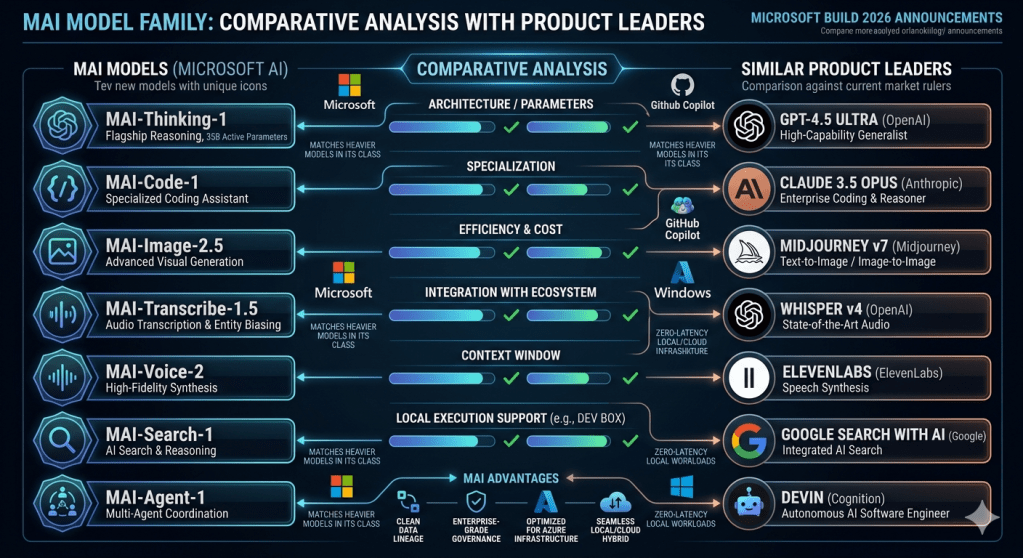
To empower this new paradigm of agentic software, Microsoft introduced its new set of seven internal AI models, branded under the “MAI” (Microsoft AI) umbrella, designed to give developers unparalleled choice across the entire tech stack.

Advanced Reasoning and Coding:

In direct response to Anthropic’s Opus 4.6, Microsoft revealed an advanced reasoning model that rivals enterprise-level coding capabilities. Additionally, an ultra-efficient model for coding has been specifically fine-tuned for the GitHub developer platform to improve the speed, cost, and reliability of code generation.

Microsoft announced a comprehensive suite of seven new AI models, engineered completely in-house by the AI Superintelligence Team. Branded under the “MAI” nomenclature, these models span a wide array of specialized capabilities, including reasoning, code generation, image creation, transcription, and voice synthesis.

At the apex of this new ecosystem sits MAI-Thinking-1. This model represents Microsoft’s most ambitious proprietary release, featuring a 35-billion-active-parameter architecture explicitly engineered for long-context reasoning, executing multi-step instructions, and performing advanced code generation. Microsoft deliberately built this model from the ground up using enterprise-grade, commercially licensed data. By abstaining from the controversial practice of relying on outputs generated by other leading competitive AI models, Microsoft ensured a pristine data lineage. This strategic data sourcing methodology significantly improves operational efficiency while simultaneously reducing the computing costs associated with running massive enterprise inferences. Microsoft claims that MAI-Thinking-1 successfully matches other leading, heavier models in its weight class across key software and operational benchmarks.

Expanding the MAI Portfolio

Alongside the flagship reasoning model, Microsoft introduced a diverse array of specialized, modality-specific models:

  • MAI-Image-2.5: A next-generation visual generation model.
  • MAI-Voice-2: A high-fidelity voice synthesis engine.
  • MAI-Transcribe-1.5: An advanced audio-to-text transcription model.
  • MAI-Code-1: A specialized coding assistant model.

This multi-model approach allows enterprise customers and developers to select the exact right size, latency, and modality for their specific architectural needs, ensuring that developers do not have to rely on a massive, expensive generalist model for simple, highly specialized tasks. 
4. The agentic app backend with Microsoft Fabric and databases

AI is changing how we do things – with the proportion of workers shifting from asking questions to giving whole tasks to multi-agent systems. This need a reliable and scalable data foundation. During the Build 2026 Microsoft announced major updates to its database infrastructure and Microsoft Fabric. The developer workflow is becoming entirely centralized. The GitHub Copilot app has now officially become the primary control center for all agentic development processes. Simultaneously, Microsoft Foundry has significantly matured, transitioning from an experimental platform into a hardened, production-grade agent deployment environment.

Rayfin: Redefining the Application Backend

To bridge the gap between AI prototyping and robust enterprise deployment, Microsoft unveiled Rayfin. Rayfin is strategically targeted at creating prompt-to-production enterprise application backends. Within the Rayfin framework, foundational data models live entirely as code, and data access policies become fully programmable entities.

Crucially, all application data managed through Rayfin seamlessly lands in Microsoft’s OneLake repository, while Fabric provides the underlying enterprise scale and security architecture. This integration ensures that highly automated, GitHub-based CI/CD workflows can efficiently drive structural changes to complex backend data systems.

Azure HorizonDB and Cosmos DB: The Data Layer of the AI Era

A foundational element of AI applications is robust, scalable PostgreSQL infrastructure. To dominate this space, Microsoft introduced Azure HorizonDB. This new database architecture completely brings PostgreSQL into the modern AI application era.

Azure HorizonDB is built with extreme reliability and scale in mind. It features zone resilience as a default characteristic. The storage architecture is massively elastic, capable of scaling up to an astounding 128 TB of capacity. On the compute side, it offers scale-out capabilities reaching up to 3,072 vCores, allowing it to handle virtually any throughput demand. Furthermore, Azure HorizonDB features deeply integrated vector search functionalities, native AI model management, and seamless operational connectivity directly to Microsoft Foundry and Fabric.

Complementing HorizonDB, Microsoft also announced significant improvements to Azure Cosmos DB. These improvements are specifically tailored to enhance local development experiences and optimize the long-term memory of AI agents. The Cosmos DB updates drastically shorten developer feedback loops and actively reduce the dependency on live cloud connections during local testing. This approach improves execution repeatability across diverse developer environments and automated build agents, enabling engineers to identify and resolve data access issues far earlier in the software development lifecycle.

5. Securing the Agentic Enterprise with MDASH

As the volume of AI-generated code explodes and software delivery speeds increase exponentially, the traditional models of application security (AppSec) are rapidly becoming obsolete. Microsoft directly addressed this critical vulnerability gap with the introduction of MDASH (Microsoft Security multi-model agentic scanning harness).

The fundamental premise of MDASH is that the AI era requires AI-native security tooling. Microsoft openly acknowledged that in the immediate future, organizations must expect vastly more code to be both generated and reviewed by artificial intelligence. Concurrently, malicious threat actors are guaranteed to utilize these exact same advanced models to discover zero-day exploits and orchestrate complex attacks.

MDASH is designed to raise the bar for enterprise AppSec by deploying agentic security systems to fight back. The platform mandates and heavily invests in highly automated code reviews, rigorous programmatic policy enforcement, isolated sandboxing environments, and continuous exploitability analysis. The goal of MDASH is not to replace the human security engineer, but rather to elevate them. By automating the repetitive, lower-tier triage and discovery phases, MDASH ensures that human security professionals remain in the loop solely for making complex, nuanced risk decisions rather than wasting time on manual vulnerability hunting.

6. Accelerating Human Progress: Scientific Discovery and the Quantum Leap

While enterprise SaaS, developer tools, and operational security dominate the corporate dialogue, Microsoft utilized the final stages of Build 2026 to showcase how its compute infrastructure is actively solving fundamental challenges in global science and advanced physics.

Microsoft Discovery: Automating the Scientific Method

Microsoft announced the general availability of Microsoft Discovery, an entirely new class of enterprise-grade, agentic AI platform built natively on Azure. The explicit purpose of Microsoft Discovery is to fundamentally alter how research and development is conducted, expanding what individual scientists can achieve by applying agentic workflows across the entire scientific process.

The platform is already demonstrating massive, real-world utility across major global corporations:

  • BHP is actively deploying Microsoft Discovery to accelerate the identification of novel copper-leaching solutions, reducing research timelines from several years down to mere months.
  • Syensqo is utilizing the platform to vastly accelerate complex semiconductor research and development.
  • GSK is deploying these agentic systems to rapidly iterate on advanced pharmaceutical drug discovery processes.

To democratize this profound capability beyond the Fortune 500, Microsoft also launched a free Discovery local app tailored for the broader scientific community. Currently available in public preview, this localized application provides immense research capabilities to academic institutions and independent researchers, requiring nothing more than a standard GitHub Copilot account to access.

The Quantum Milestone: Majorana 2

In perhaps the most technically astounding hardware announcement of the conference, Microsoft unveiled Majorana 2, its next-generation quantum computing chip. While quantum computing has historically been characterized by slow, incremental progress, Majorana 2 represents a literal giant step toward true commercial scale.

The technical specifications of the chip represent a paradigm shift in physics engineering. The Majorana 2 chip achieves an astonishing average qubit lifetime of 20 seconds, with specific instances sustaining stability for up to a full minute. This architectural breakthrough provides a 1,000x increase in reliability when compared to Microsoft’s previous generation of quantum hardware. Furthermore, Microsoft has established a clear, viable engineering path to placing one million functional qubits onto a single chip that physically fits within the palm of a hand.

The integration of artificial intelligence is central to this timeline. Microsoft confidently declared that by heavily utilizing agentic AI to optimize physics models and hardware designs, the company is firmly on track to deliver a fully scalable, commercially viable quantum machine by the year 2029.

7. The Agentic Revolution: Moving Beyond the Prompt

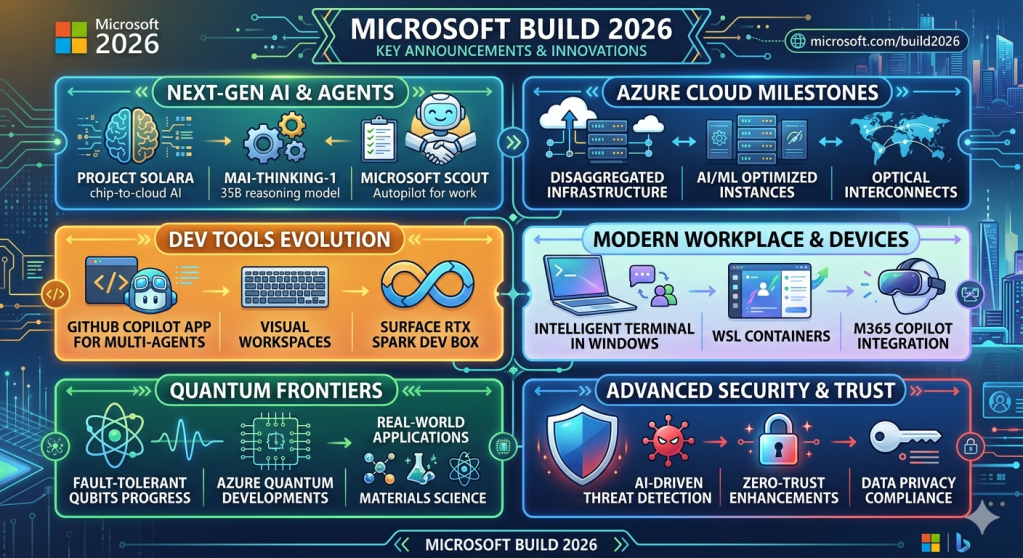
The central thesis of Build 2026 was the transition from reactive AI to proactive, agentic AI. Microsoft unveiled two massive initiatives designed to materialize this vision: Project Solara and Microsoft Scout.

Project Solara: Rethinking Chip-to-Cloud Interactivity

Perhaps the most visually striking and forward-looking announcement was Project Solara. Positioned as a completely new chip-to-cloud platform, Project Solara is engineered exclusively for the operational needs of AI agents. Microsoft’s core objective with this platform is to radically reduce the cost and friction associated with creating AI-powered, custom-built devices across various industries and enterprise use cases.

To demonstrate the practical application of this platform, Microsoft unveiled two distinct prototype reference devices:

  1. The Project Solara Badge Device: Powered by cutting-edge Qualcomm technology, this wearable badge represents a fundamental reimagining of mobile productivity. It acts as a reference design for on-the-go, agent-first interaction, allowing a user to communicate hands-free with their AI agents while traveling or moving between corporate meetings.
  2. The Project Solara Desk Device: Leveraging MediaTek silicon, this prototype functions as an ever-present desktop companion. It acts as an always-available ambient AI assistant that maintains continuous awareness of a user’s schedule, ongoing tasks, and immediate workflow context.

Project Solara highlights Microsoft’s philosophical belief that the future of computing will not be bound to conventional screens or singular applications. Instead, computing will manifest as intelligent agents operating seamlessly and contextually across dynamically shifting physical and digital environments.

Microsoft Scout: The Autopilot for Corporate Workflows

Transitioning from hardware to pure software, Microsoft introduced Microsoft Scout, officially characterized as the company’s first “Autopilot agent for work”. Scout represents a massive departure from the standard “Copilot” model. Instead of relying on a human user to perpetually enter conversational prompts, Scout is explicitly designed to operate silently and proactively in the background, continuously managing daily tasks.

Scout is built upon the open-source OpenClaw technological foundation. It is intellectually driven by the Work IQ context engine, which allows the agent to intrinsically understand and navigate the user’s specific corporate environment. The Work IQ APIs are essential here, as they make profound layers of Microsoft 365 context natively available to these agents. This means Scout can fluidly traverse Microsoft Teams, Outlook, OneDrive, and SharePoint, while simultaneously executing local actions directly on the user’s local machine hardware.

The operational capabilities of Scout are immense. Microsoft detailed that Scout can autonomously track complex, multi-stage projects, proactively identify and resolve calendar scheduling conflicts, aggregate data to prepare comprehensive meeting briefs, and independently handle a myriad of routine workplace activities on behalf of its human counterpart.

Crucially, Microsoft has preemptively addressed the massive security implications of autonomous corporate agents. Every individual AI agent deployed through Microsoft Scout is assigned its own unique Entra identity. This profound architectural decision ensures that enterprise IT organizations can comprehensively monitor exactly what data an agent is accessing and enforce strict governance over the administrative actions it is permitted to execute. Microsoft is currently rolling out Scout on an experimental, highly controlled basis to selected Frontier organizations situated in the United States.

8. Hardware Innovations: Localizing the AI Workload

While cloud infrastructure remains Microsoft’s financial bedrock, Build 2026 clearly demonstrated that local, edge-based computational power is vital for the agentic future, leading to significant hardware unveilings.

The Surface RTX Spark Dev Box

For developers requiring immense localized power, Microsoft introduced the Surface RTX Spark Dev Box. This is a highly specialized, compact desktop workstation meticulously powered by Nvidia’s advanced RTX Spark silicon. The performance metrics of this machine are staggering for its form factor; it delivers up to one full petaflop of raw AI processing performance and boasts up to 128GB of unified system memory.

The strategic purpose of the Surface RTX Spark Dev Box is to enable developers to execute massive AI workloads locally without continuous reliance on the cloud. Microsoft stated that the device is fully capable of running colossal AI models containing up to 120 billion parameters natively on the local hardware. This makes the machine an unprecedented tool for high-intensity developer tasks such as local model fine-tuning, operating complex agentic AI workflows, and running demanding development pipelines that require zero-latency execution.

The Evolution of the Windows Platform

Microsoft explicitly focused on transforming Windows 11 into the premier environment for modern, AI-first software engineering, ensuring developers can choose seamlessly between local computing and the cloud. Several core Windows updates were announced to facilitate this:

  • Expanded Windows AI APIs: Empowering developers to integrate deeper system-level intelligence into their applications.
  • Native Coreutils: Microsoft is now making Linux-like command line utilities (Coreutils) run natively on Windows and broadly available to the public.
  • WSL Containers: Nearing public preview, this built-in utility provides a native way to create, orchestrate, and interact with Linux containers entirely through familiar CLI and API interfaces directly within Windows.
  • Intelligent Terminal: The command line experience has been reimagined with an Intelligent Terminal that intentionally brings context-aware assistance directly to the prompt.
  • Windows Development Skills: Now generally available, these tools grant autonomous agents the structured, programmatic knowledge required to build highly native Windows applications from end to end using WinUI3 skills alongside the WinApp CLI.
  • OpenClaw Support: Bringing native support for the open-source OpenClaw framework directly to the Windows operating system.

Furthermore, to manage this new agentic workforce securely, Microsoft introduced Windows 365 for Agents. This paradigm-shifting concept provides autonomous AI agents with their own fully managed Cloud PCs. This allows organizations to host, monitor, and provision compute resources for non-human workers just as they would for human employees. To augment local security, Microsoft Execution Containers were announced, bringing rigorous, OS-level isolation and containment to local agents running on a developer’s machine.

Conclusion

Build 2026 will be known as the point when Microsoft cemented itself in the conversation about what the real-world application of AI will look like.

By making such ambitious moves into enterprise applications directly challenging companies like Anthropic, Microsoft has declared its intentions. Microsoft IQ is a necessary layer of contextual data that provides agents with the essential foundation it needs, while the range of MAI models offer a wide range of performance tailored options for the developer community. The leaps in infrastructure and databases, ranging from Fabric to Rayfin and Azure HorizonDB, prove the building blocks are now in place for an agentic world, with an emphasis on a seamlessly integrated security layer including MDASH and Defender.

Add in the capabilities of the Discovery Engine to accelerate scientific research and the implications of the Majorana 2 quantum chip and the overall vision from Microsoft is clear: an entire ecosystem for intelligent computing designed for the modern developer who requires freedom to build and security of enterprise grade trust.
References

https://blogs.microsoft.com/blog/2026/06/02/microsoft-build-2026-be-yourself-at-work

https://venturebeat.com/technology/microsoft-ai-chief-says-company-was-set-free-from-openai-to-pursue-superintelligence

https://partner.microsoft.com/pt-pt/blog/article/microsoft-build-2026-recap
AI Foundry, copilot-studio, Customer Experience, Customer-service, Power Apps

Microsoft Ignite 2025 Book of News: Key Highlights, Enterprise Applications, and Business Value

Introduction

The Microsoft Ignite 2025 Book of News marks a pivotal moment in the evolution of enterprise technology, with Microsoft unveiling a sweeping array of innovations that redefine how organizations build, govern, and scale AI-driven solutions. This year’s announcements center on the maturation of the agent ecosystem, the formalization of intelligence layers such as Work IQ, Fabric IQ, and Foundry IQ, and a robust commitment to security, governance, and interoperability across the Microsoft Cloud and partner platforms. The following report provides a comprehensive, in-depth analysis of the most significant highlights from Ignite 2025, focusing on practical enterprise applications and the specific benefits these advancements deliver to businesses and IT teams. Each section details a major announcement or theme, illustrates its real-world use, and explains its value proposition for organizations navigating the next era of digital transformation.

1. Microsoft Agent 365: The Control Plane for AI Agents

Overview

Microsoft Agent 365 is introduced as the unified control plane for managing AI agents across the enterprise. It extends the familiar infrastructure used for user management to the rapidly growing population of AI agents, providing comprehensive tools for registry, access control, visualization, interoperability, and security. Agent 365 is designed to support agents built on Microsoft platforms, open-source frameworks, and third-party ecosystems, ensuring organizations can confidently deploy, observe, and govern agents at scale.

Practical Enterprise Example

Scenario: A global financial services firm deploys dozens of AI agents to automate customer onboarding, fraud detection, and compliance monitoring. Using Agent 365, the IT team registers all agents—whether developed in-house or sourced from partners—assigns unique Entra Agent IDs, and applies conditional access policies. The security team leverages the visualization dashboard to monitor agent interactions with sensitive data, while compliance officers audit agent activity logs for regulatory reporting.

Business Value

  • Unified Governance: Agent 365 provides a single pane of glass for managing the entire agent fleet, reducing the risk of shadow agents and ensuring all agents adhere to organizational policies.
  • Security and Compliance: By integrating with Microsoft Defender, Entra, and Purview, Agent 365 enforces least-privilege access, detects threats, and maintains audit trails, supporting regulatory compliance.
  • Operational Efficiency: Centralized observability and lifecycle management streamline agent onboarding, monitoring, and retirement, minimizing administrative overhead and accelerating innovation.

2. Entra Agent ID and Agent Identity Management

Overview

Microsoft Entra Agent ID introduces first-class identity constructs for AI agents, bringing Zero Trust principles to autonomous systems. The Entra Agent Registry acts as a centralized inventory and metadata repository for all agents, supporting lifecycle management, access control, and policy enforcement. This ensures that every agent—regardless of origin—can be discovered, governed, and secured in line with enterprise standards.

Practical Enterprise Example

Scenario: A healthcare provider integrates AI agents into its electronic health record (EHR) system to automate patient data retrieval and appointment scheduling. Each agent is assigned an Entra Agent ID, registered in the Agent Registry, and granted access only to the necessary patient data. The IT team uses Entra’s lifecycle workflows to automatically deactivate agents when they are no longer needed, preventing orphaned or overprivileged agents.

Business Value

  • Zero Trust for Agents: Entra Agent ID enforces identity assurance, conditional access, and risk-based policies for agents, mirroring protections for human users.
  • Lifecycle Governance: Automated workflows ensure agents are created, sponsored, and decommissioned according to policy, reducing the risk of unauthorized access or lingering credentials.
  • Auditability and Compliance: The Agent Registry provides a single source of truth for agent identities, supporting audit, discovery, and compliance reporting across hybrid and multi-cloud environments.

3. The Expanding Agent Ecosystem: Sales Development Agent and Role-Specific Agents

Overview

Microsoft’s agent ecosystem expands with the introduction of specialized agents such as the Sales Development Agent, Workforce Insights Agent, People Agent, Learning Agent, Teams Admin Agent, and SharePoint Admin Agent. These agents are designed to automate domain-specific tasks, enhance productivity, and deliver actionable insights across business functions.

Practical Enterprise Example

Sales Development Agent:
A B2B software company deploys the Sales Development Agent to autonomously research prospects, qualify leads, and initiate personalized outreach. The agent integrates with Dynamics 365 and Salesforce, ensuring no lead is left behind and handing off high-potential opportunities to human sellers. Microsoft’s own sales team reported a 15.1% increase in lead-to-opportunity conversion after adopting this agent.

Workforce Insights Agent:
An HR department uses the Workforce Insights Agent to analyze organizational composition, identify skill gaps, and recommend workforce planning strategies. Delegates can access dynamic reports filtered by role, location, or tenure, supporting data-driven decisions for talent management and upskilling.

Business Value

  • Scalability: Agents like the Sales Development Agent operate 24/7, scaling outreach and engagement without increasing headcount.
  • Data-Driven Decisions: Workforce Insights and People Agents provide leaders with real-time analytics, enabling proactive workforce planning and targeted learning interventions.
  • Operational Consistency: Admin agents automate routine IT tasks, ensuring uniform policy application, reducing manual errors, and freeing up staff for higher-value work.

4. Agents in Microsoft Teams and Multi-Vendor Interoperability via Model Context Protocol (MCP)

Overview

Agents in Microsoft Teams channels now support orchestration with third-party apps and agents through the Model Context Protocol (MCP). This enables seamless, cross-platform workflows where agents can interact with tools like Jira, Asana, and GitHub, pulling data, creating tasks, and coordinating actions—all within Teams.

Practical Enterprise Example

Scenario: A product launch team uses a Teams channel agent to monitor project risks. The agent queries Jira for open issues, summarizes blockers, and schedules a follow-up meeting with stakeholders—all triggered by a single conversational prompt in Teams. The agent can also create Asana tasks or fetch GitHub pull request statuses, reducing context switching and manual coordination.

Business Value

  • Enhanced Collaboration: Agents orchestrate multi-step workflows across disparate systems, enabling teams to focus on outcomes rather than tool management.
  • Reduced Context Switching: By integrating third-party apps into Teams, agents minimize the need to toggle between platforms, improving productivity and reducing errors.
  • Interoperability: MCP standardizes agent-to-app communication, future-proofing investments and supporting a diverse ecosystem of tools and vendors.

5. Work IQ, Fabric IQ, and Foundry IQ: The Intelligence Layers

Overview

Microsoft formalizes its intelligence stack with Work IQ, Fabric IQ, and Foundry IQ—three complementary layers that provide context, reasoning, and knowledge grounding for agents and Copilot experiences. Work IQ leverages organizational data and memory, Fabric IQ adds semantic understanding to the data estate, and Foundry IQ unifies knowledge retrieval across platforms.

Practical Enterprise Example

Scenario: A multinational retailer deploys a custom supply chain agent built in Copilot Studio. The agent uses Work IQ to understand internal workflows, Fabric IQ to reason over sales and inventory data, and Foundry IQ to access product documentation and external market trends. When a supply chain disruption occurs, the agent synthesizes insights from all three layers to recommend optimal inventory reallocation and supplier engagement strategies.

Business Value

  • Contextual Intelligence: Agents act with a deep understanding of organizational processes, data relationships, and business semantics, reducing hallucinations and improving decision quality.
  • Unified Knowledge Access: Foundry IQ enables agents to query a single knowledge base spanning Microsoft 365, Fabric, SharePoint, and external sources, streamlining development and enhancing accuracy.
  • Governance and Security: All IQ layers respect user permissions, sensitivity labels, and compliance policies, ensuring responsible AI adoption at scale.

6. Microsoft Agent Factory and Copilot Studio: Accelerating Agent Development

Overview

Microsoft Agent Factory is a new program designed to help organizations move from experimentation to execution with AI agents. It offers a unified, metered licensing model (Agent Commit Units), hands-on support from Forward Deployed Engineers, and tailored training to boost AI fluency. Copilot Studio enhancements include agent evaluations, real-time monitoring, and integration with Entra Agent ID for secure, enterprise-grade agent development.

Practical Enterprise Example

Scenario: A manufacturing company wants to automate quality control and predictive maintenance. Using Agent Factory, the IT team rapidly prototypes agents in Copilot Studio, leverages Forward Deployed Engineers for best practices, and deploys agents to production with unified governance. The company uses the metered plan to flexibly allocate resources across Copilot Studio and Foundry, optimizing costs and accelerating time to value.

Business Value

  • Simplified Procurement: The Pre-Purchase Plan consolidates licensing across agent platforms, reducing administrative complexity and enabling predictable budgeting.
  • Faster Innovation: Access to expert engineers and role-based training accelerates agent development, deployment, and adoption.
  • Enterprise-Ready Agents: Built-in evaluations, observability, and identity management ensure agents meet security, compliance, and performance standards from day one.

7. Observability, Governance, and Security for Agents

Overview

Observability is now a first-class requirement for AI agents. Microsoft Agent 365 Observability, built on OpenTelemetry, provides end-to-end telemetry, centralized monitoring, and integration with Defender and Purview for security and compliance. Foundry Control Plane extends these capabilities to developers, offering fleetwide visibility, behavioral guardrails, and real-time policy enforcement.

Practical Enterprise Example

Scenario: An insurance company deploys a suite of claims processing agents. Using Agent 365 Observability, IT and security teams monitor agent invocations, tool usage, and exceptions in real time. Any anomalous behavior—such as unexpected data access or tool calls—is flagged, and automated remediation actions are triggered via Defender integration. Compliance teams use Purview to audit agent interactions with sensitive customer data.

Business Value

  • Risk Reduction: Continuous monitoring and automated threat detection minimize the risk of agent compromise, data leaks, or policy violations.
  • Operational Transparency: Centralized dashboards and audit logs provide clear visibility into agent activity, supporting incident response and regulatory audits.
  • Lifecycle Management: Real-time observability enables proactive tuning, performance optimization, and safe decommissioning of agents.

8. Productivity Enhancements Across Microsoft 365 Copilot and Agents

Overview

Microsoft 365 Copilot and its agents receive significant upgrades, including dedicated Word, Excel, and PowerPoint Agents, expanded Copilot Chat for non-Copilot license users, and enhanced voice and collaboration features. Work IQ powers more personalized, context-aware experiences, while Copilot Notebooks and Pages streamline content creation and sharing.

Practical Enterprise Example

Scenario: A consulting firm’s employees use Copilot Chat in Outlook to triage their inboxes, schedule meetings, and surface insights across emails and calendars. In Word and PowerPoint, Agent Mode enables iterative co-creation of reports and presentations, grounded in organizational knowledge and web data. Even users without a Copilot license benefit from content-aware chat and agent-driven document generation.

Business Value

  • Democratized AI Access: Copilot Chat and Agent Mode bring advanced AI capabilities to all users, regardless of licensing tier, increasing productivity across the organization.
  • Personalized Assistance: Work IQ ensures Copilot and agents understand individual work patterns, delivering tailored suggestions and automating routine tasks.
  • Seamless Collaboration: Features like Copilot Notebooks, Pages, and SharePoint integration enable teams to co-author, iterate, and share content effortlessly.

9. Azure Governance Updates: Service Groups and Azure Policy

Overview

Azure introduces Service Groups, a flexible resource grouping mechanism that supports cross-subscription management, nested hierarchies, and low-privilege administration. Azure Policy enhancements include identity-based exemptions and a refreshed UX, making it easier to manage compliance, exemptions, and remediations across complex environments.

Practical Enterprise Example

Scenario: A multinational conglomerate manages hundreds of Azure subscriptions across business units. Using Service Groups, the cloud operations team creates logical groupings for cost centers, products, and organizational structures, enabling targeted monitoring and analytics. Identity-based exemptions allow admins to grant temporary policy exceptions to approved service principals without overexposing critical resources.

Business Value

  • Operational Agility: Service Groups provide dynamic, cross-cutting views of resources, supporting flexible management and monitoring without restructuring the environment.
  • Granular Compliance: Identity-based exemptions and improved policy management reduce the risk of over-permission and streamline compliance workflows.
  • Scalability: Nested hierarchies and aggregated data views enable organizations to scale governance practices as their cloud footprint grows.

10. Security Innovations: Defender, Entra, and Purview for Agents

Overview

Microsoft delivers a suite of security innovations targeting the unique risks of agentic AI. Defender for Cloud and GitHub integration provides end-to-end protection across the app lifecycle. Unified posture management and threat protection for AI agents are now available, with Entra Agent ID securing agent identities and access. Purview extends data security and compliance to agents, supporting observability, DLP, and insider risk management.

Practical Enterprise Example

Scenario: A pharmaceutical company develops custom agents for R&D data analysis and regulatory submissions. Defender for Cloud monitors agent code and runtime behavior, correlating security signals with GitHub repositories. Entra Agent ID ensures only authorized agents access sensitive datasets, while Purview DLP policies block agents from processing or sharing confidential information outside approved channels.

Business Value

  • Comprehensive Protection: Integrated security across code, runtime, and data ensures agents are protected from development to deployment.
  • Proactive Risk Management: AI-powered threat detection, posture management, and automated remediation reduce the risk of breaches and compliance violations.
  • Consistent Policy Enforcement: Purview extends existing security and governance frameworks to agents, delivering unified protection across human and digital workforces.

11. Multi-Vendor Interoperability and Partner Ecosystem

Overview

Microsoft’s commitment to interoperability is evident in its support for MCP, open standards, and a vibrant partner ecosystem. The Microsoft Marketplace now features the industry’s largest catalog of AI apps and agents, enabling organizations to blend Microsoft and third-party solutions. Integrations with platforms like Palo Alto Networks and Zenity extend security and governance across multi-cloud and hybrid environments.

Practical Enterprise Example

Scenario: A manufacturing enterprise leverages Microsoft’s partner ecosystem to deploy Siemens’ AI-powered digital thread solutions, SymphonyAI’s operational analytics, and Hexagon’s robotics—all integrated with Microsoft 365 Copilot and Teams. The IT team manages these solutions through Agent 365 and Foundry Control Plane, ensuring consistent governance and security across Microsoft and partner platforms.

Business Value

  • Best-of-Breed Solutions: Organizations can select and integrate the most effective tools from Microsoft and partners, accelerating innovation and time to value.
  • Unified Management: Centralized governance and observability extend across the entire ecosystem, reducing complexity and risk.
  • Scalable Collaboration: The Marketplace and MCP support rapid deployment, scaling, and management of multi-vendor solutions, empowering organizations to adapt to evolving business needs.

12. Real-World Enterprise Applications by Industry

Manufacturing

Use Case: Predictive maintenance agents ingest sensor data, detect anomalies, and forecast equipment failures, automatically notifying planners and optimizing maintenance schedules. Companies like Husqvarna and DMG Mori have reported significant improvements in product quality, reliability, and operational efficiency by integrating agentic AI with Azure and partner solutions.

Benefit: Reduced unplanned downtime, lower maintenance costs, and increased equipment lifespan.

Financial Services

Use Case: AI agents automate compliance monitoring, fraud detection, and customer onboarding, leveraging Work IQ and Purview for context-aware reasoning and data protection.

Benefit: Enhanced regulatory compliance, faster customer service, and reduced operational risk.

Healthcare

Use Case: Agents with Entra Agent ID manage access to patient records, automate appointment scheduling, and support clinical decision-making, all while maintaining strict privacy and audit controls.

Benefit: Improved patient outcomes, streamlined operations, and robust data security.

Professional Services

Use Case: Consulting firms use Copilot Chat, Agent Mode, and Notebooks to automate document creation, meeting preparation, and knowledge management, increasing billable hours and client satisfaction.

Benefit: Higher productivity, better collaboration, and faster project delivery.

13. Cost, Licensing, and Deployment Considerations

Overview

Microsoft introduces flexible, metered licensing models (Agent Commit Units) and new offerings like Microsoft 365 Copilot Business for SMBs. The Agent Factory Pre-Purchase Plan consolidates procurement across Copilot Studio and Foundry, while deployment tools and training programs support rapid adoption and change management.

Practical Enterprise Example

Scenario: An SMB with fewer than 300 users adopts Microsoft 365 Copilot Business at $21 per user/month, automating everyday tasks and scaling operations without complexity. A large enterprise uses the Agent Factory Pre-Purchase Plan to allocate resources dynamically across multiple agent projects, optimizing spend and accelerating deployment.

Business Value

  • Predictable Costs: Metered plans and SMB offerings provide transparency and flexibility, aligning investment with usage and business growth.
  • Simplified Deployment: Unified procurement and deployment tools reduce administrative burden and speed up time to value.
  • Scalable Adoption: Training, change management, and upskilling programs ensure workforce readiness and maximize ROI on AI investments.

14. Training, Change Management, and Upskilling for Agent Adoption

Overview

Microsoft emphasizes the importance of workforce enablement, offering tailored, role-based training as part of Agent Factory and Copilot Studio programs. Forward Deployed Engineers and skilling experts collaborate with organizations to map learning plans, deliver instructor-led sessions, and build AI fluency across teams.

Practical Enterprise Example

Scenario: A retail organization embarks on an AI transformation journey, enrolling business leaders, IT staff, and frontline workers in customized training programs. The company leverages hands-on labs, webinars, and co-innovation workshops to build confidence and accelerate agent adoption.

Business Value

  • Accelerated Adoption: Comprehensive training reduces resistance to change and empowers employees to leverage AI agents effectively.
  • Sustained Innovation: Ongoing upskilling ensures the organization can continuously evolve its agent ecosystem and maintain a competitive edge.
  • Stronger ROI: Well-trained teams maximize the value of AI investments, driving measurable improvements in productivity, efficiency, and business outcomes.

Conclusion

Microsoft Ignite 2025 signals a new era for enterprise AI, where agents are not just assistants but dynamic collaborators embedded across every workflow. The convergence of Agent 365, Entra Agent ID, Work IQ, Fabric IQ, Foundry IQ, and a robust security and governance framework empowers organizations to innovate with confidence, scale responsibly, and unlock unprecedented value from their data and processes. By embracing these advancements, businesses and IT teams can transform operations, enhance productivity, and secure their digital future in an increasingly agentic world.

Key Takeaways:

  • Agent 365 and Entra Agent ID deliver unified governance, security, and lifecycle management for AI agents, reducing risk and operational complexity.
  • Role-specific agents (Sales, Workforce Insights, Admin) automate domain tasks, scale capacity, and provide actionable insights, driving measurable business impact.
  • MCP and multi-vendor interoperability enable seamless, cross-platform workflows, future-proofing investments and supporting a diverse ecosystem.
  • Work IQ, Fabric IQ, and Foundry IQ provide the intelligence backbone for context-aware, reliable, and governed AI solutions.
  • Agent Factory and Copilot Studio accelerate agent development, deployment, and adoption, supported by flexible licensing and comprehensive training.
  • Security, observability, and compliance are embedded at every layer, ensuring responsible AI adoption and regulatory alignment.
  • Real-world applications across industries demonstrate tangible benefits in efficiency, quality, compliance, and innovation.

By leveraging the innovations announced at Ignite 2025, organizations can confidently navigate the frontier of AI-powered transformation, positioning themselves as leaders in the emerging agentic economy.

architecture, contact-centre, copilot-studio, Customer Experience, Customer-service, Power Apps

Step‑by‑step project delivery life cycle for Dynamics 365 & Power Platform projects

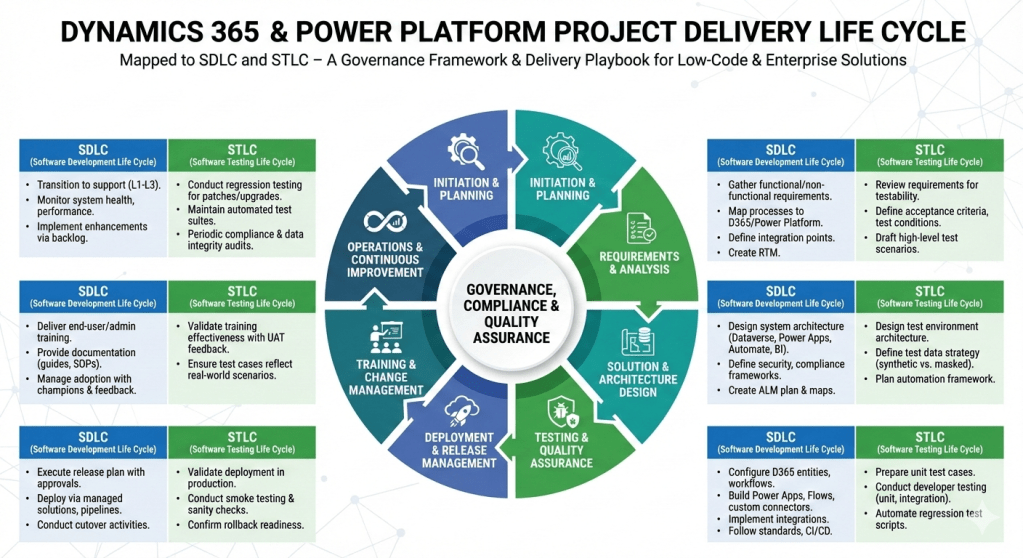
Here’s a step‑by‑step project delivery life cycle for Dynamics 365 & Power Platform projects, mapped to both SDLC (Software Development Life Cycle) and STLC (Software Testing Life Cycle). I’ve structured it so you can use it as a governance framework or a delivery playbook.

Dynamics 365 & Power Platform Project Delivery Life Cycle

1. Initiation & Planning

  • SDLC:
    • Define business objectives, scope, and success criteria.
    • Identify stakeholders, governance model, and compliance requirements.
    • Conduct feasibility study and ROI analysis.
  • STLC:
    • Define test strategy aligned with business goals.
    • Identify quality metrics, compliance standards, and risk areas.

2. Requirements & Analysis

  • SDLC:
    • Gather functional and non‑functional requirements (workshops, interviews, user stories).
    • Map business processes to Dynamics 365 modules and Power Platform capabilities.
    • Define integration points (ERP, CRM, CTI, external APIs).
    • Create requirement traceability matrix.
  • STLC:
    • Review requirements for testability.
    • Define acceptance criteria and test conditions.
    • Draft high‑level test scenarios.

3. Solution & Architecture Design

  • SDLC:
    • Design system architecture (Dataverse, Power Apps, Power Automate, Power BI, Dynamics 365 modules).
    • Define security, compliance, and governance frameworks.
    • Create ALM (Application Lifecycle Management) plan with environments (Dev, Test, UAT, Prod).
    • Prepare architecture maps and integration diagrams.
  • STLC:
    • Design test environment architecture.
    • Define test data strategy (synthetic vs. masked production data).
    • Plan automation framework (e.g., EasyRepro, Selenium, Power Automate test flows).

4. Development & Configuration

  • SDLC:
    • Configure Dynamics 365 entities, forms, workflows, and business rules.
    • Build Power Apps (Canvas/Model‑Driven), Power Automate flows, and custom connectors.
    • Implement integrations (Azure Functions, Logic Apps, APIs).
    • Follow coding standards, version control (GitHub/Azure DevOps), and CI/CD pipelines.
  • STLC:
    • Prepare unit test cases.
    • Conduct developer testing (unit, integration).
    • Automate regression test scripts.

5. Testing & Quality Assurance

  • SDLC:
    • Conduct system testing, UAT, performance testing, and security validation.
    • Validate integrations and data migration.
  • STLC:
    • Test Planning: Finalize test plan, entry/exit criteria.
    • Test Design: Create detailed test cases, test scripts, and data sets.
    • Test Execution: Run functional, regression, performance, and security tests.
    • Defect Management: Log, track, and resolve defects in Azure DevOps/Jira.
    • Test Closure: Document results, lessons learned, and sign‑off.

6. Deployment & Release Management

  • SDLC:
    • Execute release plan with governance approvals.
    • Deploy via managed solutions, pipelines, or release automation.
    • Conduct cutover activities (data migration, user provisioning, environment setup).
  • STLC:
    • Validate deployment in production.
    • Conduct smoke testing and sanity checks.
    • Confirm rollback strategy readiness.

7. Training & Change Management

  • SDLC:
    • Deliver end‑user training, admin training, and governance workshops.
    • Provide documentation (user guides, SOPs, governance playbooks).
    • Manage adoption with change champions and feedback loops.
  • STLC:
    • Validate training effectiveness with UAT feedback.
    • Ensure test cases reflect real‑world scenarios.

8. Operations & Continuous Improvement

  • SDLC:
    • Transition to support (L1, L2, L3).
    • Monitor system health, performance, and compliance.
    • Implement enhancements via backlog grooming.
  • STLC:
    • Conduct regression testing for patches and upgrades.
    • Maintain automated test suites for continuous validation.
    • Periodic audits for compliance and data integrity.

This framework ensures governance, compliance, and quality assurance are embedded throughout delivery. It’s especially powerful for Dynamics 365 & Power Platform projects where configuration, low‑code development, and integrations coexist with enterprise‑grade testing.