
Introduction
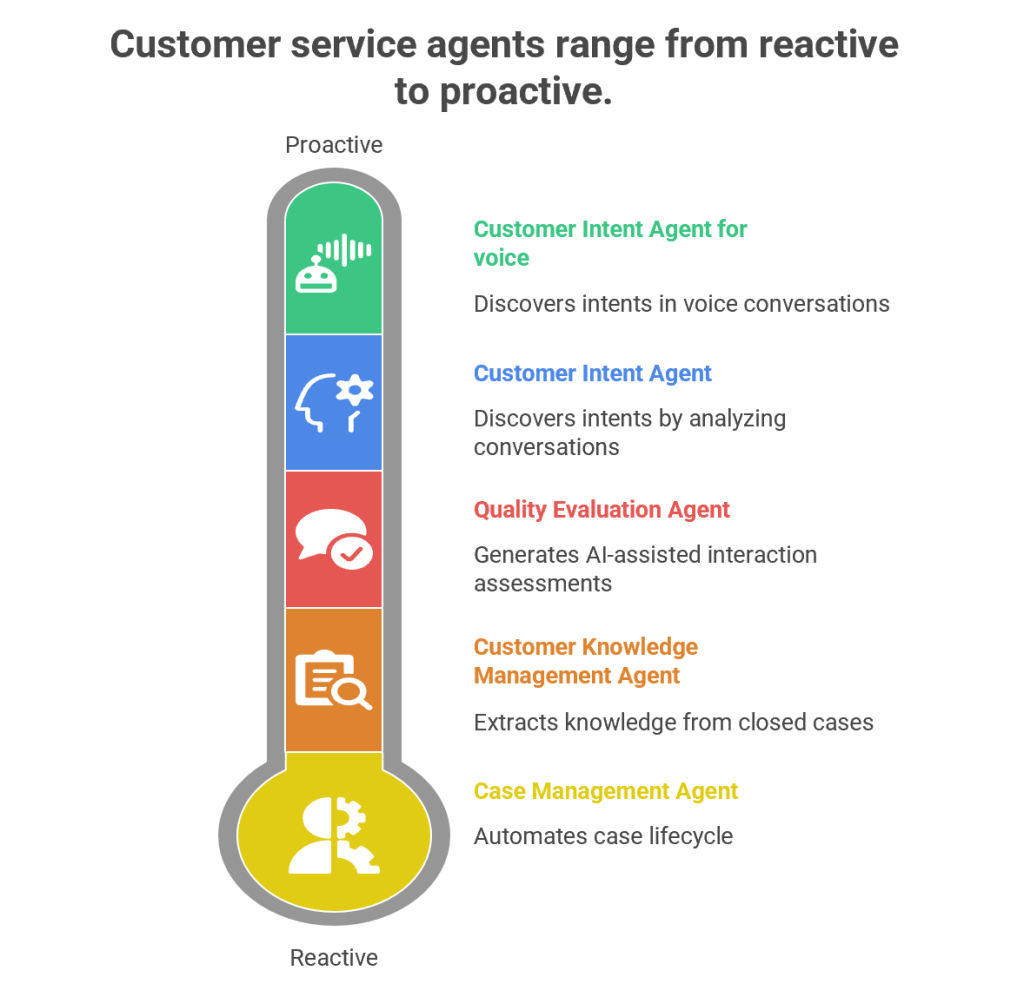
Customer service has evolved from being a reactive support function into a proactive, AI-driven engagement hub. Microsoft’s Dynamics 365 Customer Service Autonomous Agents represent the next leap in this journey. These agents are designed to autonomously handle repetitive tasks, discover customer intents, generate knowledge, and evaluate quality—all while freeing human agents to focus on complex, empathy-driven interactions.
1. Customer Intent Agent
Purpose
The Customer Intent Agent uses generative AI to autonomously discover customer intents by analyzing historical and ongoing cases, conversations, and interactions. Intents are essentially the “reason” behind a customer’s contact—such as resetting a password, checking an order status, or reporting a service outage.
How It Works
- Data Mining: The agent scans past cases, chat transcripts, and emails to identify recurring themes.
- Intent Discovery: It clusters similar issues into “intents” using natural language processing (NLP).
- Knowledge Recommendations: Once an intent is identified, the agent suggests the most relevant knowledge articles to resolve the issue.
- Continuous Learning: As new cases emerge, the agent adapts and refines its intent library.
Business Value
- Reduces manual effort in categorizing cases.
- Improves self-service portals by surfacing the right FAQs.
- Enhances assisted service by guiding human agents toward faster resolutions.
- Provides insights into emerging customer needs (e.g., a sudden spike in billing queries).
Example
Imagine a telecom company receiving thousands of queries daily. The Customer Intent Agent identifies that 40% of queries relate to “SIM card activation.” It then recommends a knowledge article and updates the chatbot to handle this intent autonomously, reducing call center load.
2. Customer Intent Agent for Voice
Purpose
While the standard Customer Intent Agent focuses on text-based interactions, the Voice variant is tailored for contact centers handling phone calls.
How It Works
- Speech-to-Text Conversion: Converts live voice conversations into text.
- Intent Recognition: Uses generative AI to detect customer intent in real time.
- Guided Conversations: Suggests follow-up questions to agents, helping them steer the call effectively.
- Real-Time Solutions: Provides tailored solutions during the call, reducing average handling time (AHT).
Business Value
- Enhances voice-based customer service, which remains dominant in many industries.
- Improves agent confidence by suggesting next-best actions during live calls.
- Reduces call duration and increases first-call resolution (FCR).
Example
In a bank’s contact center, a customer calls saying, “I can’t access my account.” The agent dashboard instantly shows the intent as “Login Issue” and suggests asking: “Are you using the mobile app or web portal?” It then recommends a troubleshooting script, speeding up resolution.
3. Case Management Agent
Purpose
The Case Management Agent automates the entire case lifecycle—from creation to closure. Traditionally, service representatives spend significant time manually filling case details, updating statuses, and closing tickets. This agent eliminates that overhead.
How It Works
- Case Creation: Automatically generates cases from emails, chats, or voice transcripts.
- Case Updates: Populates fields like category, priority, and SLA deadlines.
- Resolution & Closure: Suggests resolutions based on knowledge articles and closes cases once resolved.
- Customization: Administrators can configure rules to tailor the agent’s behavior to organizational needs.
Business Value
- Saves time for service representatives.
- Ensures consistency in case handling.
- Improves SLA compliance by automating escalations.
- Reduces human error in case documentation.
Example
In an e-commerce company, when a customer emails “My package hasn’t arrived,” the Case Management Agent automatically creates a case, tags it as “Delivery Delay,” sets priority, and routes it to the logistics department. Once resolved, it closes the case and notifies the customer.
4. Customer Knowledge Management Agent
Purpose
Knowledge is the backbone of customer service. The Customer Knowledge Management Agent ensures that knowledge bases remain up-to-date, accurate, and compliant.
How It Works
- Knowledge Extraction: Analyzes closed cases to identify gaps in existing knowledge articles.
- Knowledge Creation: Drafts new articles using generative AI.
- Compliance Checks: Ensures articles meet organizational and regulatory standards.
- Real-Time Updates: Continuously refines knowledge bases as new cases emerge.
Business Value
- Improves self-service by keeping FAQs relevant.
- Enhances agent productivity by providing contextual knowledge suggestions.
- Reduces repetitive queries by empowering customers with accurate information.
- Ensures compliance in industries like healthcare and finance.
Example
A healthcare provider closes multiple cases related to “insurance claim submission.” The agent notices no existing article covers this process. It drafts a new knowledge article, reviews compliance, and publishes it—empowering both customers and agents.
5. Quality Evaluation Agent
Purpose
The Quality Evaluation Agent autonomously assesses customer interactions for quality and compliance. Supervisors traditionally spend hours manually reviewing calls and chats; this agent automates that process.
How It Works
- Evaluation Framework: Supervisors define criteria (e.g., politeness, accuracy, compliance).
- AI-Assisted Assessments: The agent evaluates cases and conversations against these criteria.
- Feedback Loop: Provides insights into agent performance and customer satisfaction.
- Continuous Improvement: Suggests training modules or process changes based on evaluation results.
Business Value
- Ensures consistent service quality across agents.
- Identifies training needs proactively.
- Improves compliance with regulatory standards.
- Enhances customer satisfaction through better service delivery.
Example
In a financial services firm, the agent evaluates 1,000 chat transcripts overnight. It flags 50 cases where agents failed to verify customer identity properly, alerting supervisors to potential compliance risks.
Synergy Between Agents
While each agent has a distinct role, their combined power transforms customer service:
- Customer Intent Agents identify why customers reach out.
- Case Management Agent automates case handling.
- Knowledge Management Agent ensures information is accurate.
- Quality Evaluation Agent maintains service excellence.
Together, they create a self-optimizing, autonomous customer service ecosystem.
Strategic Impact
- Operational Efficiency: Reduces manual workload.
- Customer Satisfaction: Improves resolution speed and accuracy.
- Compliance: Ensures adherence to regulations.
- Scalability: Handles large volumes of interactions seamlessly.
 GM Dynamics & Agentic AI Consulting