Microsoft Dynamics 365, Power Platform enthusiast having around 15 years of experience with complete SDLC. Along with that active Community Lead, MCT and Speaker.
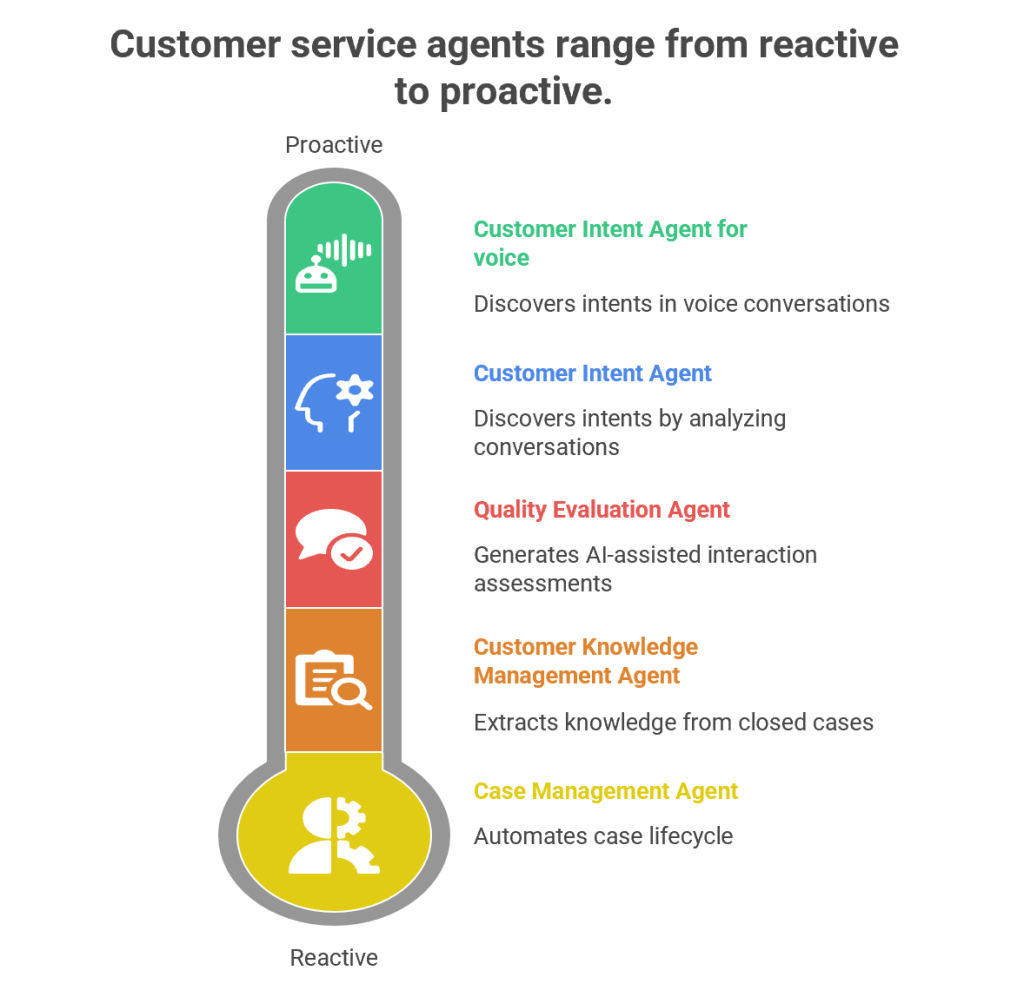
Customer service has evolved from being a reactive support function into a proactive, AI-driven engagement hub. Microsoft’s Dynamics 365 Customer Service Autonomous Agents represent the next leap in this journey. These agents are designed to autonomously handle repetitive tasks, discover customer intents, generate knowledge, and evaluate quality—all while freeing human agents to focus on complex, empathy-driven interactions.
1. Customer Intent Agent
Purpose
The Customer Intent Agent uses generative AI to autonomously discover customer intents by analyzing historical and ongoing cases, conversations, and interactions. Intents are essentially the “reason” behind a customer’s contact—such as resetting a password, checking an order status, or reporting a service outage.
How It Works
Data Mining: The agent scans past cases, chat transcripts, and emails to identify recurring themes.
Intent Discovery: It clusters similar issues into “intents” using natural language processing (NLP).
Knowledge Recommendations: Once an intent is identified, the agent suggests the most relevant knowledge articles to resolve the issue.
Continuous Learning: As new cases emerge, the agent adapts and refines its intent library.
Business Value
Reduces manual effort in categorizing cases.
Improves self-service portals by surfacing the right FAQs.
Enhances assisted service by guiding human agents toward faster resolutions.
Provides insights into emerging customer needs (e.g., a sudden spike in billing queries).
Example
Imagine a telecom company receiving thousands of queries daily. The Customer Intent Agent identifies that 40% of queries relate to “SIM card activation.” It then recommends a knowledge article and updates the chatbot to handle this intent autonomously, reducing call center load.
2. Customer Intent Agent for Voice
Purpose
While the standard Customer Intent Agent focuses on text-based interactions, the Voice variant is tailored for contact centers handling phone calls.
How It Works
Speech-to-Text Conversion: Converts live voice conversations into text.
Intent Recognition: Uses generative AI to detect customer intent in real time.
Guided Conversations: Suggests follow-up questions to agents, helping them steer the call effectively.
Real-Time Solutions: Provides tailored solutions during the call, reducing average handling time (AHT).
Business Value
Enhances voice-based customer service, which remains dominant in many industries.
Improves agent confidence by suggesting next-best actions during live calls.
Reduces call duration and increases first-call resolution (FCR).
Example
In a bank’s contact center, a customer calls saying, “I can’t access my account.” The agent dashboard instantly shows the intent as “Login Issue” and suggests asking: “Are you using the mobile app or web portal?” It then recommends a troubleshooting script, speeding up resolution.
3. Case Management Agent
Purpose
The Case Management Agent automates the entire case lifecycle—from creation to closure. Traditionally, service representatives spend significant time manually filling case details, updating statuses, and closing tickets. This agent eliminates that overhead.
How It Works
Case Creation: Automatically generates cases from emails, chats, or voice transcripts.
Case Updates: Populates fields like category, priority, and SLA deadlines.
Resolution & Closure: Suggests resolutions based on knowledge articles and closes cases once resolved.
Customization: Administrators can configure rules to tailor the agent’s behavior to organizational needs.
Business Value
Saves time for service representatives.
Ensures consistency in case handling.
Improves SLA compliance by automating escalations.
Reduces human error in case documentation.
Example
In an e-commerce company, when a customer emails “My package hasn’t arrived,” the Case Management Agent automatically creates a case, tags it as “Delivery Delay,” sets priority, and routes it to the logistics department. Once resolved, it closes the case and notifies the customer.
4. Customer Knowledge Management Agent
Purpose
Knowledge is the backbone of customer service. The Customer Knowledge Management Agent ensures that knowledge bases remain up-to-date, accurate, and compliant.
How It Works
Knowledge Extraction: Analyzes closed cases to identify gaps in existing knowledge articles.
Knowledge Creation: Drafts new articles using generative AI.
Compliance Checks: Ensures articles meet organizational and regulatory standards.
Real-Time Updates: Continuously refines knowledge bases as new cases emerge.
Business Value
Improves self-service by keeping FAQs relevant.
Enhances agent productivity by providing contextual knowledge suggestions.
Reduces repetitive queries by empowering customers with accurate information.
Ensures compliance in industries like healthcare and finance.
Example
A healthcare provider closes multiple cases related to “insurance claim submission.” The agent notices no existing article covers this process. It drafts a new knowledge article, reviews compliance, and publishes it—empowering both customers and agents.
5. Quality Evaluation Agent
Purpose
The Quality Evaluation Agent autonomously assesses customer interactions for quality and compliance. Supervisors traditionally spend hours manually reviewing calls and chats; this agent automates that process.
AI-Assisted Assessments: The agent evaluates cases and conversations against these criteria.
Feedback Loop: Provides insights into agent performance and customer satisfaction.
Continuous Improvement: Suggests training modules or process changes based on evaluation results.
Business Value
Ensures consistent service quality across agents.
Identifies training needs proactively.
Improves compliance with regulatory standards.
Enhances customer satisfaction through better service delivery.
Example
In a financial services firm, the agent evaluates 1,000 chat transcripts overnight. It flags 50 cases where agents failed to verify customer identity properly, alerting supervisors to potential compliance risks.
Synergy Between Agents
While each agent has a distinct role, their combined power transforms customer service:
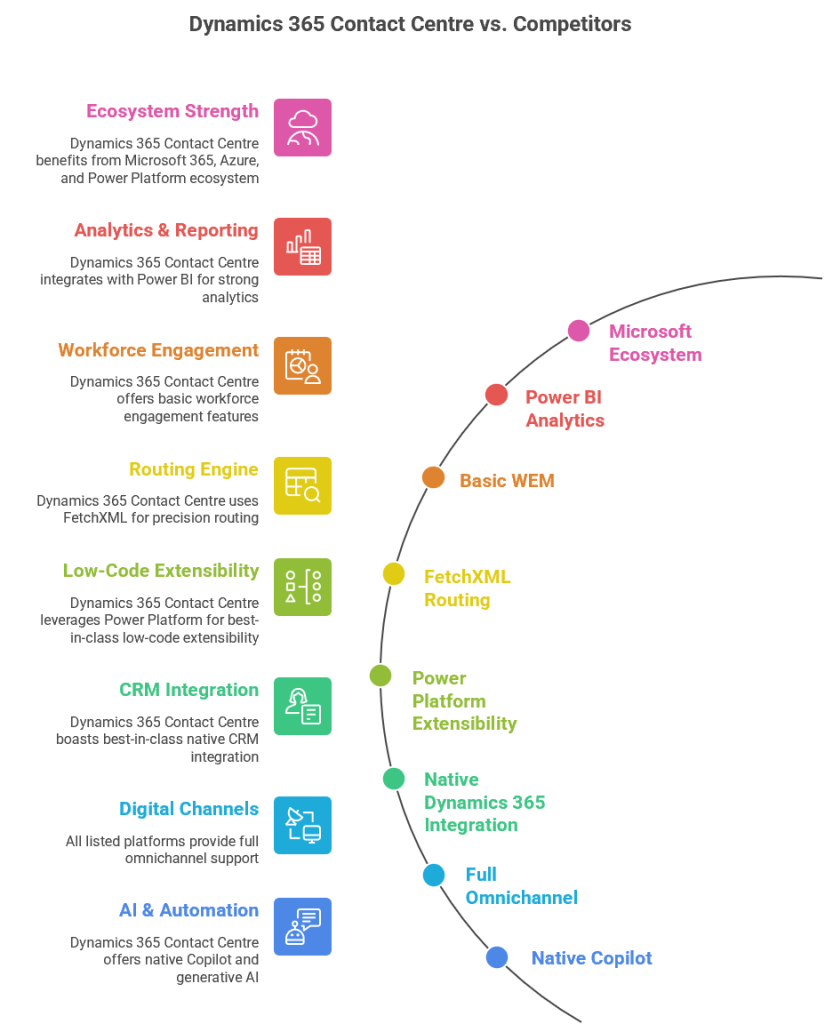
Dynamics 365 Contact Centre is Microsoft’s AI‑first, cloud‑native CCaaS platform built on Azure Communication Services and deeply integrated with Dynamics 365, Power Platform, and Microsoft 365. Compared to other CCaaS leaders, Microsoft’s strengths lie in AI, CRM context, low‑code extensibility, and ecosystem integration, while competitors often lead in telephony maturity, WEM, and global carrier options.
Dynamics 365 Contact Centre
Strengths
Deep Microsoft ecosystem integration (Teams, M365, Power Platform, Dynamics 365)
AI‑first design with Copilot and CRM‑aware automation
Low‑code extensibility via Power Automate and Dataverse
Unified agent desktop with CRM context
FetchXML‑based routing for compliance‑driven orgs
Weaknesses
Workforce engagement management still maturing
Telephony ecosystem not as broad as Genesys/NICE
Best suited for Microsoft‑aligned enterprises
Amazon Connect
Strengths
Highly scalable, developer‑friendly
Strong AWS AI/ML integration
Pay‑as‑you‑go pricing
Weaknesses
Requires heavy custom development
Weak CRM story
Limited out‑of‑the‑box WEM
Genesys Cloud CX
Strengths
Very mature routing, WEM, and analytics
Strong global telephony
Broad enterprise adoption
Weaknesses
Higher cost
Less native AI compared to Microsoft
Complex configuration
NICE CXone
Strengths
Best‑in‑class analytics and WEM
Strong compliance and global reach
Mature voice and digital channels
Weaknesses
Complex licensing
Less modern architecture than Microsoft/AWS
Limited low‑code extensibility
Cisco Webex Contact Center
Strengths
Strong telephony and network reliability
Good for Cisco‑centric enterprises
Solid omnichannel
Weaknesses
AI and CRM context weaker than Microsoft
Less flexible than AWS/Genesys
Best‑Fit Recommendations
Choose Dynamics 365 Contact Centre if:
You are a Microsoft‑centric enterprise
You want AI‑first customer service
You need CRM‑aware automation
You want low‑code extensibility
You want a unified Microsoft ecosystem (Teams + Dynamics + Power Platform)
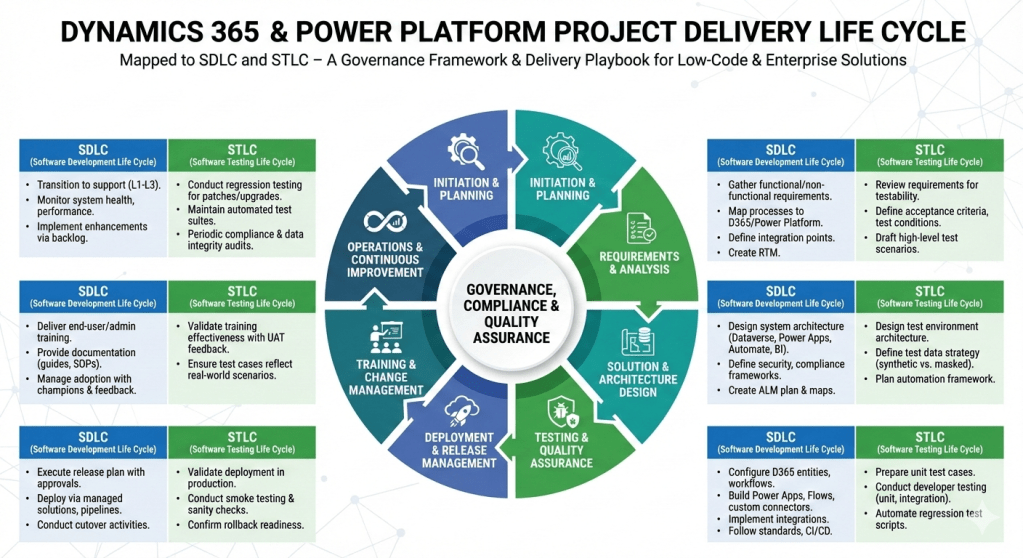
Here’s a step‑by‑step project delivery life cycle for Dynamics 365 & Power Platform projects, mapped to both SDLC (Software Development Life Cycle) and STLC (Software Testing Life Cycle). I’ve structured it so you can use it as a governance framework or a delivery playbook.
Dynamics 365 & Power Platform Project Delivery Life Cycle
1. Initiation & Planning
SDLC:
Define business objectives, scope, and success criteria.
Identify stakeholders, governance model, and compliance requirements.
Conduct feasibility study and ROI analysis.
STLC:
Define test strategy aligned with business goals.
Identify quality metrics, compliance standards, and risk areas.
2. Requirements & Analysis
SDLC:
Gather functional and non‑functional requirements (workshops, interviews, user stories).
Map business processes to Dynamics 365 modules and Power Platform capabilities.
Follow coding standards, version control (GitHub/Azure DevOps), and CI/CD pipelines.
STLC:
Prepare unit test cases.
Conduct developer testing (unit, integration).
Automate regression test scripts.
5. Testing & Quality Assurance
SDLC:
Conduct system testing, UAT, performance testing, and security validation.
Validate integrations and data migration.
STLC:
Test Planning: Finalize test plan, entry/exit criteria.
Test Design: Create detailed test cases, test scripts, and data sets.
Test Execution: Run functional, regression, performance, and security tests.
Defect Management: Log, track, and resolve defects in Azure DevOps/Jira.
Test Closure: Document results, lessons learned, and sign‑off.
6. Deployment & Release Management
SDLC:
Execute release plan with governance approvals.
Deploy via managed solutions, pipelines, or release automation.
Conduct cutover activities (data migration, user provisioning, environment setup).
STLC:
Validate deployment in production.
Conduct smoke testing and sanity checks.
Confirm rollback strategy readiness.
7. Training & Change Management
SDLC:
Deliver end‑user training, admin training, and governance workshops.
Provide documentation (user guides, SOPs, governance playbooks).
Manage adoption with change champions and feedback loops.
STLC:
Validate training effectiveness with UAT feedback.
Ensure test cases reflect real‑world scenarios.
8. Operations & Continuous Improvement
SDLC:
Transition to support (L1, L2, L3).
Monitor system health, performance, and compliance.
Implement enhancements via backlog grooming.
STLC:
Conduct regression testing for patches and upgrades.
Maintain automated test suites for continuous validation.
Periodic audits for compliance and data integrity.
This framework ensures governance, compliance, and quality assurance are embedded throughout delivery. It’s especially powerful for Dynamics 365 & Power Platform projects where configuration, low‑code development, and integrations coexist with enterprise‑grade testing.
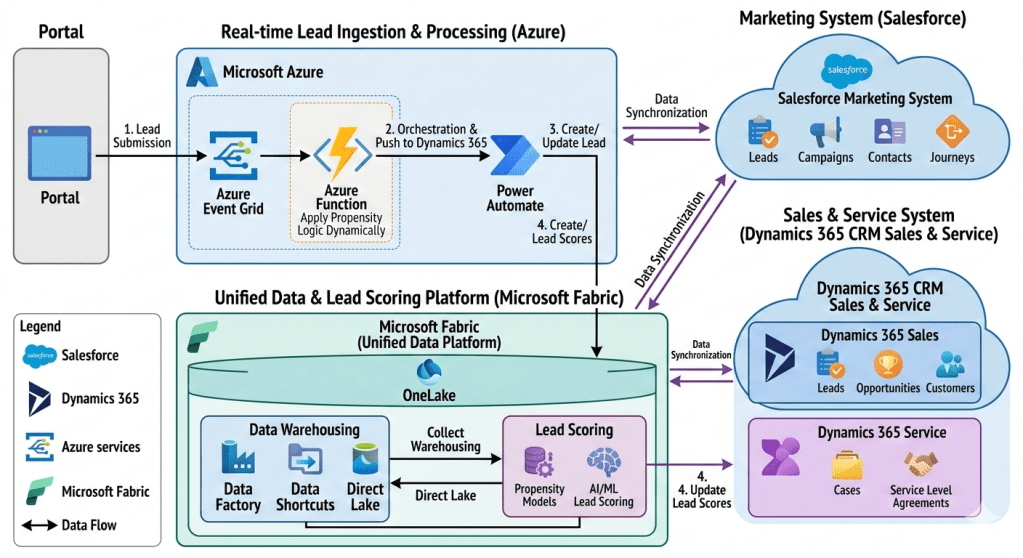
This document outlines the technical architecture of an advanced lead management and customer relationship ecosystem from one of my past implementations of an insurance company. The system integrates multiple SaaS and cloud platforms to create a seamless, real-time, and data-driven workflow for capturing, qualifying, and converting leads. At its core, it leverages the strengths of Salesforce for marketing orchestration, Dynamics 365 for core sales and service, Microsoft Azure for real-time lead ingestion and intelligent orchestration, and Microsoft Fabric as a unified data platform for comprehensive data warehousing and AI-powered lead scoring. The primary goal is to provide sales and marketing teams with a complete, 360-degree view of the customer while dynamically optimizing lead prioritization through sophisticated AI models.
Section 1: Architecture Overview
The architecture is structured into four main functional areas, connected by robust data flows and integration points:
Lead Ingestion Point: Represented by the ‘Portal,’ this is the primary source for all incoming leads.
Real-time Lead Ingestion & Processing (Microsoft Azure): This cloud-native layer captures lead data, applies initial dynamic logic, and orchestrates the creation of lead records in the CRM system.
CRM Ecosystem (Salesforce and Dynamics 365): A best-of-breed CRM strategy where specialized systems manage distinct customer relationship lifecycle phases:
Dynamics 365 CRM Sales & Service: Acts as the primary CRM for sales teams (managing leads, opportunities, and customers) and service teams (managing cases and SLAs).
Unified Data & Lead Scoring Platform (Microsoft Fabric): The analytical heart of the system, consolidating data from all platforms into a single logical data lake (OneLake) for data warehousing and to fuel advanced AI/ML lead scoring.
Section 2: External Lead Ingestion
2.1 The Portal
The entire workflow begins at the ‘Portal’ block on the far left. The Portal is a public-facing web application, landing page, or external system where potential leads submit their information via a web form. This form captures essential details such as name, email address, company, job title, and the lead’s specific interests. This action is crucial as it creates the initial ‘digital footprint’ of the lead.
Section 3: Real-time Lead Ingestion & Processing with Microsoft Azure
Once a lead submits information via the Portal, the system transitions into real-time processing within the Microsoft Azure ecosystem. This section is designed for low-latency, event-driven operations, ensuring no lead is missed and initial classification is instant.
3.1 Step 1: Lead Submission (Portal to Azure Event Grid)
The first numbered step shows data flowing from the Portal to ‘Azure Event Grid’. When a lead form is submitted, the Portal generates a standard ‘Lead Created’ event. This event is published to an Azure Event Grid topic, which acts as a highly scalable, real-time event routing service. This decoupling is essential: it allows the Portal to submit the lead instantly without waiting for subsequent, potentially slower processing steps, making the portal highly responsive.
3.2 Intelligent Processing (Azure Event Grid to Azure Function)
Azure Event Grid routes the incoming ‘Lead Created’ event to a subscribing Azure Function. This Azure Function, the central processing unit of the ingestion layer, is serverless, running code only when triggered. It is annotated with ‘Apply Propensity Logic Dynamically.’
The Azure Function’s Role and Dynamic Propensity Logic:
This is a critical, intelligent component. The Azure Function performs several immediate tasks:
Data Validation and Transformation: It parses the JSON payload from the Portal, validating data types and transforming it into a canonical lead format.
Applying Propensity Logic Dynamically: This is the application of lightweight, dynamic rules or a small, pre-trained machine learning model designed for instant action. “Dynamically” implies that these rules are not hard-coded but can be updated or fetched from a configuration system on the fly.
What this means: For example, the function could check a rule like: “If company size > 100 AND location = ‘USA’ AND product interest = ‘ILP’, then direct-route to the enterprise sales team via a special field.”
Propensity: At this stage, it’s not the full-scale, historical data-driven scoring done later in Fabric, but rather an initial “fit” check. The logic decides how to process the lead immediately: whether to flag it for rapid follow-up, categorize it based on dynamic business rules, or prepare specific metadata. The result of this logic is embedded into the lead record’s data payload.
Orchestration Trigger: Once initial logic is complete, the function triggers the next stage.
3.3 Step 2: Orchestration & Push to Dynamics 365 (Azure Function to Power Automate)
The Azure Function, having applied its initial logic and enriched the lead data, pushes the processed lead record to Power Automate via an HTTP connector. Power Automate is the orchestration engine for this phase, providing a low-code/no-code interface to manage the integration between Azure and the downstream CRM.
3.4 Step 3: Create/Update Lead (Power Automate to Dynamics 365 Sales)
The Power Automate flow takes the enriched lead data and performs an upsert operation (update or insert) into the ‘Dynamics 365 Sales’ module within the Dynamics 365 cloud.
The Power Automate Flow’s Role:
Dynamics 365 CRM Connector: The flow uses the standard Dynamics 365 CRM connector to authenticate and perform actions.
Lead Record Creation: If the lead is new (e.g., email not found in Dynamics 365), it creates a new ‘Lead’ record. The initial classification and metadata derived from the Azure Function’s dynamic logic are populated into the record.
Existing Lead Update: If the lead already exists, the flow updates the existing lead record, perhaps adding a new campaign activity.
This step ensures that the sales team has immediate access to a centralized, validated lead record in their primary CRM (Dynamics 365 Sales), enriched with initial intelligence from the ingestion layer.
Section 4: Primary CRM Ecosystem
The core customer relationship management activities are split between Salesforce and Dynamics 365, connected by continuous data synchronization.
4.1 Dynamics 365 CRM Sales & Service
Dynamics 365 CRM, the central cloud container on the right, is the primary application suite for sales and service teams.
Dynamics 365 Sales: This module contains essential CRM entity blocks:
Leads: As detailed above, leads created via Power Automate are stored here. Sales reps manage the lead qualification process within this module.
Opportunities: Qualified leads are converted into Opportunities, where sales teams manage the sales pipeline, track deals, and forecast revenue.
Customers: Once an opportunity is won, the lead is converted into a full customer record, including primary Account and Contact details.
Dynamics 365 Service: This module supports the customer after the sale:
Cases: It tracks all customer support requests and issues, providing service reps with a structured workflow to resolve problems.
Service Level Agreements (SLAs): It defines and manages the agreed-upon performance metrics for customer service (e.g., initial response time, resolution time), ensuring customer support meets predefined standards.
The combination of Sales and Service data within the single Dynamics 365 instance provides a foundational customer view for sales reps, showing them both pipeline activity and post-sales service interactions.
4.2 Salesforce Marketing System
The Salesforce cloud, in the upper right, is dedicated to advanced marketing operations. A “Data Synchronization” arrow shows continuous data exchange with the main Dynamics 365 Sales & Service container.
Marketing Data Entities:
Leads & Contacts: Salesforce Marketing maintains its own view of Leads and Contacts for marketing activities, synchronized from Dynamics 365. This includes historical lead behaviour.
Campaigns: This module manages marketing campaigns across various channels (email, social, web).
Journeys: This represents Salesforce Marketing Cloud’s “Journey Builder,” a powerful tool for designing and automating multi-channel customer journeys (e.g., welcome series, re-engagement campaigns) that deliver personalized messages at scale.
Salesforce is used because of its specialized marketing capabilities, while the actual sales process (opportunities, final customer conversion) resides in Dynamics 365. The data sync ensures that when a new lead is created in Dynamics 365, it flows to Salesforce to be nurtured; conversely, when a marketing campaign achieves a significant milestone (e.g., a lead hits a nurture goal), that information can be synchronized back to Dynamics 365 to update the lead’s status.
Section 5: Unified Data & Lead Scoring Platform (Microsoft Fabric)
This is the analytical foundation and most innovative section of the architecture. Microsoft Fabric acts as a single, unified analytics platform, consolidating data from all other systems into a single logical data lake to power both traditional reporting and advanced AI.
5.1 Data Ingestion into Microsoft Fabric (Sync Arrows and Ingestion Paths)
The diagram shows multiple arrows feeding data into Microsoft Fabric from Salesforce, Dynamics 365, and the lead ingestion stream.
Data Synchronization (Salesforce/Dynamics 365 <-> Microsoft Fabric): Arrows indicate data synchronization from both CRM systems into Fabric’s central OneLake. This provides the unified “360-degree view” by pulling marketing, sales, service, and lead history data into a single location.
Data Warehousing (Data Factory, Data Shortcuts, Direct Lake): These components illustrate how data is moved and unified:
Data Factory: Used to create complex ELT (Extract, Load, Transform) data pipelines, moving large volumes of data from various sources (perhaps legacy databases or other APIs) into OneLake.
Data Shortcuts: This is a crucial Fabric feature, allowing data to be left in its source location (like Azure Data Lake Storage Gen2 or AWS S3) while creating a “shortcut” that makes it appear as if it’s stored directly within OneLake. This eliminates the need for data duplication and extra movement.
Direct Lake: A high-performance capability in Microsoft Fabric that enables large data volumes stored in OneLake (in Delta Parquet format) to be loaded and queried directly by analytics tools (like Power BI) without intermediate data processing or caching, ensuring performance and “freshness.”
These tools combine to populate the unified OneLake with all relevant, normalized customer data.
Real-time Ingestion Path (Power Automate and Azure Function -> OneLake): In addition to the main sync, the diagram implies (via “Lead Ingestion” and “Direct Lake”) that real-time data from the initial lead ingestion (from the Azure Function/Power Automate flow) can be fed directly into OneLake, making new leads immediately available for the complex scoring process.
5.2 OneLake: The Unified Data Lake
At the center of Fabric is ‘OneLake.’ This is the foundational logical data lake, acting as the single source of truth for the entire organization. By implementing ” shortcuts,” OneLake physically might span multiple cloud locations, but it looks like a single, structured file system to any analytical service within Fabric. Data from Salesforce, Dynamics 365, and the real-time ingestion stream are all stored here.
5.3 Lead Scoring within Microsoft Fabric
This module is the core application for advanced, AI-powered lead scoring, which differs significantly from the initial “Propensity Logic” in the Azure Function. The full process within Fabric involves:
Data Unification: Aggregating data from OneLake, including:
Sales history (closed-won/lost opportunities from Dynamics 365 sync).
Customer service case history (from Dynamics 365 Service sync).
Real-time lead behaviour and attributes (from ingestion).
Propensity Models: Building and training advanced machine learning models (e.g., a predictive “propensity to buy” model) using historic data from OneLake.
AI/ML Lead Scoring: Applying these models to new leads. These sophisticated models can process hundreds of variables and identify non-obvious patterns to generate a highly precise, predictive lead score (e.g., from 1 to 100). This provides sales reps with a truly data-driven prediction of a lead’s likelihood to convert, which is far more powerful than the rules-based “propensity check” done at the ingestion point.
5.4 Step 4: Update Lead Scores (Fabric Lead Scoring to Dynamics 365 Sales)
The final numbered step closes the loop. After the AI/ML Lead Scoring process in Fabric generates an enhanced score, it pushes this score back to ‘Dynamics 365 Sales.’ This is done via an API connector or a scheduled data pipeline within Fabric (e.g., using Data Factory or a Spark job). The updated score populates a dedicated ‘Lead Score’ field on the original lead record in Dynamics 365 Sales.
This ensures sales teams work with the absolute best intelligence. A sales rep will now see a lead, created instantly from the portal, enriched with dynamic classification from the Azure Function, and continuously optimized with an AI-driven lead score from Fabric, allowing them to prioritize high-value opportunities with incredible precision.
Conclusion and Architecture Benefits
This detailed multi-cloud and multi-SaaS architecture provides several compelling advantages:
Best-of-Breed Specialization: It uses specialized platforms (Salesforce for marketing, Dynamics 365 for CRM core) without sacrificing data visibility, as both are integrated via bidirectional sync.
Intelligent, Real-time Ingestion: The combination of Azure Event Grid, Azure Functions (for dynamic logic), and Power Automate ensures all leads are captured, processed, and available in the CRM instantly, while immediately receiving a first pass of classification based on business rules.
Unified Customer View with Microsoft Fabric: The central OneLake provides a true “360-degree view,” consolidating data from Salesforce and Dynamics 365 (including sales and service) in one location, removing data silos.
Advanced AI Optimization (Continuous Improvement): The key differentiator is the AI-driven lead scoring within Fabric. It moves beyond simple rules and leverages historic data across the entire customer lifecycle to provide highly accurate, predictive prioritization, closing the loop with a score update in Dynamics 365. This ensures sales teams are always working on the leads with the highest dynamic and predictive propensity to buy.
Data Freshness and Efficiency: The use of Data Shortcuts and Direct Lake in Microsoft Fabric provides real-time access to large datasets without costly data movement or duplication, ensuring analytics are always based on current data.
A Comprehensive, Integrated Ecosystem: The Modern Taxi Industry Architecture Unveiled
The traditional taxi industry is at a critical juncture. Challenged by ridesharing disrupters, fluctuating demand, and complex regulatory requirements, taxi fleet operators must embrace digital transformation not merely as an upgrade, but as a survival imperative. The days of fragmented systems—where a radio dispatch tool operated in isolation from a customer database, and a finance system stood apart from daily operations—are over. To compete in the modern mobility landscape, a taxi company requires a holistic, integrated ecosystem that connects every touchpoint, from the passenger’s mobile app to the enterprise’s financial general ledger.
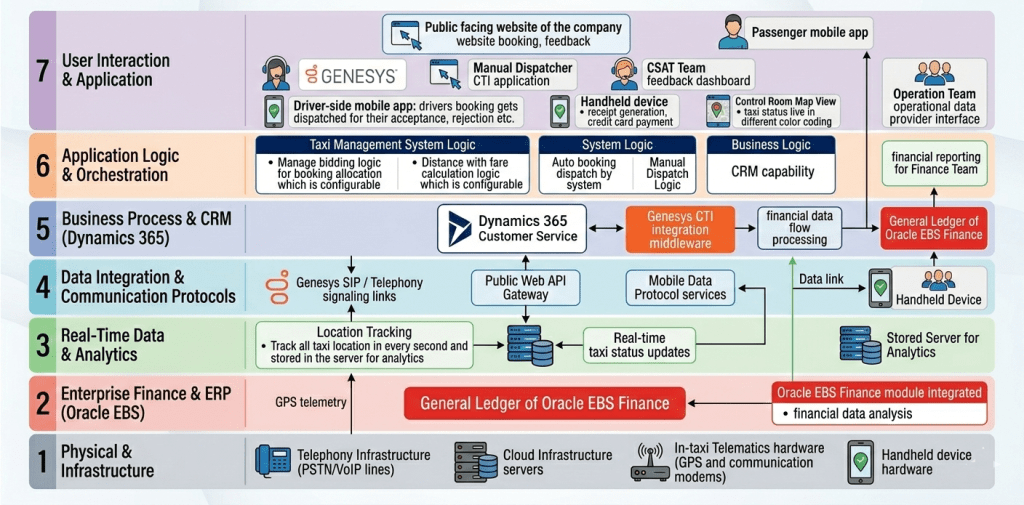
This article provides a comprehensive, deep-dive exploration of such an ecosystem, as presented in the accompanying 7-layer architecture diagram. This architecture, inspired by the OSI (Open Systems Interconnection) reference model, is designed for scalability, modularity, and, most importantly, seamless data integration. It showcases how a modern taxi enterprise can leverage a suite of best-in-breed technologies—including Genesys, Microsoft Dynamics 365, Oracle E Business Suite (EBS) Finance, and specialized taxi management software—to create a unified platform for enhanced efficiency, superior customer and driver experiences, and robust financial control.
The structure of this architecture is key. By segregating functions into distinct layers—from physical infrastructure to user interfaces—the enterprise can isolate complexity, integrate new components without disrupting existing ones, and gain a clear understanding of data flow. We will now proceed with a layer-by-layer analysis of this comprehensive ecosystem.
1. The OSI-Inspired Philosophy: Architecture for Scalability
The use of a layered, OSI-style structure for this architecture is not arbitrary; it is a strategic design choice. Just as the seven OSI layers abstract networking functions (physical, data link, network, transport, session, presentation, application) to allow different devices to communicate, this enterprise architecture abstracts functional systems to allow disparate software and hardware to operate as a single unit.
1.1 The Modularity of ‘Best-of-Breed’
This layered approach is crucial for a “best-of-breed” strategy. A taxi company doesn’t need to build a bespoke CRM, telephony, or ERP system; it needs to integrate the leading tools in each domain. This architecture makes that possible. For example, Dynamics 365 Customer Service provides a robust CRM capability in Layer 5, while Genesys provides leading telephony in Layer 7 and 5. Because these are in distinct, yet integrated, layers, the enterprise can replace or upgrade the CRM or the telephony solution without a complete system overhaul, as long as the integration interfaces in Layer 4 (Communication Protocols) remain consistent. This modularity reduces vendor lock-in and future-proofs the investment.
1.2 Clear Lines of Data Flow and Responsibility
The vertical structure also provides clarity on data ownership and responsibility.
Financial Data: Flows up from the physical transactions in Layer 1 (Handheld) and 3 (Trip Analytics) into D365 in Layer 5, and then directly into Oracle E Business Suite (EBS) in Layer 2 for final closure.
Operational Data: Telemetry (location, speed) moves from Layer 1/3 (In-taxi Telematics) up to Layer 6 (Taxi Management System Logic) and then into D365 (Layer 5) to serve as the operational data provider for the Operations and CSAT teams in Layer 7.
Customer Interaction: Originates in Layer 7 (Web/App/Phone), flows through Layer 4/5 (D365/CTI) to connect with business logic in Layer 6 (Bidding/Fare).
This clear flow allows different teams (Operations, Finance, CSAT, IT) to know exactly where to access their required data and which system is the “source of truth.”
2. A Detailed Deep-Dive into the Seven Layers
We will now traverse the stack, starting from the outermost interaction point.
2.1 Layer 7: The Frontline Interfaces (User Interaction & Application)
This is the most visible layer, where the enterprise meets its passengers, drivers, agents, and operational staff. It is the destination and source for crucial user input.
The Passenger Experience:
Public Facing Website: A critical entry point for booking, feedback, and customer engagement. As required the website provides a comprehensive “website booking, feedback” interface.
Passenger Mobile App: In a mobile-first world, this app is the passenger’s primary interaction tool, facilitating seamless booking, trip tracking, and communication.
The Driver Experience:
Driver-side Mobile App (Client Side): This app on the driver’s device is where bookings “gets dispatched for their acceptance, rejection etc.” It is also the point where GPS data and trip telemetry are gathered.
Handheld Device (Hardware Interface): Crucial for , this device, integrated with the mobile app, manages “receipt generation” and secure “credit card payment.” This is a critical physical-to-digital link for financial flow.
The Agent & Team Interfaces:
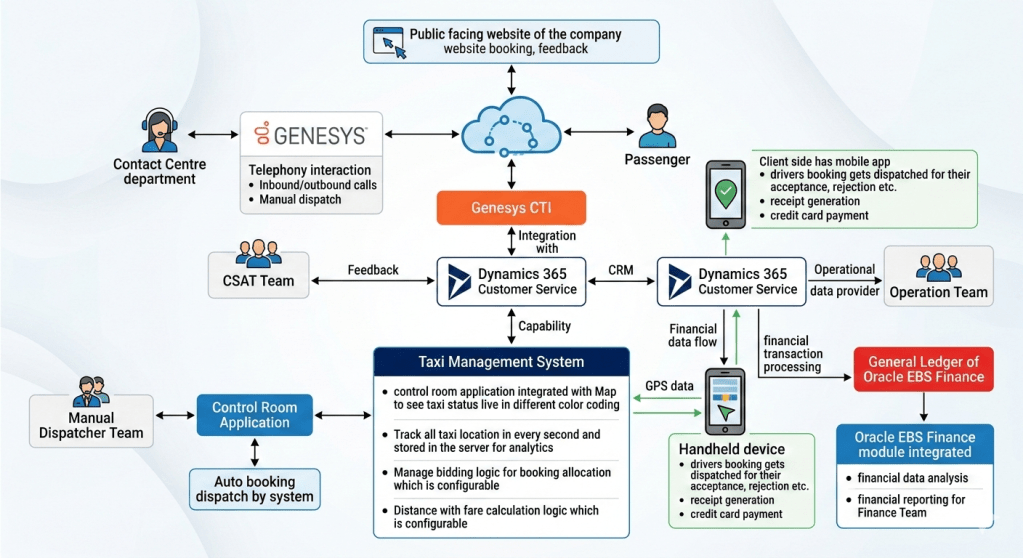
Contact Centre Department (Genesys): blend of manual and automated functions. This interface allows the “Contact Centre Team is using Dynamics 365 Customer Service along with Genesys for Inbound and outbound call supported by Auto booking dispatch by system along with remaining by manual dispatcher Team” (Original text block). It includes a “Manual Dispatcher CTI application” interface. This demonstrates the fusion of human skill and automated efficiency.
CSAT Team Feedback Dashboard: The dedicated interface for the CSAT team allows them to review and manage customer satisfaction data, acting as a feedback loop directly linked to D365 in Layer 5.
Control Room Map View: a control room with a “live in different color coding” taxi status. This map view interface is where the “Live taxi status updates” (from Layer 3) are presented visually to the Operations Team.
Operations Team Operational Data Provider Interface: A specific interface for the Operations team to consume the data generated by Dynamics 365, serving as their “Operational Data Provider”.
Finance Team Financial Reporting Interface: This interface allows the Finance team to consume the integrated data and analytics from Oracle E Business Suite (EBS)
2.2 Layer 6: Business Rules and Operational Orchestration (Application Logic & Orchestration)
This layer is the engine of the enterprise, containing the logic and business rules that define the taxi service itself. It processes the operational input from Layer 7, applies constraints, and directs action.
Taxi Management System Logic:
Manage Bidding Logic (Configurable): this component contains the critical rules for booking allocation. The bidding logic could be based on distance (closest driver), driver acceptance rating, first-responder, or a competitive bid process. Crucially, this logic is “configurable,” allowing the business to adapt rules in real-time based on market conditions, peak hours, or new business strategies.
Distance with Fare Calculation Logic (Configurable): this is where dynamic pricing and fare calculation rules reside. The calculations are based on distance (which is accurate to Layer 3), time, wait time, tolls, and dynamic multipliers. The “configurable” nature is key, allowing the enterprise to set different pricing models for different cities, seasons, or vehicle types.
System Orchestration Logic:
Auto booking dispatch by system & Manual Dispatch Logic: This orchestrates the flow of bookings to the dispatcher interfaces (Manual Dispatcher CTI app) in Layer 7, managing the blend of automated dispatch and manual override. It ensures that the right booking goes to the right driver or agent queue.
Business Logic (CRM Capability):
CRM Capability: this sub-component (of the central CRM system) defines the logic behind the “Customer 360” view. It handles data deduplication, profile matching, and interaction tracking, ensuring that when Genesys pulls a customer record, the agent has all necessary context.
2.3 Layer 5: Business Process and CRM (Dynamics 365)
This layer is the operational heart of the system, acting as the central hub for operational data, customer interaction, and inter-departmental workflows. It bridges the gap between customer-facing applications (Layer 7) and core business applications (Layer 6 and 2).
Dynamics 365 Customer Service: D365 provides the unified “CRM capability.” It serves as the “Operational Data Provider” (Original text block) for the Operation and CSAT Teams in Layer 7, delivering a consistent view of the business.
Genesys CTI integration middleware: This middleware is the vital link that integrates Genesys CTI with D365 (Requirement for original text block). It enables “screen pops” with customer information for incoming calls, allows for outbound dialling directly from the CRM, and syncs all call activity with the customer record, supporting the “Inbound and outbound call” functionality of the Contact Centre Team
Financial data flow processing: This component handles the orchestration of financial data flow from the physical handheld transactions to the General Ledger of Oracle E Business Suite (EBS). It acts as an integration point that may include data filtering, aggregation, and validation before pushing “financial transaction processing” (Original text block) to Oracle E Business Suite (EBS) in Layer 2.
2.4 Layer 4: Data Integration and Communication Protocols
This layer contains the pipes and channels that allow the vertical layers of the stack to communicate. Without these protocols, the data would remain siloed.
Web API Gateway: This secure gateway manages all web-based communication, linking the Public Facing Website in Layer 7 (booking/feedback) to the core booking logic in Layer 6 and D365 in Layer 5.
Mobile Data Protocol Services: A set of specialized protocols for the reliable transmission of mobile data from the Driver App and Handheld Device (Layer 7) back to the enterprise. This ensures that a crucial piece of data like a GPS update or a payment transaction is not lost, even in areas with poor cellular coverage.
Data link for Handheld Device: This dedicated link in Layer 4 connects the Handheld device from Layer 7 to the financial processing logic in Layer 5.
Genesys SIP / Telephony signalling links: this component manages the voice and signaling communication paths (SIP, VoIP) between the Contact Center agents (Layer 7) and the telephony platform (Layer 5), supporting inbound and outbound call functionality.
2.5 Layer 3: Real-Time Data and Analytics (Telemetry)
This layer deals with telemetry, state, and real-time intelligence. It ingests a high volume of raw data from the physical layer and processes it into useful information for the operational logic above.
Location Tracking: this component “Track all taxi location in every second and stored in the server for analytics.” This is a continuous feed of accurate GPS data (from Layer 1). The high-frequency (every second) updates are essential for real-time map visualization and precise fare calculations.
Real-time taxi status updates: Processed and validated location and status updates are fed from here up to the “Control Room Map View” in Layer 7, ensuring the map is live and accurate to the nearest second.
Stored Server for Analytics: This server acts as the primary data lake for storing all historical GPS and telemetry data, ready for offline “analytics.” The stored data can be used for things like driver performance analysis, route optimization, and identifying fraudulent activity.
2.6 Layer 2: Enterprise Finance and ERP (Oracle E Business Suite (EBS))
This layer is the financial closure and compliance hub of the enterprise. It is a secure environment for final data processing, general ledger maintenance, and financial analysis.
General Ledger of Oracle E Business Suite (EBS) Finance: requirements state that financial transactions are “pushed to General Ledger of Oracle E Business Suite (EBS) Finance” This is the final destination for all financial data flow, providing the central “financial reporting for Finance Team.”
Oracle E Business Suite(EBS) Finance module integrated: This integrated module provides the powerful “financial data analysis” capability allowing the Finance team to generate detailed reports and gain insights into the enterprise’s financial health, driver commission structures, and asset performance.
2.7 Layer 1: Physical and Infrastructure (Hardware)
This foundational layer is where the ecosystem meets the physical world. It includes all the hardware assets required for the system to function.
In-taxi Telematics hardware (GPS & communication modems): This hardware in the vehicle is the physical source of all telemetry data generating GPS telemetry that is fed up to Layer 3. It may include other sensors for vehicle diagnostics.
Telephony Infrastructure (PSTN/VoIP lines): The physical voice lines and telephony infrastructure that support the call center operations in Layer 7.
Cloud Infrastructure Servers: The underlying server clusters and storage solutions that host the core applications of the enterprise (D365, Taxi Management System, Database Servers). This infrastructure is the physical foundation for the entire ecosystem.
Handheld device hardware: The physical hardware components of the driver’s handheld device, which connects to the data links in Layer 4.
3. Key Data Flow and Integration Scenarios
The power of this architecture is only unlocked by the seamless integrations and specific data flows, which are explicitly detailed in the accompanying diagram and the original requirements. We will now walk through several critical business scenarios to demonstrate the inter-layer cooperation.
3.1 Scenario 1: The Lifecycle of a Booking (Public Front to Driver App)
Passenger Input: A passenger accesses the public facing website or mobile app (Layer 7) and enters booking details.
Web API: The data flows securely through the Web API Gateway (Layer 4).
Booking and Dispatch Logic: The request arrives at the Taxi Management System Logic (Layer 6).
Auto Bidding Logic : The system applies configurable bidding logic (e.g., closest driver, driver rating).
Location Context : The bidding logic requires the real-time location and status of all taxis, which is pulled from the Location Tracking analytics server (Layer 3).
Fare Calculation : Simultaneous with bidding, the configurable distance-with-fare logic (Layer 6) calculates an estimated dynamic fare, which is accurate because of the high-frequency GPS updates (Layer 3).
Dispatch Orchestration: The winning driver is identified. The orchestration logic in Layer 6 pushes the booking details through Mobile Data Protocol services (Layer 4).
Driver Acceptance: The booking details arrive in the Driver-side mobile app (Layer 7) for “acceptance, rejection etc.” .
Map Update: As the driver moves, GPS telemetry (Layer 1) feeds location tracking (Layer 3), which instantly updates the Control Room Map View (Layer 7) for real-time operations.
3.2 Scenario 2: The Contact Center and CRM Integration (CTI Flow)
This scenario is vital for the “Customer-Centric Support” requirements
Incoming Call: A customer calls the Contact Centre. The call passes through the PSTN/VoIP lines (Layer 1) and is routed via the Genesys telephony platform.
CTI Link: The call signalling (Layer 4) connects to the Genesys CTI integration middleware (Layer 5), which identifies the incoming phone number (ANI).
Customer Lookup : The middleware uses the CRM capability logic (Layer 6) to query the Dynamics 365 Customer Service (Layer 5) database for the customer profile linked to that number.
Screen Pop (Agent View): Simultaneously, the call is delivered to an agent’s phone (Layer 7), and a “screen pop” with the full customer profile from D365 appears on their Contact Centre interface. The agent now has a “Customer 360” view.
Support and Action (Operational Data Provider): The agent addresses the customer’s request (e.g., check booking status, file feedback). Since D365 is the “Operational Data Provider” for all departments (Original text block), the agent has access to the same booking data that the operations and CSAT teams use, ensuring consistency.
Manual/Auto Dispatch: If a new booking is required, the agent can initiate it, linking with the manual/auto dispatch logic in Layer 6 to push the booking to a driver.
Closing the Loop (CSAT): Any feedback provided by the customer is captured in D365, directly feeding the CSAT Team Dashboard (Layer 7) for analysis and continuous improvement.
3.3 Scenario 3: From Operational Trip to Financial Closure (The Handheld Link)
This scenario demonstrates the critical integration of (Handheld) with (D365) and (Oracle E Business Suite (EBS) Finance), and the direct text requirements.
Trip End: A trip is completed. The Driver-side mobile app (Layer 7) calculates the final fare based on the accurate distance telemetry (Layer 3).
Physical Transaction: The driver uses the handheld device hardware (Layer 1) to initiate “receipt generation” and securely process the passenger’s “credit card payment” .
Operational Data Sync: The trip details and payment status are synced from the handheld device (Layer 7) back to the enterprise, ensuring D365 (Layer 5) has accurate trip completion data (as the Operational Data Provider).
Financial Data Flow (Original Text Block): Crucially, this is the trigger point for financial integration. Dynamics 365 is integrated with “financial transaction processing” (Original text block).
Integration Middleware: The financial data flow passes through the Handheld data link (Layer 4) to the “financial data flow processing” component in Layer 5.
Push to Oracle: The validated and orchestrated “financial transaction processing” data is “pushed to General Ledger of Oracle E Business Suite (EBS) Finance” (Original text block) in Layer 2.
Financial Analysis : The Finance Team uses the integrated Oracle E Business Suite(EBS) Finance module (Layer 2) for “financial data analysis”. This analysis combines trip data with payment data to calculate driver commissions, asset depreciation, and fleet efficiency, providing comprehensive financial reporting.
4. Conclusion: A Blueprint for Success in the Modern Mobility Era
The architecture presented here is more than a list of integrated technologies; it is a strategic blueprint for a modern, data-driven taxi enterprise. By embracing a 7-layer, OSI-inspired structure, the organization can transcend the limitations of siloed systems and create a truly unified platform.
The core value of this ecosystem is not in the individual “best-of-breed” tools—Genesys for telephony, Microsoft Dynamics 365 for CRM, Oracle E Business Suite(EBS) for finance—but in their integration. D365’s role as the central operational data provider connects the front-end user experience (passenger, driver, agent) directly with core business logic (bidding, fare) and ultimately with enterprise-grade financial control (Oracle GL). The specialized Taxi Management System logic in Layer 6, fed by precise, real-time telemetry from Layer 3, ensures that the enterprise can make optimal, data-driven decisions at a high velocity.
The business benefits are clear:
Enhanced Customer and Driver Satisfaction (CSAT): Through unified profiles, screen-pops, dynamic pricing, reliable dispatch, and integrated feedback loops.
Improved Driver Productivity and Fleet Efficiency: Through precise location tracking, optimal dispatch orchestration, and accurate fare calculations.
Robust Financial Control and Reporting: By eliminating manual data re-entry, automating the flow from operational trip to general ledger, and providing deep financial analysis.
Operational Agility and Adaptability: Through the configurable logic and the modular, tiered architecture that isolates complexity and allows for future technology integration.
In the rapidly evolving mobility landscape, a taxi company cannot afford to stand still. This integrated architecture provides the foundation for sustainable success, transforming a collection of software applications into a powerful, agile, and customer-centric platform.

 GM Dynamics & Agentic AI Consulting