AI Foundry, contact-centre, copilot-studio, Customer-service

Dynamics 365 Customer Service Autonomous Agents – A Detailed Exploration

Introduction

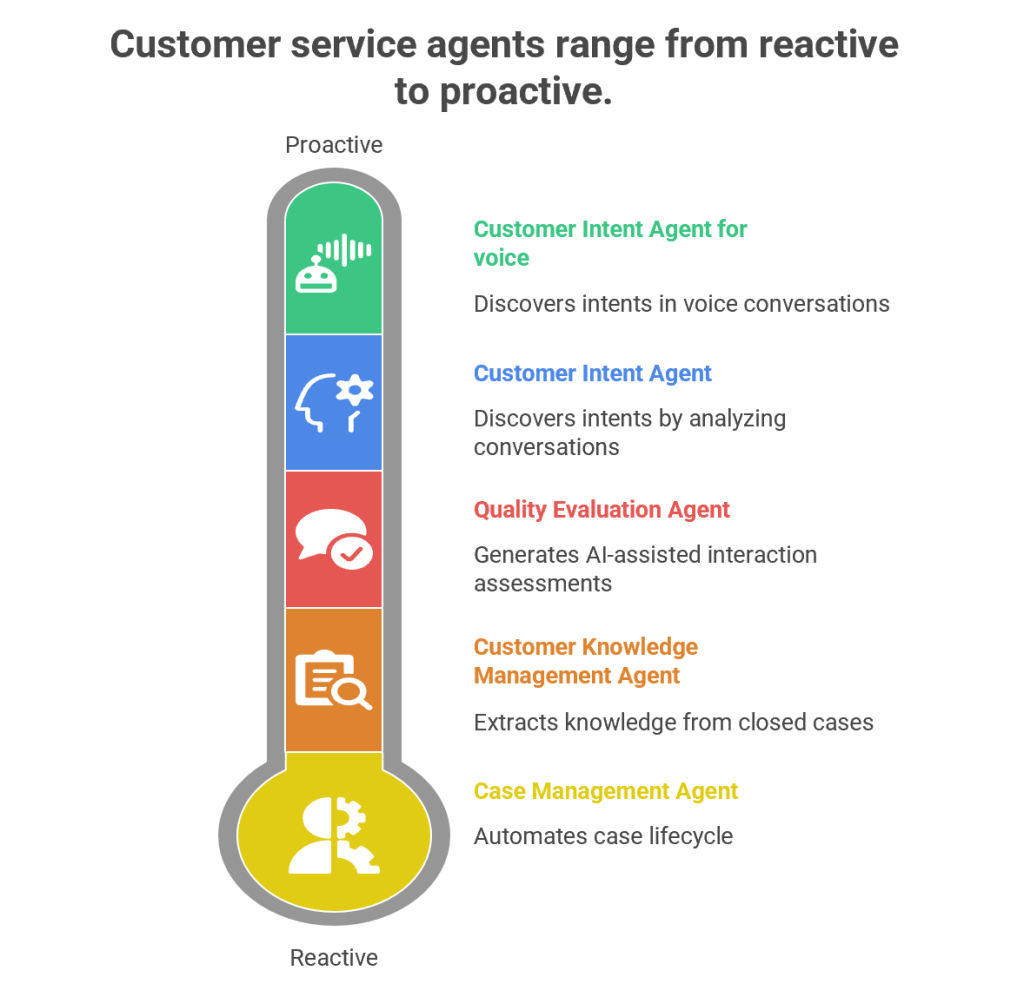
Customer service has evolved from being a reactive support function into a proactive, AI-driven engagement hub. Microsoft’s Dynamics 365 Customer Service Autonomous Agents represent the next leap in this journey. These agents are designed to autonomously handle repetitive tasks, discover customer intents, generate knowledge, and evaluate quality—all while freeing human agents to focus on complex, empathy-driven interactions.

1. Customer Intent Agent

Purpose

The Customer Intent Agent uses generative AI to autonomously discover customer intents by analyzing historical and ongoing cases, conversations, and interactions. Intents are essentially the “reason” behind a customer’s contact—such as resetting a password, checking an order status, or reporting a service outage.

How It Works

  • Data Mining: The agent scans past cases, chat transcripts, and emails to identify recurring themes.
  • Intent Discovery: It clusters similar issues into “intents” using natural language processing (NLP).
  • Knowledge Recommendations: Once an intent is identified, the agent suggests the most relevant knowledge articles to resolve the issue.
  • Continuous Learning: As new cases emerge, the agent adapts and refines its intent library.

Business Value

  • Reduces manual effort in categorizing cases.
  • Improves self-service portals by surfacing the right FAQs.
  • Enhances assisted service by guiding human agents toward faster resolutions.
  • Provides insights into emerging customer needs (e.g., a sudden spike in billing queries).

Example

Imagine a telecom company receiving thousands of queries daily. The Customer Intent Agent identifies that 40% of queries relate to “SIM card activation.” It then recommends a knowledge article and updates the chatbot to handle this intent autonomously, reducing call center load.

2. Customer Intent Agent for Voice

Purpose

While the standard Customer Intent Agent focuses on text-based interactions, the Voice variant is tailored for contact centers handling phone calls.

How It Works

  • Speech-to-Text Conversion: Converts live voice conversations into text.
  • Intent Recognition: Uses generative AI to detect customer intent in real time.
  • Guided Conversations: Suggests follow-up questions to agents, helping them steer the call effectively.
  • Real-Time Solutions: Provides tailored solutions during the call, reducing average handling time (AHT).

Business Value

  • Enhances voice-based customer service, which remains dominant in many industries.
  • Improves agent confidence by suggesting next-best actions during live calls.
  • Reduces call duration and increases first-call resolution (FCR).

Example

In a bank’s contact center, a customer calls saying, “I can’t access my account.” The agent dashboard instantly shows the intent as “Login Issue” and suggests asking: “Are you using the mobile app or web portal?” It then recommends a troubleshooting script, speeding up resolution.

3. Case Management Agent

Purpose

The Case Management Agent automates the entire case lifecycle—from creation to closure. Traditionally, service representatives spend significant time manually filling case details, updating statuses, and closing tickets. This agent eliminates that overhead.

How It Works

  • Case Creation: Automatically generates cases from emails, chats, or voice transcripts.
  • Case Updates: Populates fields like category, priority, and SLA deadlines.
  • Resolution & Closure: Suggests resolutions based on knowledge articles and closes cases once resolved.
  • Customization: Administrators can configure rules to tailor the agent’s behavior to organizational needs.

Business Value

  • Saves time for service representatives.
  • Ensures consistency in case handling.
  • Improves SLA compliance by automating escalations.
  • Reduces human error in case documentation.

Example

In an e-commerce company, when a customer emails “My package hasn’t arrived,” the Case Management Agent automatically creates a case, tags it as “Delivery Delay,” sets priority, and routes it to the logistics department. Once resolved, it closes the case and notifies the customer.

4. Customer Knowledge Management Agent

Purpose

Knowledge is the backbone of customer service. The Customer Knowledge Management Agent ensures that knowledge bases remain up-to-date, accurate, and compliant.

How It Works

  • Knowledge Extraction: Analyzes closed cases to identify gaps in existing knowledge articles.
  • Knowledge Creation: Drafts new articles using generative AI.
  • Compliance Checks: Ensures articles meet organizational and regulatory standards.
  • Real-Time Updates: Continuously refines knowledge bases as new cases emerge.

Business Value

  • Improves self-service by keeping FAQs relevant.
  • Enhances agent productivity by providing contextual knowledge suggestions.
  • Reduces repetitive queries by empowering customers with accurate information.
  • Ensures compliance in industries like healthcare and finance.

Example

A healthcare provider closes multiple cases related to “insurance claim submission.” The agent notices no existing article covers this process. It drafts a new knowledge article, reviews compliance, and publishes it—empowering both customers and agents.

5. Quality Evaluation Agent

Purpose

The Quality Evaluation Agent autonomously assesses customer interactions for quality and compliance. Supervisors traditionally spend hours manually reviewing calls and chats; this agent automates that process.

How It Works

  • Evaluation Framework: Supervisors define criteria (e.g., politeness, accuracy, compliance).
  • AI-Assisted Assessments: The agent evaluates cases and conversations against these criteria.
  • Feedback Loop: Provides insights into agent performance and customer satisfaction.
  • Continuous Improvement: Suggests training modules or process changes based on evaluation results.

Business Value

  • Ensures consistent service quality across agents.
  • Identifies training needs proactively.
  • Improves compliance with regulatory standards.
  • Enhances customer satisfaction through better service delivery.

Example

In a financial services firm, the agent evaluates 1,000 chat transcripts overnight. It flags 50 cases where agents failed to verify customer identity properly, alerting supervisors to potential compliance risks.

Synergy Between Agents

While each agent has a distinct role, their combined power transforms customer service:

  • Customer Intent Agents identify why customers reach out.
  • Case Management Agent automates case handling.
  • Knowledge Management Agent ensures information is accurate.
  • Quality Evaluation Agent maintains service excellence.

Together, they create a self-optimizing, autonomous customer service ecosystem.

Strategic Impact

  • Operational Efficiency: Reduces manual workload.
  • Customer Satisfaction: Improves resolution speed and accuracy.
  • Compliance: Ensures adherence to regulations.
  • Scalability: Handles large volumes of interactions seamlessly.
AI Foundry, copilot-studio

Announcing Claude Opus 4.5 in Microsoft Copilot Studio

Based on the Microsoft Copilot blog post from November 24, 2025, here is the information regarding the announcement of Claude Opus 4.5 in Copilot Studio:

Announcing Claude Opus 4.5 in Microsoft Copilot Studio

This update marks the integration of Anthropic’s most powerful model into the Copilot Studio platform, providing developers with advanced reasoning and long-context capabilities for building complex agents.

Real-time User Journey

The user journey for Claude Opus 4.5 centers on high-complexity, multi-step problem solving:

  1. Complexity Identification: A developer identifies a business process that requires deep reasoning over vast amounts of data (e.g., analyzing a 200-page legal contract alongside historical case files).
  2. Model Selection: Within Copilot Studio, the developer selects Claude Opus 4.5 as the reasoning engine for their agent.
  3. Interaction: The end-user provides a high-level goal, such as “Identify all conflicting clauses in these five documents and suggest a reconciliation strategy based on our internal compliance handbook.”
  4. Long-Context Reasoning: The agent utilizes the model’s massive context window to ingest all documents simultaneously, maintaining the “thread” across long, multi-step logic paths.
  5. Execution: The agent produces a highly nuanced output, citing specific sections of the context provided, and can trigger follow-up actions like drafting an email to the legal team.

Step-by-Step: How to Enable

As an experimental model, Claude Opus 4.5 requires administrative permission to use:

  • Step 1: Admin Opt-in: A Microsoft 365 Administrator must log in to the Microsoft 365 Admin Center.
  • Step 2: External Model Settings: Navigate to the settings for external AI models and explicitly opt-in to Anthropic models (if not already done).
  • Step 3: Access Copilot Studio: Once opted in, go to Microsoft Copilot Studio.
  • Step 4: Create/Open an Agent: Open an existing agent or create a new one.
  • Step 5: Select Model: Go to Settings > Generative AI. Under the model selection dropdown, choose Claude Opus 4.5 (Experimental).
  • Step 6: Test: Use the “Test your agent” pane to validate how the new model performs with your specific prompts and knowledge base.

Infographic: Claude Opus 4.5 Core Strengths

The following table highlights why Claude Opus 4.5 is positioned as the “premium” choice for complex agents:

FeatureCapabilityBenefit for Agents
Sharper ReasoningAdvanced logical deduction.Solves “impossible” problems that stump smaller models.
Long-ContextHandles massive datasets.Reads hundreds of pages in a single turn without losing focus.
Multi-Step TasksStronger instruction following.Executes complex sequences of actions with high accuracy.
Model ChoiceMulti-vendor flexibility.Allows developers to use Agent Evaluations to pick the best model for the job.

References

copilot-studio, Customer-service, Power Apps

Customer Feedback Survey Agent is now generally available in Dynamics 365

Customer Feedback Survey Agent is now generally available

(An autonomous AI agent designed to proactively collect, analyze, and act upon customer feedback across multiple channels.)

Real-time User Journey

This journey demonstrates how the agent moves from simple data collection to proactive service recovery:

  1. Interaction Trigger: A customer completes a complex support session regarding a billing dispute.
  2. Autonomous Outreach: Instead of a generic email sent hours later, the Customer Feedback Survey Agent initiates a brief, conversational chat via the customer’s preferred channel (e.g., WhatsApp or SMS) immediately after the case is closed.
  3. Adaptive Questioning: The agent doesn’t just ask “Rate us 1-5.” It acknowledges the context: “I see we just helped with a billing issue. On a scale of 1-5, how clear was the explanation provided?”
  4. Sentiment Analysis: If the customer provides a low score (e.g., a “2”) and mentions they are still confused, the agent identifies the Negative Sentiment in real-time.
  5. Proactive Recovery: The agent offers an immediate resolution: “I’m sorry to hear that. Would you like me to schedule a follow-up call with a senior billing specialist, or should I send a simplified breakdown to your email right now?”
  6. Insights for Leadership: The agent summarizes the feedback and automatically tags it under “Policy Clarity Issues” in the supervisor’s dashboard, highlighting a systemic trend.

Step-by-Step: How to Enable This Feature

The Customer Feedback Survey Agent is managed within the Dynamics 365 Contact Center and Customer Service environments.

  • Step 1: Access the Agent Hub

Sign in to the Contact Center admin center or Customer Service admin center. Navigate to Operations > Agent Hub.

  • Step 2: Activate the Feedback Agent

Locate the Customer Feedback Survey Agent card. Toggle the status to Enabled.

  • Step 3: Connect to Customer Voice

Ensure your environment is linked to Microsoft Dynamics 365 Customer Voice. The agent uses these project templates as the foundation for its data structure.

  • Step 4: Configure “Agentic” Triggers

Define the conditions under which the agent should act (e.g., “Trigger survey immediately after Case Closure” or “Trigger after a 10-minute webchat session”).

  • Step 5: Define Recovery Workflows

In the agent settings, configure the Action Logic. Specify what the agent should do for specific scores (e.g., “If score < 3, offer a callback” or “If score = 5, ask for a public review”).

  • Step 6: Publish to Channels

Select the channels where the agent should operate (Voice, Chat, WhatsApp, or Email). Click Publish to start the autonomous feedback cycle.

Infographic: Static Surveys vs. Autonomous Feedback Agent

FeatureTraditional Static SurveysCustomer Feedback Survey Agent
TimingDelayed (often sent 24+ hours later).Instant (Real-time at point of service).
FormatStatic forms/links.Conversational & Adaptive.
Response RateTypically low (3–5%).High Engagement due to context and timing.
ActionabilityPassive (Wait for human to read results).Active (Can initiate recovery or callbacks).
IntelligenceRequires manual sentiment tagging.Auto-tags and categorizes feedback.

References

AI Foundry, copilot-studio, Customer-service, Power Apps

Revolutionizing customer support with autonomous case resolution in Dynamics 365

Revolutionizing customer support with autonomous case resolution

(The introduction of the Case Management Agent, an autonomous AI agent that manages the end-to-end lifecycle of a support ticket without human intervention.)

Real-time User Journey

This journey showcases how an autonomous agent handles a complex, multi-step service request:

  1. Trigger: A customer sends an email regarding a faulty device. The system automatically creates a case in Dynamics 365.
  2. Agent Assignment: Instead of a human queue, the Case Management Agent is assigned. It immediately reads the email, identifies the product, and checks the customer’s warranty status in the database.
  3. Autonomous Investigation: The agent identifies that a diagnostic test is needed. It sends an automated (but personalized) reply to the customer with instructions.
  4. Data Processing: The customer replies with the test results. The agent parses the data, compares it against the “Troubleshooting Knowledge Base,” and determines a replacement is required.
  5. Action Execution: The agent interacts with the ERP system to initiate a replacement order and generates a return shipping label for the customer.
  6. Resolution & Summary: The agent sends the final confirmation to the customer and closes the case. It then writes a concise summary of all actions taken in the timeline for human audit purposes.

Step-by-Step: How to Enable This Feature

The Case Management Agent is part of the new “Agentic” capabilities in Dynamics 365.

  • Step 1: Access the Agent Hub

Log in to the Customer Service admin center or Contact Center admin center. Navigate to Operations > Agent Hub.

  • Step 2: Activate the Case Management Agent

Find the Case Management Agent card. Toggle the status to Enabled.

  • Step 3: Define the “Knowledge Source”

Under the agent settings, point the agent to your high-quality data sources (SharePoint, Dataverse tables, or specific websites) so it knows how to resolve issues based on your company policy.

  • Step 4: Set Safety Guardrails

Configure the “Human-in-the-loop” settings. You can specify that the agent can resolve “Low” and “Medium” priority cases autonomously but must route “High” priority cases to a human.

  • Step 5: Configure Connection Actions

Use Power Automate connectors to allow the agent to perform actions in external systems (like SAP, Salesforce, or internal shipping tools) to complete the resolution.

  • Step 6: Monitor via Activity Feed

Ensure the AI Agent Activity Feed is added to your supervisor’s workspace so they can monitor the agent’s reasoning and step-by-step progress in real-time.

Infographic: Manual vs. Autonomous Case Resolution

FeatureManual Case ManagementAutonomous Case Resolution
Response TimeHours to Days (Queue dependent).Seconds/Minutes (Instant).
InvestigationManual searching of docs/ERP.Instantaneous cross-system data lookup.
ConsistencyVaries by agent experience.100% adherence to company policy.
AvailabilityRestricted to business hours.24/7/365 operations.
CostHigh (Labor intensive).Scalable (Minimal per-case cost).

References

copilot-studio, Power Apps

Inside the New Power Apps: A Reimagined Developer Experience for the Agentic Era

This update introduces a completely new developer surface (located at vibe.powerapps.com) that combines “vibe coding” (high-speed, natural language development) with enterprise-grade scalability. It redefines app development by using a team of specialized AI agents to build full-stack applications.

Real-time User Journey: Multi-Agent App Creation

The new user journey shifts from “dragging and dropping” to “collaborative directing”:

  1. Vision Prompting: A maker describes a complex business problem in natural language: “I need an app for our field technicians to track equipment repairs, check inventory parts in real-time, and automatically notify customers via email.”
  2. Agent Collaboration: A team of agents springs into action:
    • The Researcher Agent: Outlines detailed user stories and functional requirements.
    • The Data Agent: Proposes and builds an optimized data model in Dataverse.
    • The UI/UX Agent: Drafts the modern, responsive interface including forms and galleries.
  3. Real-time Preview: Within minutes, the maker sees a full-stack, functional “draft” of the app.
  4. Human-in-the-Loop Refinement: The maker can give iterative feedback (e.g., “Make the status buttons color-coded”) and the agents update the code and logic immediately.
  5. Seamless Handoff: Once satisfied, the app is ready for deployment with built-in governance, security, and the Power Apps MCP Server already configured to interact with other agents.

Step-by-Step: How to Enable the New Power Apps

Note: This feature was launched at Ignite 2025 and is being rolled out to Managed Environments.

  • Step 1: Access the New Portal: Navigate to the new developer entry point at vibe.powerapps.com.
  • Step 2: Environment Readiness: Ensure your environment is a Managed Environment in the Power Platform Admin Center to support agentic capabilities.
  • Step 3: Enable Copilot & Agents: Under the environment settings, ensure the Generative AI and Copilot features are toggled to “On.”
  • Step 4: Use the MCP Server: To allow your apps to interact with agents (like M365 Copilot), enable the Power Apps Model Context Protocol (MCP) Server in the app settings. This allows agents to “read” your app’s screens and perform tasks like intelligent form filling.
  • Step 5: Governance Setup: In the Admin Center, configure the new Inventory and Usage reporting to monitor the agents and apps created in this new environment.

Infographic: Reimagining App Development

This update marks a shift from “Low-Code” to “Agentic-Code”:

PillarLegacy Power AppsThe New Power Apps (2026 Wave)
Development StyleManual drag-and-drop components.Vibe Coding (Natural language + Agents).
BrainpowerSingle maker expertise.Team of Specialized Agents (Data, UI, Research).
ConnectivityManual connector configuration.MCP Server (Apps provide “skills” to agents).
SpeedHours or days to MVP.Minutes from prompt to full-stack app.
GovernanceManual app auditing.AI-Powered Governance with real-time risk assessment.

References