AI Foundry, contact-centre, copilot-studio, Customer Experience, Customer-service, Power Apps

Dynamics 365 Finance and Operations Autonomous Agents – A Deep-Dive

Introduction

Finance and Operations (F&O) functions are the backbone of enterprise performance. They ensure that procurement, accounting, project management, expense handling, and operational monitoring run smoothly. Yet, these areas are often burdened with repetitive manual tasks, compliance risks, and inefficiencies.

Microsoft’s Dynamics 365 Finance and Operations Autonomous Agents are designed to address these challenges. By embedding AI-driven automation into core workflows, these agents free finance and operations teams to focus on strategic decision-making rather than routine administration.

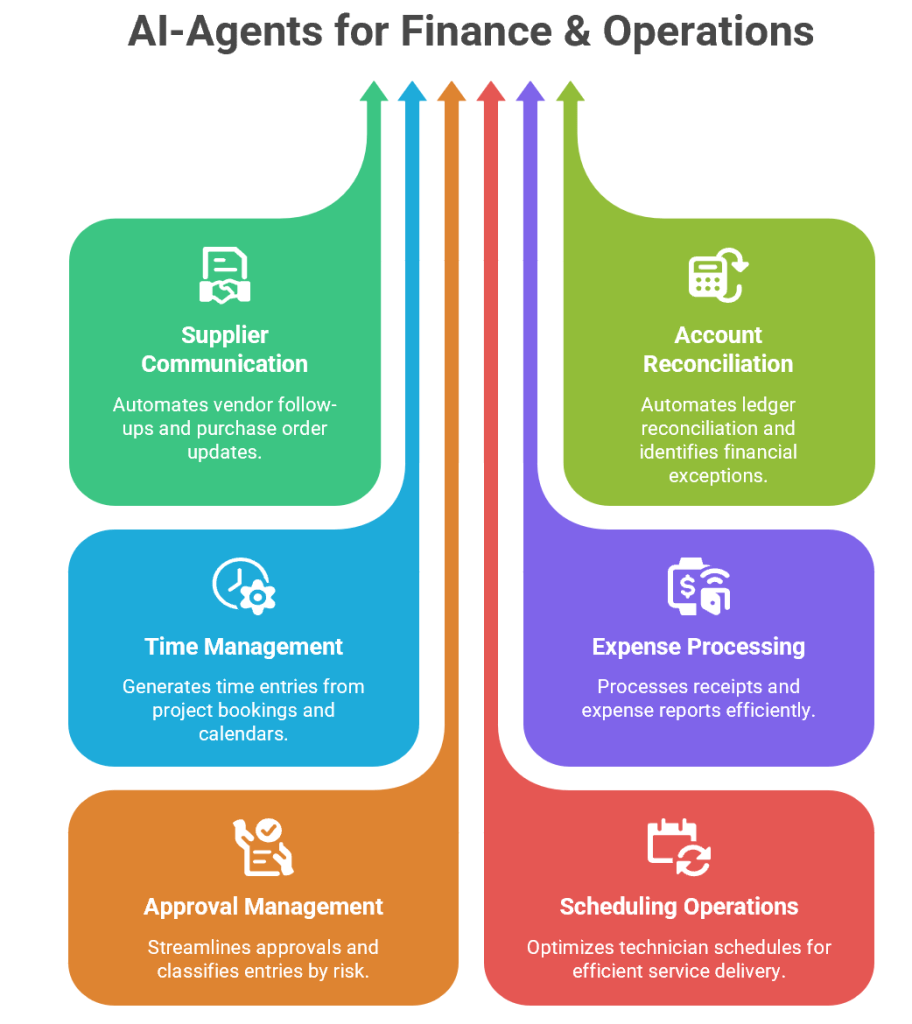
1. Supplier Communication Agent

Purpose

Procurement teams spend significant time chasing suppliers for confirmations, updates, and changes. The Supplier Communication Agent automates these interactions, ensuring real-time visibility and freeing teams for strategic work.

How It Works

  • Automated Follow-Ups: Sends reminders to suppliers for pending confirmations.
  • Workflow Updates: Applies supplier changes directly to purchase orders.
  • Exception Escalation: Flags anomalies (e.g., delivery delays, pricing mismatches) for human review.
  • Real-Time Visibility: Updates dashboards with supplier responses.

Business Value

  • Reduces manual communication overhead.
  • Improves supplier relationship management.
  • Enhances procurement efficiency.
  • Provides transparency across supply chains.

Example

A manufacturing company issues 1,000 purchase orders monthly. The agent autonomously follows up with suppliers, applies changes to delivery dates, and escalates exceptions. Procurement managers focus on strategic sourcing rather than chasing confirmations.

2. Account Reconciliation Agent

Purpose

Financial reconciliation is critical but often tedious. The Account Reconciliation Agent automates ledger-to-subledger reconciliation, identifies exceptions, and suggests resolutions.

How It Works

  • Automated Matching: Compares ledger entries with subledger transactions.
  • Exception Identification: Flags mismatches (e.g., missing invoices, duplicate entries).
  • Resolution Suggestions: Provides corrective actions (e.g., adjusting entries).
  • Audit Trail: Maintains transparent logs for compliance.

Business Value

  • Accelerates financial closings.
  • Improves accuracy in reporting.
  • Reduces audit risks.
  • Frees accountants for strategic analysis.

Example

During month-end close, the agent reconciles thousands of transactions overnight, identifies 50 mismatches, and suggests corrections. Finance teams review exceptions instead of manually reconciling every entry.

3. Time Agent

Purpose

Manual time entry is error-prone and inefficient. The Time Agent generates time entries from project bookings, calendars, and Outlook meetings.

How It Works

  • Data Extraction: Pulls project schedules and meeting logs.
  • Time Entry Generation: Creates entries automatically in Dynamics 365.
  • Error Reduction: Eliminates manual input mistakes.
  • Compliance Tracking: Ensures accurate revenue recognition.

Business Value

  • Saves employees time.
  • Improves billing accuracy.
  • Enhances compliance with project accounting standards.
  • Provides real-time visibility into resource utilization.

Example

A consulting firm’s employees spend hours logging time weekly. The agent automatically generates entries from Outlook calendars and project bookings, reducing errors and ensuring accurate client billing.

4. Expense Agent

Purpose

Expense management is often bogged down by manual receipt processing and policy enforcement. The Expense Agent automates this process.

How It Works

  • Receipt Extraction: Reads data from emails or images.
  • Policy Checks: Validates expenses against company rules.
  • Grouping Logic: Organizes reports by travel or project.
  • Compliance Enforcement: Flags violations for review.

Business Value

  • Accelerates reimbursements.
  • Ensures compliance with travel and expense policies.
  • Reduces fraud risk.
  • Improves employee satisfaction.

Example

An employee submits receipts via email. The agent extracts data, applies policy checks (e.g., meal limits, travel allowances), groups expenses by trip, and processes reimbursement automatically.

5. Approval Management Agent

Purpose

Approvals are critical but often slow. The Approval Management Agent streamlines this process by reviewing submissions against policy rules.

How It Works

  • Policy Validation: Checks entries against organizational rules.
  • Risk Classification: Flags high-risk items.
  • Routing: Sends flagged items to managers for review.
  • Efficiency: Automates approvals for compliant entries.

Business Value

  • Speeds up approval cycles.
  • Improves accuracy in compliance.
  • Reduces bottlenecks in workflows.
  • Enhances employee productivity.

Example

An expense report is submitted. The agent validates it against policy, approves compliant items instantly, and routes flagged entries (e.g., exceeding travel allowance) to managers.

6. Scheduling Operations Agent

Purpose

Resource scheduling is complex, requiring consideration of skillsets, travel time, and commitments. The Scheduling Operations Agent optimizes technician schedules.

How It Works

  • Skill Matching: Assigns tasks based on technician expertise.
  • Travel Optimization: Minimizes travel time between jobs.
  • Commitment Tracking: Ensures customer appointments are honored.
  • Dynamic Adjustments: Re-optimizes schedules in real time.

Business Value

  • Improves resource utilization.
  • Enhances customer satisfaction.
  • Reduces operational costs.
  • Provides agility in service delivery.

Example

A field service company manages hundreds of technicians. The agent optimizes schedules daily, ensuring the right technician is assigned to the right job, reducing travel time, and improving customer satisfaction.

7. Batch Monitoring Agent

Purpose

Batch processes are critical in finance and supply chain systems. The Batch Monitoring Agent provides AI-powered monitoring and diagnostics.

How It Works

  • Failure Detection: Identifies runtime anomalies and failures.
  • Throttling Alerts: Flags performance bottlenecks.
  • Diagnostics: Provides root cause analysis.
  • Operational Visibility: Updates dashboards with batch health.

Business Value

  • Ensures smooth batch execution.
  • Reduces downtime in financial and supply chain operations.
  • Improves IT administrator efficiency.
  • Enhances system reliability.

Example

During nightly batch runs, the agent detects throttling in invoice processing, alerts IT administrators, and suggests corrective actions. This prevents delays in financial reporting.

Synergy Between Agents

Together, these agents create a self-optimizing Finance and Operations ecosystem:

  • Supplier Communication Agent ensures procurement efficiency.
  • Account Reconciliation Agent accelerates financial closings.
  • Time and Expense Agents streamline project accounting.
  • Approval Management Agent enforces compliance.
  • Scheduling Operations Agent optimizes resource allocation.
  • Batch Monitoring Agent ensures system reliability.

Strategic Impact

Operational Efficiency : Agents automate repetitive tasks, freeing teams for strategic work.

Compliance : Automated checks reduce regulatory risks.

Accuracy : AI-driven validation improves financial integrity.

Scalability : Organizations can handle larger volumes of transactions without expanding headcount.

Conclusion

Dynamics 365 Finance and Operations Autonomous Agents represent a paradigm shift in enterprise management. By embedding AI into procurement, accounting, project management, expense handling, and system monitoring, they empower organizations to achieve greater efficiency, compliance, and scalability.

AI Foundry, copilot-studio, Customer Experience, Power Apps

Dynamics 365 Sales Autonomous Agents – A Deep-Dive

Introduction

Sales organizations today face increasing complexity: fragmented customer journeys, rising expectations for personalization, and the need to close deals faster in competitive markets. Microsoft’s Dynamics 365 Sales Autonomous Agents are designed to address these challenges by embedding generative AI and automation directly into the sales lifecycle.

These agents act as digital colleagues, autonomously handling repetitive tasks, researching opportunities, qualifying leads, and even engaging customers. By doing so, they free human sellers to focus on relationship-building and strategic deal closure.

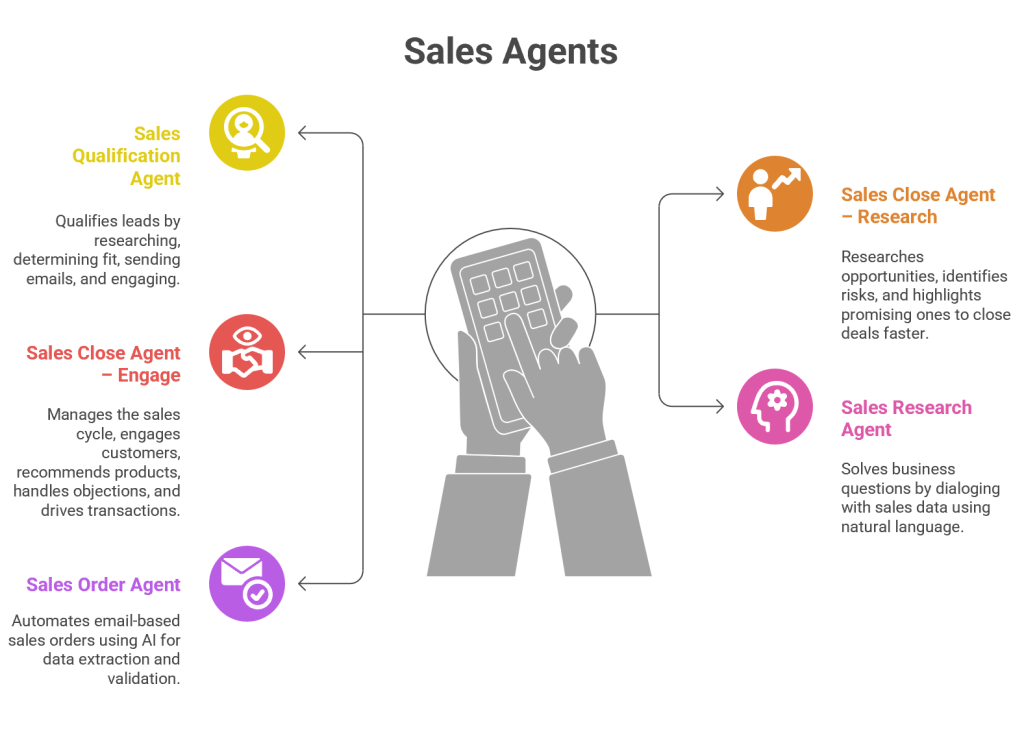
1. Sales Qualification Agent

Purpose

The Sales Qualification Agent helps sales teams qualify leads effortlessly by autonomously researching prospects, determining fit, and initiating outreach. Lead qualification is traditionally time-consuming, requiring sellers to manually gather data, assess potential, and decide whether to pursue.

How It Works

  • Data Aggregation: Pulls information from CRM, LinkedIn, company websites, and public databases.
  • Fit Analysis: Uses AI models to score leads based on industry, company size, buying signals, and past interactions.
  • Outreach Automation: Sends personalized emails to leads, initiating engagement.
  • Lead Engagement: Tracks responses and autonomously nurtures leads until they’re ready for human intervention.

Business Value

  • Reduces wasted effort on low-quality leads.
  • Ensures sellers focus on high-potential opportunities.
  • Increases conversion rates by engaging leads faster.
  • Provides consistent qualification criteria across teams.

Example

A software company receives 500 leads from a webinar. The Sales Qualification Agent researches each lead, identifies 120 as high-potential based on company size and budget, sends personalized outreach emails, and nurtures responses. Sellers only step in once leads show strong buying intent.

2. Sales Close Agent – Research

Purpose

Closing deals requires deep research into opportunities, risks, and customer needs. The Sales Close Agent – Research autonomously performs this research, providing sellers with actionable insights.

How It Works

  • Opportunity Analysis: Reviews CRM data, competitor activity, and customer history.
  • Risk Identification: Flags potential risks (budget constraints, competitor engagement, regulatory issues).
  • Opportunity Highlighting: Identifies promising deals with high likelihood of closure.
  • Insight Delivery: Provides sellers with concise research summaries.

Business Value

  • Saves sellers hours of manual research.
  • Improves win rates by highlighting risks early.
  • Enhances pipeline visibility for managers.
  • Enables sellers to focus on strategy rather than data gathering.

Example

A manufacturing company is negotiating with a large retailer. The agent discovers that the retailer recently expanded into new markets, signalling increased demand. It also flags a risk: the retailer is evaluating a competitor. Sellers use this insight to tailor their pitch and mitigate risks.

3. Sales Close Agent – Engage

Purpose

The Sales Close Agent – Engage goes beyond research—it autonomously manages the end-to-end sales cycle, engaging customers, recommending products, handling objections, and driving transactions to closure.

How It Works

  • Customer Engagement: Initiates conversations via email, chat, or voice.
  • Product Recommendations: Suggests products based on customer profile and past purchases.
  • Objection Handling: Uses AI-driven scripts to address common objections.
  • Transaction Closure: Drives deals to completion with templated personalization for outreach and follow-ups.

Business Value

  • Automates repetitive engagement tasks.
  • Ensures consistent messaging across customers.
  • Accelerates deal closure by maintaining momentum.
  • Provides scalability—handling hundreds of opportunities simultaneously.

Example

In a SaaS company, the agent engages mid-tier prospects by recommending product bundles, addressing objections like “Is this scalable?” with pre-approved responses, and scheduling demos. Sellers step in only for high-value negotiations, while the agent autonomously closes smaller deals.

4. Sales Research Agent

Purpose

Sales teams often need to answer complex business questions: Which industries are showing growth? Which customers are at risk of churn? The Sales Research Agent enables sellers to query their sales data using natural language.

How It Works

  • Natural Language Interface: Sellers ask questions like “Show me top opportunities in healthcare this quarter.”
  • Data Querying: The agent translates queries into structured searches across CRM and analytics systems.
  • Insight Generation: Provides answers in plain language, charts, or dashboards.
  • Dialog Continuity: Supports conversational follow-ups, refining queries iteratively.

Business Value

  • Democratizes access to sales insights—no need for data analysts.
  • Speeds up decision-making with instant answers.
  • Improves pipeline visibility and forecasting accuracy.
  • Empowers sellers with data-driven strategies.

Example

A sales manager asks: “Which deals are at risk of delay due to budget approvals?” The agent scans CRM notes, identifies 15 deals with flagged budget issues, and presents them in a dashboard. The manager reallocates resources accordingly.

5. Sales Order Agent

Purpose

Processing sales orders is often manual, error-prone, and time-consuming. The Sales Order Agent automates this process using AI for data extraction and validation.

How It Works

  • Email Parsing: Extracts order details from customer emails.
  • Data Validation: Checks product codes, quantities, and pricing against CRM.
  • Order Creation: Automatically generates orders in Dynamics 365.
  • Notifications: Sends confirmations to customers.
  • Exception Handling: Routes anomalies (e.g., invalid product codes) for manual review.

Business Value

  • Reduces manual order entry workload.
  • Improves accuracy and compliance.
  • Speeds up order processing, enhancing customer satisfaction.
  • Scales order handling without increasing headcount.

Example

A distributor receives hundreds of email-based orders daily. The agent extracts details, validates them, creates orders, and sends confirmations. Exceptions (like missing product codes) are routed to human staff. This reduces processing time from hours to minutes.

Synergy Between Agents

Together, these agents create a self-optimizing sales ecosystem:

  • Sales Qualification Agent ensures only high-quality leads enter the pipeline.
  • Sales Close Agents (Research + Engage) accelerate deal closure.
  • Sales Research Agent empowers sellers with instant insights.
  • Sales Order Agent automates post-sale processes.

This synergy transforms Dynamics 365 Sales into a comprehensive AI-driven sales engine.

Strategic Impact

Operational Efficiency : Agents automate repetitive tasks, freeing sellers to focus on strategic activities.

Customer Experience : Personalized, timely engagement improves satisfaction and loyalty.

Revenue Growth : Faster qualification, research, and closure increase win rates and shorten sales cycles.

Scalability : Organizations can handle larger volumes of leads and orders without expanding headcount.

Conclusion

Dynamics 365 Sales Autonomous Agents represent a paradigm shift in sales operations. By embedding AI into every stage of the sales lifecycle—from lead qualification to order processing—they empower organizations to achieve greater efficiency, accuracy, and customer satisfaction.

These agents are not just tools; they are digital sales colleagues that work alongside human sellers, ensuring that sales organizations remain competitive in an increasingly complex marketplace.

AI Foundry, copilot-studio, Customer Experience, Customer-service, Power Apps

Microsoft Ignite 2025 Book of News: Key Highlights, Enterprise Applications, and Business Value

Introduction

The Microsoft Ignite 2025 Book of News marks a pivotal moment in the evolution of enterprise technology, with Microsoft unveiling a sweeping array of innovations that redefine how organizations build, govern, and scale AI-driven solutions. This year’s announcements center on the maturation of the agent ecosystem, the formalization of intelligence layers such as Work IQ, Fabric IQ, and Foundry IQ, and a robust commitment to security, governance, and interoperability across the Microsoft Cloud and partner platforms. The following report provides a comprehensive, in-depth analysis of the most significant highlights from Ignite 2025, focusing on practical enterprise applications and the specific benefits these advancements deliver to businesses and IT teams. Each section details a major announcement or theme, illustrates its real-world use, and explains its value proposition for organizations navigating the next era of digital transformation.

1. Microsoft Agent 365: The Control Plane for AI Agents

Overview

Microsoft Agent 365 is introduced as the unified control plane for managing AI agents across the enterprise. It extends the familiar infrastructure used for user management to the rapidly growing population of AI agents, providing comprehensive tools for registry, access control, visualization, interoperability, and security. Agent 365 is designed to support agents built on Microsoft platforms, open-source frameworks, and third-party ecosystems, ensuring organizations can confidently deploy, observe, and govern agents at scale.

Practical Enterprise Example

Scenario: A global financial services firm deploys dozens of AI agents to automate customer onboarding, fraud detection, and compliance monitoring. Using Agent 365, the IT team registers all agents—whether developed in-house or sourced from partners—assigns unique Entra Agent IDs, and applies conditional access policies. The security team leverages the visualization dashboard to monitor agent interactions with sensitive data, while compliance officers audit agent activity logs for regulatory reporting.

Business Value

  • Unified Governance: Agent 365 provides a single pane of glass for managing the entire agent fleet, reducing the risk of shadow agents and ensuring all agents adhere to organizational policies.
  • Security and Compliance: By integrating with Microsoft Defender, Entra, and Purview, Agent 365 enforces least-privilege access, detects threats, and maintains audit trails, supporting regulatory compliance.
  • Operational Efficiency: Centralized observability and lifecycle management streamline agent onboarding, monitoring, and retirement, minimizing administrative overhead and accelerating innovation.

2. Entra Agent ID and Agent Identity Management

Overview

Microsoft Entra Agent ID introduces first-class identity constructs for AI agents, bringing Zero Trust principles to autonomous systems. The Entra Agent Registry acts as a centralized inventory and metadata repository for all agents, supporting lifecycle management, access control, and policy enforcement. This ensures that every agent—regardless of origin—can be discovered, governed, and secured in line with enterprise standards.

Practical Enterprise Example

Scenario: A healthcare provider integrates AI agents into its electronic health record (EHR) system to automate patient data retrieval and appointment scheduling. Each agent is assigned an Entra Agent ID, registered in the Agent Registry, and granted access only to the necessary patient data. The IT team uses Entra’s lifecycle workflows to automatically deactivate agents when they are no longer needed, preventing orphaned or overprivileged agents.

Business Value

  • Zero Trust for Agents: Entra Agent ID enforces identity assurance, conditional access, and risk-based policies for agents, mirroring protections for human users.
  • Lifecycle Governance: Automated workflows ensure agents are created, sponsored, and decommissioned according to policy, reducing the risk of unauthorized access or lingering credentials.
  • Auditability and Compliance: The Agent Registry provides a single source of truth for agent identities, supporting audit, discovery, and compliance reporting across hybrid and multi-cloud environments.

3. The Expanding Agent Ecosystem: Sales Development Agent and Role-Specific Agents

Overview

Microsoft’s agent ecosystem expands with the introduction of specialized agents such as the Sales Development Agent, Workforce Insights Agent, People Agent, Learning Agent, Teams Admin Agent, and SharePoint Admin Agent. These agents are designed to automate domain-specific tasks, enhance productivity, and deliver actionable insights across business functions.

Practical Enterprise Example

Sales Development Agent:
A B2B software company deploys the Sales Development Agent to autonomously research prospects, qualify leads, and initiate personalized outreach. The agent integrates with Dynamics 365 and Salesforce, ensuring no lead is left behind and handing off high-potential opportunities to human sellers. Microsoft’s own sales team reported a 15.1% increase in lead-to-opportunity conversion after adopting this agent.

Workforce Insights Agent:
An HR department uses the Workforce Insights Agent to analyze organizational composition, identify skill gaps, and recommend workforce planning strategies. Delegates can access dynamic reports filtered by role, location, or tenure, supporting data-driven decisions for talent management and upskilling.

Business Value

  • Scalability: Agents like the Sales Development Agent operate 24/7, scaling outreach and engagement without increasing headcount.
  • Data-Driven Decisions: Workforce Insights and People Agents provide leaders with real-time analytics, enabling proactive workforce planning and targeted learning interventions.
  • Operational Consistency: Admin agents automate routine IT tasks, ensuring uniform policy application, reducing manual errors, and freeing up staff for higher-value work.

4. Agents in Microsoft Teams and Multi-Vendor Interoperability via Model Context Protocol (MCP)

Overview

Agents in Microsoft Teams channels now support orchestration with third-party apps and agents through the Model Context Protocol (MCP). This enables seamless, cross-platform workflows where agents can interact with tools like Jira, Asana, and GitHub, pulling data, creating tasks, and coordinating actions—all within Teams.

Practical Enterprise Example

Scenario: A product launch team uses a Teams channel agent to monitor project risks. The agent queries Jira for open issues, summarizes blockers, and schedules a follow-up meeting with stakeholders—all triggered by a single conversational prompt in Teams. The agent can also create Asana tasks or fetch GitHub pull request statuses, reducing context switching and manual coordination.

Business Value

  • Enhanced Collaboration: Agents orchestrate multi-step workflows across disparate systems, enabling teams to focus on outcomes rather than tool management.
  • Reduced Context Switching: By integrating third-party apps into Teams, agents minimize the need to toggle between platforms, improving productivity and reducing errors.
  • Interoperability: MCP standardizes agent-to-app communication, future-proofing investments and supporting a diverse ecosystem of tools and vendors.

5. Work IQ, Fabric IQ, and Foundry IQ: The Intelligence Layers

Overview

Microsoft formalizes its intelligence stack with Work IQ, Fabric IQ, and Foundry IQ—three complementary layers that provide context, reasoning, and knowledge grounding for agents and Copilot experiences. Work IQ leverages organizational data and memory, Fabric IQ adds semantic understanding to the data estate, and Foundry IQ unifies knowledge retrieval across platforms.

Practical Enterprise Example

Scenario: A multinational retailer deploys a custom supply chain agent built in Copilot Studio. The agent uses Work IQ to understand internal workflows, Fabric IQ to reason over sales and inventory data, and Foundry IQ to access product documentation and external market trends. When a supply chain disruption occurs, the agent synthesizes insights from all three layers to recommend optimal inventory reallocation and supplier engagement strategies.

Business Value

  • Contextual Intelligence: Agents act with a deep understanding of organizational processes, data relationships, and business semantics, reducing hallucinations and improving decision quality.
  • Unified Knowledge Access: Foundry IQ enables agents to query a single knowledge base spanning Microsoft 365, Fabric, SharePoint, and external sources, streamlining development and enhancing accuracy.
  • Governance and Security: All IQ layers respect user permissions, sensitivity labels, and compliance policies, ensuring responsible AI adoption at scale.

6. Microsoft Agent Factory and Copilot Studio: Accelerating Agent Development

Overview

Microsoft Agent Factory is a new program designed to help organizations move from experimentation to execution with AI agents. It offers a unified, metered licensing model (Agent Commit Units), hands-on support from Forward Deployed Engineers, and tailored training to boost AI fluency. Copilot Studio enhancements include agent evaluations, real-time monitoring, and integration with Entra Agent ID for secure, enterprise-grade agent development.

Practical Enterprise Example

Scenario: A manufacturing company wants to automate quality control and predictive maintenance. Using Agent Factory, the IT team rapidly prototypes agents in Copilot Studio, leverages Forward Deployed Engineers for best practices, and deploys agents to production with unified governance. The company uses the metered plan to flexibly allocate resources across Copilot Studio and Foundry, optimizing costs and accelerating time to value.

Business Value

  • Simplified Procurement: The Pre-Purchase Plan consolidates licensing across agent platforms, reducing administrative complexity and enabling predictable budgeting.
  • Faster Innovation: Access to expert engineers and role-based training accelerates agent development, deployment, and adoption.
  • Enterprise-Ready Agents: Built-in evaluations, observability, and identity management ensure agents meet security, compliance, and performance standards from day one.

7. Observability, Governance, and Security for Agents

Overview

Observability is now a first-class requirement for AI agents. Microsoft Agent 365 Observability, built on OpenTelemetry, provides end-to-end telemetry, centralized monitoring, and integration with Defender and Purview for security and compliance. Foundry Control Plane extends these capabilities to developers, offering fleetwide visibility, behavioral guardrails, and real-time policy enforcement.

Practical Enterprise Example

Scenario: An insurance company deploys a suite of claims processing agents. Using Agent 365 Observability, IT and security teams monitor agent invocations, tool usage, and exceptions in real time. Any anomalous behavior—such as unexpected data access or tool calls—is flagged, and automated remediation actions are triggered via Defender integration. Compliance teams use Purview to audit agent interactions with sensitive customer data.

Business Value

  • Risk Reduction: Continuous monitoring and automated threat detection minimize the risk of agent compromise, data leaks, or policy violations.
  • Operational Transparency: Centralized dashboards and audit logs provide clear visibility into agent activity, supporting incident response and regulatory audits.
  • Lifecycle Management: Real-time observability enables proactive tuning, performance optimization, and safe decommissioning of agents.

8. Productivity Enhancements Across Microsoft 365 Copilot and Agents

Overview

Microsoft 365 Copilot and its agents receive significant upgrades, including dedicated Word, Excel, and PowerPoint Agents, expanded Copilot Chat for non-Copilot license users, and enhanced voice and collaboration features. Work IQ powers more personalized, context-aware experiences, while Copilot Notebooks and Pages streamline content creation and sharing.

Practical Enterprise Example

Scenario: A consulting firm’s employees use Copilot Chat in Outlook to triage their inboxes, schedule meetings, and surface insights across emails and calendars. In Word and PowerPoint, Agent Mode enables iterative co-creation of reports and presentations, grounded in organizational knowledge and web data. Even users without a Copilot license benefit from content-aware chat and agent-driven document generation.

Business Value

  • Democratized AI Access: Copilot Chat and Agent Mode bring advanced AI capabilities to all users, regardless of licensing tier, increasing productivity across the organization.
  • Personalized Assistance: Work IQ ensures Copilot and agents understand individual work patterns, delivering tailored suggestions and automating routine tasks.
  • Seamless Collaboration: Features like Copilot Notebooks, Pages, and SharePoint integration enable teams to co-author, iterate, and share content effortlessly.

9. Azure Governance Updates: Service Groups and Azure Policy

Overview

Azure introduces Service Groups, a flexible resource grouping mechanism that supports cross-subscription management, nested hierarchies, and low-privilege administration. Azure Policy enhancements include identity-based exemptions and a refreshed UX, making it easier to manage compliance, exemptions, and remediations across complex environments.

Practical Enterprise Example

Scenario: A multinational conglomerate manages hundreds of Azure subscriptions across business units. Using Service Groups, the cloud operations team creates logical groupings for cost centers, products, and organizational structures, enabling targeted monitoring and analytics. Identity-based exemptions allow admins to grant temporary policy exceptions to approved service principals without overexposing critical resources.

Business Value

  • Operational Agility: Service Groups provide dynamic, cross-cutting views of resources, supporting flexible management and monitoring without restructuring the environment.
  • Granular Compliance: Identity-based exemptions and improved policy management reduce the risk of over-permission and streamline compliance workflows.
  • Scalability: Nested hierarchies and aggregated data views enable organizations to scale governance practices as their cloud footprint grows.

10. Security Innovations: Defender, Entra, and Purview for Agents

Overview

Microsoft delivers a suite of security innovations targeting the unique risks of agentic AI. Defender for Cloud and GitHub integration provides end-to-end protection across the app lifecycle. Unified posture management and threat protection for AI agents are now available, with Entra Agent ID securing agent identities and access. Purview extends data security and compliance to agents, supporting observability, DLP, and insider risk management.

Practical Enterprise Example

Scenario: A pharmaceutical company develops custom agents for R&D data analysis and regulatory submissions. Defender for Cloud monitors agent code and runtime behavior, correlating security signals with GitHub repositories. Entra Agent ID ensures only authorized agents access sensitive datasets, while Purview DLP policies block agents from processing or sharing confidential information outside approved channels.

Business Value

  • Comprehensive Protection: Integrated security across code, runtime, and data ensures agents are protected from development to deployment.
  • Proactive Risk Management: AI-powered threat detection, posture management, and automated remediation reduce the risk of breaches and compliance violations.
  • Consistent Policy Enforcement: Purview extends existing security and governance frameworks to agents, delivering unified protection across human and digital workforces.

11. Multi-Vendor Interoperability and Partner Ecosystem

Overview

Microsoft’s commitment to interoperability is evident in its support for MCP, open standards, and a vibrant partner ecosystem. The Microsoft Marketplace now features the industry’s largest catalog of AI apps and agents, enabling organizations to blend Microsoft and third-party solutions. Integrations with platforms like Palo Alto Networks and Zenity extend security and governance across multi-cloud and hybrid environments.

Practical Enterprise Example

Scenario: A manufacturing enterprise leverages Microsoft’s partner ecosystem to deploy Siemens’ AI-powered digital thread solutions, SymphonyAI’s operational analytics, and Hexagon’s robotics—all integrated with Microsoft 365 Copilot and Teams. The IT team manages these solutions through Agent 365 and Foundry Control Plane, ensuring consistent governance and security across Microsoft and partner platforms.

Business Value

  • Best-of-Breed Solutions: Organizations can select and integrate the most effective tools from Microsoft and partners, accelerating innovation and time to value.
  • Unified Management: Centralized governance and observability extend across the entire ecosystem, reducing complexity and risk.
  • Scalable Collaboration: The Marketplace and MCP support rapid deployment, scaling, and management of multi-vendor solutions, empowering organizations to adapt to evolving business needs.

12. Real-World Enterprise Applications by Industry

Manufacturing

Use Case: Predictive maintenance agents ingest sensor data, detect anomalies, and forecast equipment failures, automatically notifying planners and optimizing maintenance schedules. Companies like Husqvarna and DMG Mori have reported significant improvements in product quality, reliability, and operational efficiency by integrating agentic AI with Azure and partner solutions.

Benefit: Reduced unplanned downtime, lower maintenance costs, and increased equipment lifespan.

Financial Services

Use Case: AI agents automate compliance monitoring, fraud detection, and customer onboarding, leveraging Work IQ and Purview for context-aware reasoning and data protection.

Benefit: Enhanced regulatory compliance, faster customer service, and reduced operational risk.

Healthcare

Use Case: Agents with Entra Agent ID manage access to patient records, automate appointment scheduling, and support clinical decision-making, all while maintaining strict privacy and audit controls.

Benefit: Improved patient outcomes, streamlined operations, and robust data security.

Professional Services

Use Case: Consulting firms use Copilot Chat, Agent Mode, and Notebooks to automate document creation, meeting preparation, and knowledge management, increasing billable hours and client satisfaction.

Benefit: Higher productivity, better collaboration, and faster project delivery.

13. Cost, Licensing, and Deployment Considerations

Overview

Microsoft introduces flexible, metered licensing models (Agent Commit Units) and new offerings like Microsoft 365 Copilot Business for SMBs. The Agent Factory Pre-Purchase Plan consolidates procurement across Copilot Studio and Foundry, while deployment tools and training programs support rapid adoption and change management.

Practical Enterprise Example

Scenario: An SMB with fewer than 300 users adopts Microsoft 365 Copilot Business at $21 per user/month, automating everyday tasks and scaling operations without complexity. A large enterprise uses the Agent Factory Pre-Purchase Plan to allocate resources dynamically across multiple agent projects, optimizing spend and accelerating deployment.

Business Value

  • Predictable Costs: Metered plans and SMB offerings provide transparency and flexibility, aligning investment with usage and business growth.
  • Simplified Deployment: Unified procurement and deployment tools reduce administrative burden and speed up time to value.
  • Scalable Adoption: Training, change management, and upskilling programs ensure workforce readiness and maximize ROI on AI investments.

14. Training, Change Management, and Upskilling for Agent Adoption

Overview

Microsoft emphasizes the importance of workforce enablement, offering tailored, role-based training as part of Agent Factory and Copilot Studio programs. Forward Deployed Engineers and skilling experts collaborate with organizations to map learning plans, deliver instructor-led sessions, and build AI fluency across teams.

Practical Enterprise Example

Scenario: A retail organization embarks on an AI transformation journey, enrolling business leaders, IT staff, and frontline workers in customized training programs. The company leverages hands-on labs, webinars, and co-innovation workshops to build confidence and accelerate agent adoption.

Business Value

  • Accelerated Adoption: Comprehensive training reduces resistance to change and empowers employees to leverage AI agents effectively.
  • Sustained Innovation: Ongoing upskilling ensures the organization can continuously evolve its agent ecosystem and maintain a competitive edge.
  • Stronger ROI: Well-trained teams maximize the value of AI investments, driving measurable improvements in productivity, efficiency, and business outcomes.

Conclusion

Microsoft Ignite 2025 signals a new era for enterprise AI, where agents are not just assistants but dynamic collaborators embedded across every workflow. The convergence of Agent 365, Entra Agent ID, Work IQ, Fabric IQ, Foundry IQ, and a robust security and governance framework empowers organizations to innovate with confidence, scale responsibly, and unlock unprecedented value from their data and processes. By embracing these advancements, businesses and IT teams can transform operations, enhance productivity, and secure their digital future in an increasingly agentic world.

Key Takeaways:

  • Agent 365 and Entra Agent ID deliver unified governance, security, and lifecycle management for AI agents, reducing risk and operational complexity.
  • Role-specific agents (Sales, Workforce Insights, Admin) automate domain tasks, scale capacity, and provide actionable insights, driving measurable business impact.
  • MCP and multi-vendor interoperability enable seamless, cross-platform workflows, future-proofing investments and supporting a diverse ecosystem.
  • Work IQ, Fabric IQ, and Foundry IQ provide the intelligence backbone for context-aware, reliable, and governed AI solutions.
  • Agent Factory and Copilot Studio accelerate agent development, deployment, and adoption, supported by flexible licensing and comprehensive training.
  • Security, observability, and compliance are embedded at every layer, ensuring responsible AI adoption and regulatory alignment.
  • Real-world applications across industries demonstrate tangible benefits in efficiency, quality, compliance, and innovation.

By leveraging the innovations announced at Ignite 2025, organizations can confidently navigate the frontier of AI-powered transformation, positioning themselves as leaders in the emerging agentic economy.

AI Foundry, contact-centre, copilot-studio, Customer Experience, Customer-service, Power Apps, Power Automate

Microsoft Ignite 2025: Transitioning to the Era of Agentic Business Transformation

Microsoft Ignite 2025: Transitioning to the Era of Agentic Business Transformation

The central theme for November 2025 was the evolution of Copilot Studio into a foundation for “agentic” workflows—where AI agents don’t just assist but autonomously drive business processes with human oversight.

Real-time User Journey: Human-in-the-Loop (HITL)

One of the most significant “real-time” journeys introduced is the Human-in-the-Loop capability:

  1. Autonomous Start: An agent begins a multi-step workflow (e.g., processing a high-value procurement order).
  2. Pause for Judgment: The agent reaches a step requiring approval or specific context (e.g., the order exceeds a price threshold).
  3. Real-time Request: The agent automatically pauses and sends a structured Outlook form to a designated human reviewer.
  4. Human Action: The person reviews the details and submits their input/approval via the form.
  5. Resumption: The agent receives the response and immediately resumes the workflow using the human’s input as a parameter to complete the task.

Step-by-Step: How to Enable GPT-5 Chat

GPT-5 Chat became generally available in November 2025 for US and EU customers. To enable it:

  • Step 1: Open your agent’s Overview page in Microsoft Copilot Studio.
  • Step 2: Locate the Model Selection settings.
  • Step 3: Select GPT-5 Chat from the dropdown menu to set it as the primary model.
  • Step 4 (Experimental): For US customers wanting to test the latest reasoning, you can toggle on GPT-5.2 (Experimental) in early release environments for improved code generation and multilingual support.

Infographic: The New Agentic Capabilities

The November 2025 update expanded the platform across three core pillars:

Intelligence (Models)Action (Skills)Governance (Control)
GPT-5 GA: Higher accuracy and instruction-following.Human-in-the-Loop: Agents pause for human approval.Microsoft Agent 365: The unified control plane for agents.
Model Choice: Multi-model support (OpenAI, Anthropic, xAI).Action Groups: One-click sets for Outlook/SharePoint tools.Entra Agent ID: Identity-based security for every agent.
MCP Integration: Connects to 1,400+ external systems.Producer Skills: Generate Word, Excel, and PPT files.Defender for Agents: Real-time threat protection.

References

AI Foundry, contact-centre, copilot-studio, Customer-service

Dynamics 365 Customer Service Autonomous Agents – A Detailed Exploration

Introduction

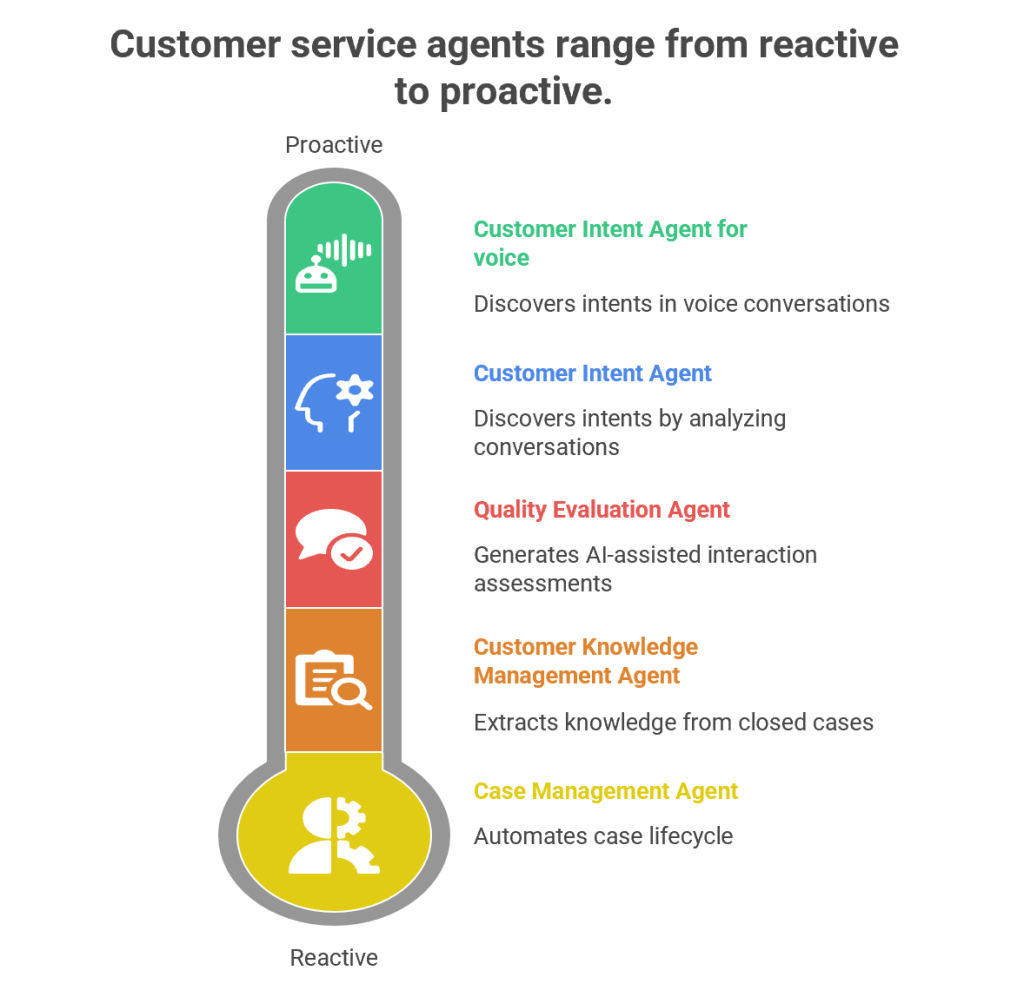
Customer service has evolved from being a reactive support function into a proactive, AI-driven engagement hub. Microsoft’s Dynamics 365 Customer Service Autonomous Agents represent the next leap in this journey. These agents are designed to autonomously handle repetitive tasks, discover customer intents, generate knowledge, and evaluate quality—all while freeing human agents to focus on complex, empathy-driven interactions.

1. Customer Intent Agent

Purpose

The Customer Intent Agent uses generative AI to autonomously discover customer intents by analyzing historical and ongoing cases, conversations, and interactions. Intents are essentially the “reason” behind a customer’s contact—such as resetting a password, checking an order status, or reporting a service outage.

How It Works

  • Data Mining: The agent scans past cases, chat transcripts, and emails to identify recurring themes.
  • Intent Discovery: It clusters similar issues into “intents” using natural language processing (NLP).
  • Knowledge Recommendations: Once an intent is identified, the agent suggests the most relevant knowledge articles to resolve the issue.
  • Continuous Learning: As new cases emerge, the agent adapts and refines its intent library.

Business Value

  • Reduces manual effort in categorizing cases.
  • Improves self-service portals by surfacing the right FAQs.
  • Enhances assisted service by guiding human agents toward faster resolutions.
  • Provides insights into emerging customer needs (e.g., a sudden spike in billing queries).

Example

Imagine a telecom company receiving thousands of queries daily. The Customer Intent Agent identifies that 40% of queries relate to “SIM card activation.” It then recommends a knowledge article and updates the chatbot to handle this intent autonomously, reducing call center load.

2. Customer Intent Agent for Voice

Purpose

While the standard Customer Intent Agent focuses on text-based interactions, the Voice variant is tailored for contact centers handling phone calls.

How It Works

  • Speech-to-Text Conversion: Converts live voice conversations into text.
  • Intent Recognition: Uses generative AI to detect customer intent in real time.
  • Guided Conversations: Suggests follow-up questions to agents, helping them steer the call effectively.
  • Real-Time Solutions: Provides tailored solutions during the call, reducing average handling time (AHT).

Business Value

  • Enhances voice-based customer service, which remains dominant in many industries.
  • Improves agent confidence by suggesting next-best actions during live calls.
  • Reduces call duration and increases first-call resolution (FCR).

Example

In a bank’s contact center, a customer calls saying, “I can’t access my account.” The agent dashboard instantly shows the intent as “Login Issue” and suggests asking: “Are you using the mobile app or web portal?” It then recommends a troubleshooting script, speeding up resolution.

3. Case Management Agent

Purpose

The Case Management Agent automates the entire case lifecycle—from creation to closure. Traditionally, service representatives spend significant time manually filling case details, updating statuses, and closing tickets. This agent eliminates that overhead.

How It Works

  • Case Creation: Automatically generates cases from emails, chats, or voice transcripts.
  • Case Updates: Populates fields like category, priority, and SLA deadlines.
  • Resolution & Closure: Suggests resolutions based on knowledge articles and closes cases once resolved.
  • Customization: Administrators can configure rules to tailor the agent’s behavior to organizational needs.

Business Value

  • Saves time for service representatives.
  • Ensures consistency in case handling.
  • Improves SLA compliance by automating escalations.
  • Reduces human error in case documentation.

Example

In an e-commerce company, when a customer emails “My package hasn’t arrived,” the Case Management Agent automatically creates a case, tags it as “Delivery Delay,” sets priority, and routes it to the logistics department. Once resolved, it closes the case and notifies the customer.

4. Customer Knowledge Management Agent

Purpose

Knowledge is the backbone of customer service. The Customer Knowledge Management Agent ensures that knowledge bases remain up-to-date, accurate, and compliant.

How It Works

  • Knowledge Extraction: Analyzes closed cases to identify gaps in existing knowledge articles.
  • Knowledge Creation: Drafts new articles using generative AI.
  • Compliance Checks: Ensures articles meet organizational and regulatory standards.
  • Real-Time Updates: Continuously refines knowledge bases as new cases emerge.

Business Value

  • Improves self-service by keeping FAQs relevant.
  • Enhances agent productivity by providing contextual knowledge suggestions.
  • Reduces repetitive queries by empowering customers with accurate information.
  • Ensures compliance in industries like healthcare and finance.

Example

A healthcare provider closes multiple cases related to “insurance claim submission.” The agent notices no existing article covers this process. It drafts a new knowledge article, reviews compliance, and publishes it—empowering both customers and agents.

5. Quality Evaluation Agent

Purpose

The Quality Evaluation Agent autonomously assesses customer interactions for quality and compliance. Supervisors traditionally spend hours manually reviewing calls and chats; this agent automates that process.

How It Works

  • Evaluation Framework: Supervisors define criteria (e.g., politeness, accuracy, compliance).
  • AI-Assisted Assessments: The agent evaluates cases and conversations against these criteria.
  • Feedback Loop: Provides insights into agent performance and customer satisfaction.
  • Continuous Improvement: Suggests training modules or process changes based on evaluation results.

Business Value

  • Ensures consistent service quality across agents.
  • Identifies training needs proactively.
  • Improves compliance with regulatory standards.
  • Enhances customer satisfaction through better service delivery.

Example

In a financial services firm, the agent evaluates 1,000 chat transcripts overnight. It flags 50 cases where agents failed to verify customer identity properly, alerting supervisors to potential compliance risks.

Synergy Between Agents

While each agent has a distinct role, their combined power transforms customer service:

  • Customer Intent Agents identify why customers reach out.
  • Case Management Agent automates case handling.
  • Knowledge Management Agent ensures information is accurate.
  • Quality Evaluation Agent maintains service excellence.

Together, they create a self-optimizing, autonomous customer service ecosystem.

Strategic Impact

  • Operational Efficiency: Reduces manual workload.
  • Customer Satisfaction: Improves resolution speed and accuracy.
  • Compliance: Ensures adherence to regulations.
  • Scalability: Handles large volumes of interactions seamlessly.