Proactive voice engagements in Dynamics 365 Contact Center
(A shift from reactive support to proactive service, where AI agents initiate outbound voice calls to notify customers of critical updates, service disruptions, or personalized offers.)
Real-time User Journey: Anticipatory Service
This journey illustrates how the system prevents a customer from needing to call support by reaching out first:
Event Detection: An airline’s internal system flags that Flight 102 is delayed by four hours due to a technical issue.
Audience Segmentation: The Proactive Engagement Agent identifies all passengers on that flight who have not yet checked in or are currently in transit.
Autonomous Outreach: The AI agent initiates an outbound call to a passenger.
Natural Interaction: The passenger answers. Using HD Voices, the agent says: “Hi Alex, I’m calling from the airline. Your flight to Seattle has been delayed. I’ve already found a seat for you on the 6:00 PM departure. Would you like me to confirm that now?”
Interactive Resolution: The passenger agrees via voice. The agent updates the booking in the CRM and sends a new boarding pass via SMS.
Deflection Success: Because the airline reached out proactively, the passenger does not call the busy airport desk, reducing the “spike” in inbound volume for human agents.
Step-by-Step: How to Enable This Feature
Proactive voice requires configuration in both the Dynamics 365 Contact Center and Azure Communication Services.
Step 1: Configure Outbound Settings
In the Contact Center admin center, navigate to Channels > Voice. Ensure you have a validated outbound phone number and the appropriate telephony carrier settings.
Step 2: Define Proactive Triggers
Use Power Automate or Dataverse to set up a trigger. For example, “When a Flight Status changes to ‘Delayed’, trigger the Proactive Voice Flow.”
Step 3: Create the Voice Agent in Copilot Studio
Design the “Outbound Conversation” topic in Microsoft Copilot Studio. Specifically, select an HD Voice and draft the script using variables (like {CustomerName} and {FlightNumber}) for personalization.
Step 4: Enable “Proactive Outreach” in Settings
In the Bot settings, navigate to Proactive Engagements and toggle the feature to On. Map your Copilot bot to the outbound voice channel.
Step 5: Set Governance & Quiet Hours
Configure “Quiet Hours” (e.g., no proactive calls between 9:00 PM and 8:00 AM) and “Frequency Caps” to ensure customers aren’t overwhelmed by automated calls.
Step 6: Launch and Monitor
Publish the bot. Use the Agent Activity Feed to monitor the success rate and customer responses to these proactive calls in real-time.
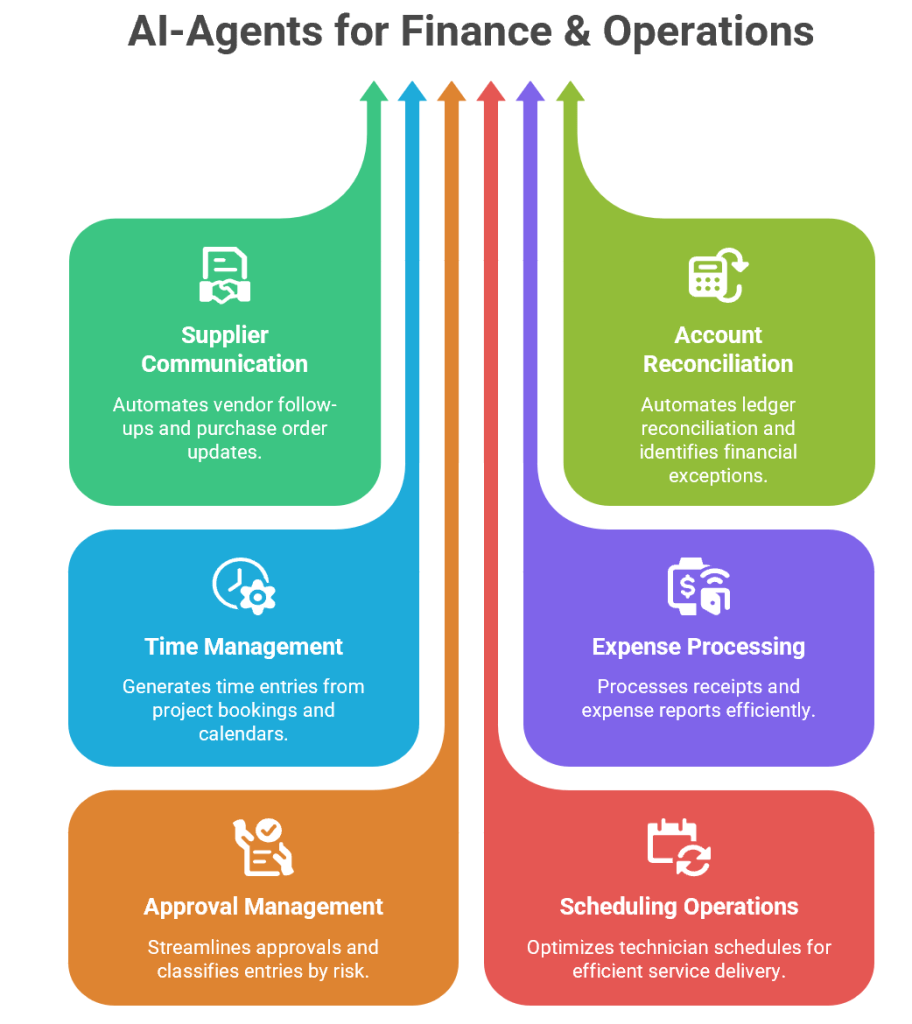
Finance and Operations (F&O) functions are the backbone of enterprise performance. They ensure that procurement, accounting, project management, expense handling, and operational monitoring run smoothly. Yet, these areas are often burdened with repetitive manual tasks, compliance risks, and inefficiencies.
Microsoft’s Dynamics 365 Finance and Operations Autonomous Agents are designed to address these challenges. By embedding AI-driven automation into core workflows, these agents free finance and operations teams to focus on strategic decision-making rather than routine administration.
1. Supplier Communication Agent
Purpose
Procurement teams spend significant time chasing suppliers for confirmations, updates, and changes. The Supplier Communication Agent automates these interactions, ensuring real-time visibility and freeing teams for strategic work.
How It Works
Automated Follow-Ups: Sends reminders to suppliers for pending confirmations.
Workflow Updates: Applies supplier changes directly to purchase orders.
Exception Escalation: Flags anomalies (e.g., delivery delays, pricing mismatches) for human review.
Real-Time Visibility: Updates dashboards with supplier responses.
Business Value
Reduces manual communication overhead.
Improves supplier relationship management.
Enhances procurement efficiency.
Provides transparency across supply chains.
Example
A manufacturing company issues 1,000 purchase orders monthly. The agent autonomously follows up with suppliers, applies changes to delivery dates, and escalates exceptions. Procurement managers focus on strategic sourcing rather than chasing confirmations.
2. Account Reconciliation Agent
Purpose
Financial reconciliation is critical but often tedious. The Account Reconciliation Agent automates ledger-to-subledger reconciliation, identifies exceptions, and suggests resolutions.
How It Works
Automated Matching: Compares ledger entries with subledger transactions.
Audit Trail: Maintains transparent logs for compliance.
Business Value
Accelerates financial closings.
Improves accuracy in reporting.
Reduces audit risks.
Frees accountants for strategic analysis.
Example
During month-end close, the agent reconciles thousands of transactions overnight, identifies 50 mismatches, and suggests corrections. Finance teams review exceptions instead of manually reconciling every entry.
3. Time Agent
Purpose
Manual time entry is error-prone and inefficient. The Time Agent generates time entries from project bookings, calendars, and Outlook meetings.
How It Works
Data Extraction: Pulls project schedules and meeting logs.
Time Entry Generation: Creates entries automatically in Dynamics 365.
Compliance Tracking: Ensures accurate revenue recognition.
Business Value
Saves employees time.
Improves billing accuracy.
Enhances compliance with project accounting standards.
Provides real-time visibility into resource utilization.
Example
A consulting firm’s employees spend hours logging time weekly. The agent automatically generates entries from Outlook calendars and project bookings, reducing errors and ensuring accurate client billing.
4. Expense Agent
Purpose
Expense management is often bogged down by manual receipt processing and policy enforcement. The Expense Agent automates this process.
How It Works
Receipt Extraction: Reads data from emails or images.
Policy Checks: Validates expenses against company rules.
Grouping Logic: Organizes reports by travel or project.
Compliance Enforcement: Flags violations for review.
Business Value
Accelerates reimbursements.
Ensures compliance with travel and expense policies.
Reduces fraud risk.
Improves employee satisfaction.
Example
An employee submits receipts via email. The agent extracts data, applies policy checks (e.g., meal limits, travel allowances), groups expenses by trip, and processes reimbursement automatically.
5. Approval Management Agent
Purpose
Approvals are critical but often slow. The Approval Management Agent streamlines this process by reviewing submissions against policy rules.
How It Works
Policy Validation: Checks entries against organizational rules.
Risk Classification: Flags high-risk items.
Routing: Sends flagged items to managers for review.
Efficiency: Automates approvals for compliant entries.
Business Value
Speeds up approval cycles.
Improves accuracy in compliance.
Reduces bottlenecks in workflows.
Enhances employee productivity.
Example
An expense report is submitted. The agent validates it against policy, approves compliant items instantly, and routes flagged entries (e.g., exceeding travel allowance) to managers.
6. Scheduling Operations Agent
Purpose
Resource scheduling is complex, requiring consideration of skillsets, travel time, and commitments. The Scheduling Operations Agent optimizes technician schedules.
How It Works
Skill Matching: Assigns tasks based on technician expertise.
Travel Optimization: Minimizes travel time between jobs.
Commitment Tracking: Ensures customer appointments are honored.
Dynamic Adjustments: Re-optimizes schedules in real time.
Business Value
Improves resource utilization.
Enhances customer satisfaction.
Reduces operational costs.
Provides agility in service delivery.
Example
A field service company manages hundreds of technicians. The agent optimizes schedules daily, ensuring the right technician is assigned to the right job, reducing travel time, and improving customer satisfaction.
7. Batch Monitoring Agent
Purpose
Batch processes are critical in finance and supply chain systems. The Batch Monitoring Agent provides AI-powered monitoring and diagnostics.
How It Works
Failure Detection: Identifies runtime anomalies and failures.
Throttling Alerts: Flags performance bottlenecks.
Diagnostics: Provides root cause analysis.
Operational Visibility: Updates dashboards with batch health.
Business Value
Ensures smooth batch execution.
Reduces downtime in financial and supply chain operations.
Improves IT administrator efficiency.
Enhances system reliability.
Example
During nightly batch runs, the agent detects throttling in invoice processing, alerts IT administrators, and suggests corrective actions. This prevents delays in financial reporting.
Synergy Between Agents
Together, these agents create a self-optimizing Finance and Operations ecosystem:
Supplier Communication Agent ensures procurement efficiency.
Scalability : Organizations can handle larger volumes of transactions without expanding headcount.
Conclusion
Dynamics 365 Finance and Operations Autonomous Agents represent a paradigm shift in enterprise management. By embedding AI into procurement, accounting, project management, expense handling, and system monitoring, they empower organizations to achieve greater efficiency, compliance, and scalability.
Microsoft Ignite 2025: Transitioning to the Era of Agentic Business Transformation
The central theme for November 2025 was the evolution of Copilot Studio into a foundation for “agentic” workflows—where AI agents don’t just assist but autonomously drive business processes with human oversight.
Real-time User Journey: Human-in-the-Loop (HITL)
One of the most significant “real-time” journeys introduced is the Human-in-the-Loop capability:
Autonomous Start: An agent begins a multi-step workflow (e.g., processing a high-value procurement order).
Pause for Judgment: The agent reaches a step requiring approval or specific context (e.g., the order exceeds a price threshold).
Real-time Request: The agent automatically pauses and sends a structured Outlook form to a designated human reviewer.
Human Action: The person reviews the details and submits their input/approval via the form.
Resumption: The agent receives the response and immediately resumes the workflow using the human’s input as a parameter to complete the task.
Step-by-Step: How to Enable GPT-5 Chat
GPT-5 Chat became generally available in November 2025 for US and EU customers. To enable it:
Step 1: Open your agent’s Overview page in Microsoft Copilot Studio.
Step 2: Locate the Model Selection settings.
Step 3: Select GPT-5 Chat from the dropdown menu to set it as the primary model.
Step 4 (Experimental): For US customers wanting to test the latest reasoning, you can toggle on GPT-5.2 (Experimental) in early release environments for improved code generation and multilingual support.
Infographic: The New Agentic Capabilities
The November 2025 update expanded the platform across three core pillars:
Intelligence (Models)
Action (Skills)
Governance (Control)
GPT-5 GA: Higher accuracy and instruction-following.
Human-in-the-Loop: Agents pause for human approval.
Microsoft Agent 365: The unified control plane for agents.
Model Choice: Multi-model support (OpenAI, Anthropic, xAI).
Action Groups: One-click sets for Outlook/SharePoint tools.
Entra Agent ID: Identity-based security for every agent.
MCP Integration: Connects to 1,400+ external systems.
Producer Skills: Generate Word, Excel, and PPT files.
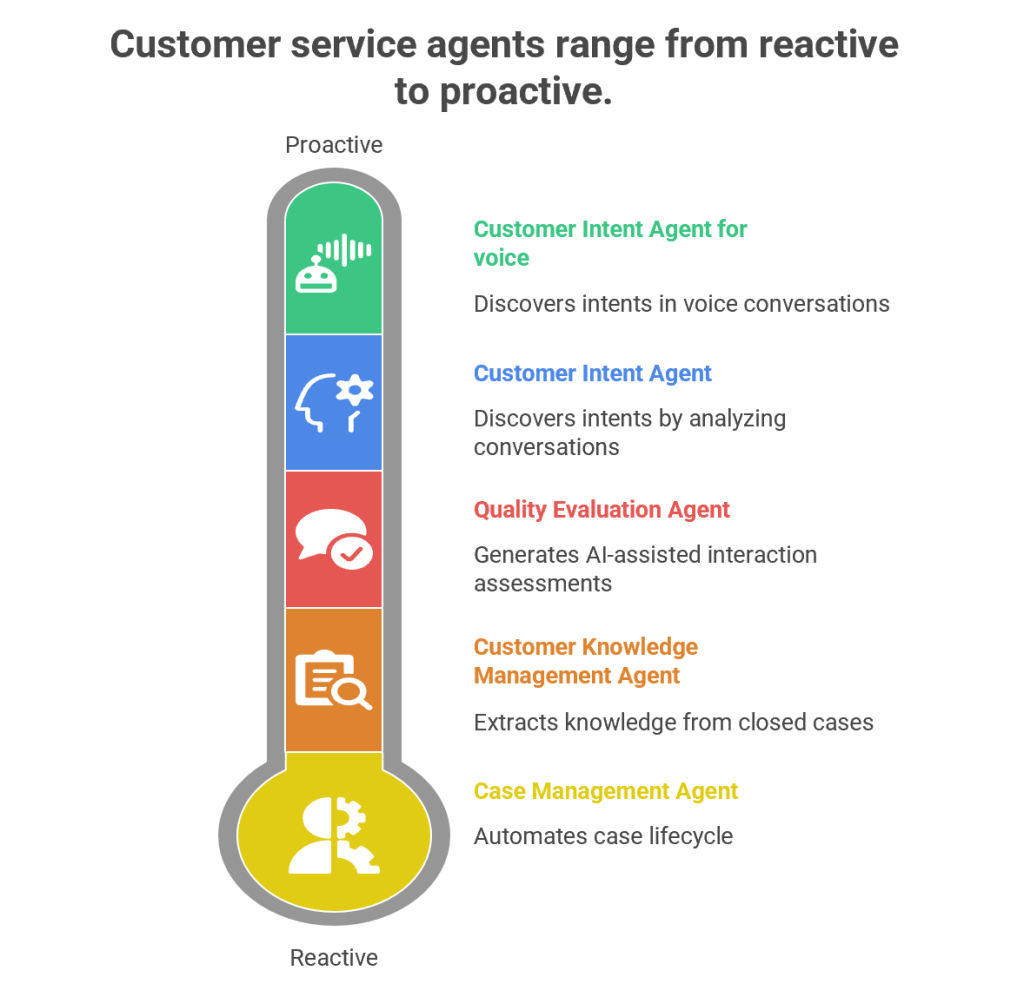
Customer service has evolved from being a reactive support function into a proactive, AI-driven engagement hub. Microsoft’s Dynamics 365 Customer Service Autonomous Agents represent the next leap in this journey. These agents are designed to autonomously handle repetitive tasks, discover customer intents, generate knowledge, and evaluate quality—all while freeing human agents to focus on complex, empathy-driven interactions.
1. Customer Intent Agent
Purpose
The Customer Intent Agent uses generative AI to autonomously discover customer intents by analyzing historical and ongoing cases, conversations, and interactions. Intents are essentially the “reason” behind a customer’s contact—such as resetting a password, checking an order status, or reporting a service outage.
How It Works
Data Mining: The agent scans past cases, chat transcripts, and emails to identify recurring themes.
Intent Discovery: It clusters similar issues into “intents” using natural language processing (NLP).
Knowledge Recommendations: Once an intent is identified, the agent suggests the most relevant knowledge articles to resolve the issue.
Continuous Learning: As new cases emerge, the agent adapts and refines its intent library.
Business Value
Reduces manual effort in categorizing cases.
Improves self-service portals by surfacing the right FAQs.
Enhances assisted service by guiding human agents toward faster resolutions.
Provides insights into emerging customer needs (e.g., a sudden spike in billing queries).
Example
Imagine a telecom company receiving thousands of queries daily. The Customer Intent Agent identifies that 40% of queries relate to “SIM card activation.” It then recommends a knowledge article and updates the chatbot to handle this intent autonomously, reducing call center load.
2. Customer Intent Agent for Voice
Purpose
While the standard Customer Intent Agent focuses on text-based interactions, the Voice variant is tailored for contact centers handling phone calls.
How It Works
Speech-to-Text Conversion: Converts live voice conversations into text.
Intent Recognition: Uses generative AI to detect customer intent in real time.
Guided Conversations: Suggests follow-up questions to agents, helping them steer the call effectively.
Real-Time Solutions: Provides tailored solutions during the call, reducing average handling time (AHT).
Business Value
Enhances voice-based customer service, which remains dominant in many industries.
Improves agent confidence by suggesting next-best actions during live calls.
Reduces call duration and increases first-call resolution (FCR).
Example
In a bank’s contact center, a customer calls saying, “I can’t access my account.” The agent dashboard instantly shows the intent as “Login Issue” and suggests asking: “Are you using the mobile app or web portal?” It then recommends a troubleshooting script, speeding up resolution.
3. Case Management Agent
Purpose
The Case Management Agent automates the entire case lifecycle—from creation to closure. Traditionally, service representatives spend significant time manually filling case details, updating statuses, and closing tickets. This agent eliminates that overhead.
How It Works
Case Creation: Automatically generates cases from emails, chats, or voice transcripts.
Case Updates: Populates fields like category, priority, and SLA deadlines.
Resolution & Closure: Suggests resolutions based on knowledge articles and closes cases once resolved.
Customization: Administrators can configure rules to tailor the agent’s behavior to organizational needs.
Business Value
Saves time for service representatives.
Ensures consistency in case handling.
Improves SLA compliance by automating escalations.
Reduces human error in case documentation.
Example
In an e-commerce company, when a customer emails “My package hasn’t arrived,” the Case Management Agent automatically creates a case, tags it as “Delivery Delay,” sets priority, and routes it to the logistics department. Once resolved, it closes the case and notifies the customer.
4. Customer Knowledge Management Agent
Purpose
Knowledge is the backbone of customer service. The Customer Knowledge Management Agent ensures that knowledge bases remain up-to-date, accurate, and compliant.
How It Works
Knowledge Extraction: Analyzes closed cases to identify gaps in existing knowledge articles.
Knowledge Creation: Drafts new articles using generative AI.
Compliance Checks: Ensures articles meet organizational and regulatory standards.
Real-Time Updates: Continuously refines knowledge bases as new cases emerge.
Business Value
Improves self-service by keeping FAQs relevant.
Enhances agent productivity by providing contextual knowledge suggestions.
Reduces repetitive queries by empowering customers with accurate information.
Ensures compliance in industries like healthcare and finance.
Example
A healthcare provider closes multiple cases related to “insurance claim submission.” The agent notices no existing article covers this process. It drafts a new knowledge article, reviews compliance, and publishes it—empowering both customers and agents.
5. Quality Evaluation Agent
Purpose
The Quality Evaluation Agent autonomously assesses customer interactions for quality and compliance. Supervisors traditionally spend hours manually reviewing calls and chats; this agent automates that process.
AI-Assisted Assessments: The agent evaluates cases and conversations against these criteria.
Feedback Loop: Provides insights into agent performance and customer satisfaction.
Continuous Improvement: Suggests training modules or process changes based on evaluation results.
Business Value
Ensures consistent service quality across agents.
Identifies training needs proactively.
Improves compliance with regulatory standards.
Enhances customer satisfaction through better service delivery.
Example
In a financial services firm, the agent evaluates 1,000 chat transcripts overnight. It flags 50 cases where agents failed to verify customer identity properly, alerting supervisors to potential compliance risks.
Synergy Between Agents
While each agent has a distinct role, their combined power transforms customer service:
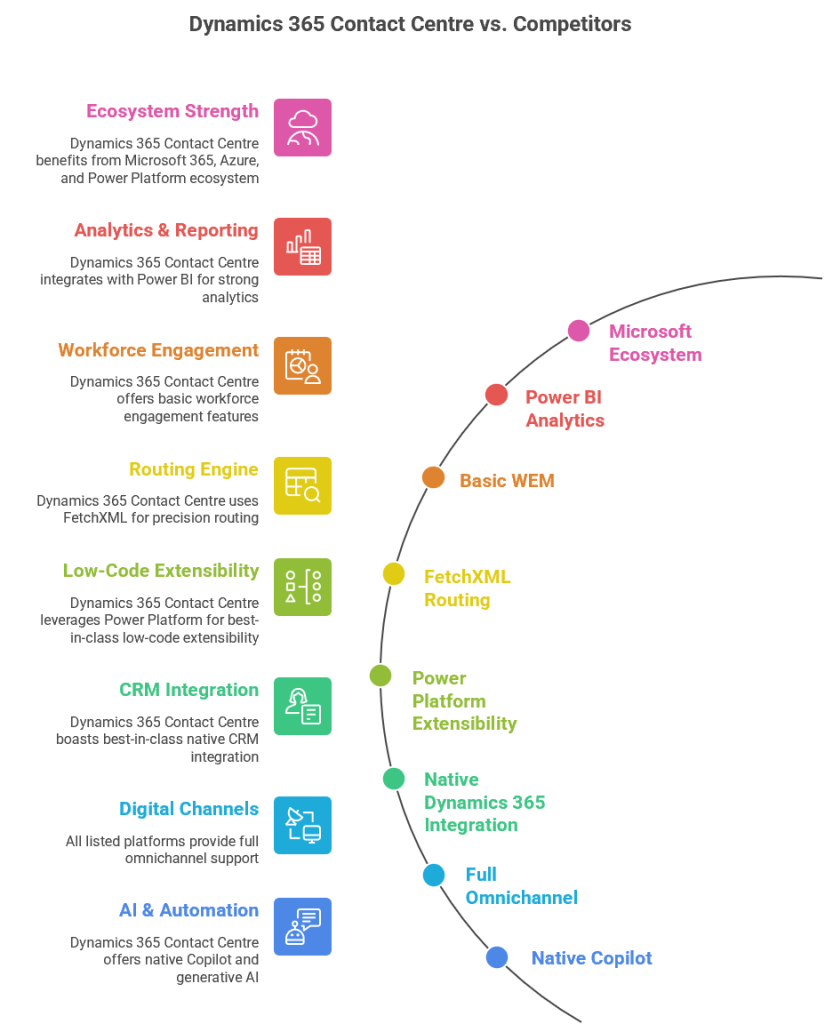
Dynamics 365 Contact Centre is Microsoft’s AI‑first, cloud‑native CCaaS platform built on Azure Communication Services and deeply integrated with Dynamics 365, Power Platform, and Microsoft 365. Compared to other CCaaS leaders, Microsoft’s strengths lie in AI, CRM context, low‑code extensibility, and ecosystem integration, while competitors often lead in telephony maturity, WEM, and global carrier options.
Dynamics 365 Contact Centre
Strengths
Deep Microsoft ecosystem integration (Teams, M365, Power Platform, Dynamics 365)
AI‑first design with Copilot and CRM‑aware automation
Low‑code extensibility via Power Automate and Dataverse
Unified agent desktop with CRM context
FetchXML‑based routing for compliance‑driven orgs
Weaknesses
Workforce engagement management still maturing
Telephony ecosystem not as broad as Genesys/NICE
Best suited for Microsoft‑aligned enterprises
Amazon Connect
Strengths
Highly scalable, developer‑friendly
Strong AWS AI/ML integration
Pay‑as‑you‑go pricing
Weaknesses
Requires heavy custom development
Weak CRM story
Limited out‑of‑the‑box WEM
Genesys Cloud CX
Strengths
Very mature routing, WEM, and analytics
Strong global telephony
Broad enterprise adoption
Weaknesses
Higher cost
Less native AI compared to Microsoft
Complex configuration
NICE CXone
Strengths
Best‑in‑class analytics and WEM
Strong compliance and global reach
Mature voice and digital channels
Weaknesses
Complex licensing
Less modern architecture than Microsoft/AWS
Limited low‑code extensibility
Cisco Webex Contact Center
Strengths
Strong telephony and network reliability
Good for Cisco‑centric enterprises
Solid omnichannel
Weaknesses
AI and CRM context weaker than Microsoft
Less flexible than AWS/Genesys
Best‑Fit Recommendations
Choose Dynamics 365 Contact Centre if:
You are a Microsoft‑centric enterprise
You want AI‑first customer service
You need CRM‑aware automation
You want low‑code extensibility
You want a unified Microsoft ecosystem (Teams + Dynamics + Power Platform)

 GM Dynamics & Agentic AI Consulting