
architecture, Customer Experience, Customer-service

Architectural Description: Intelligent, Integrated Multi-Platform CRM and Interaction Ecosystem

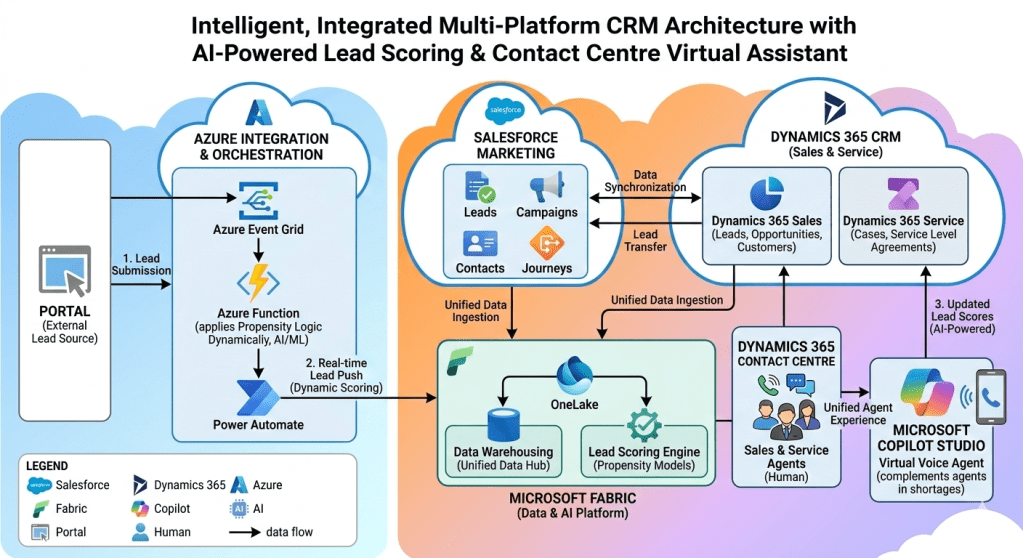
This architecture addresses the common organizational challenge of fragmented customer journeys by integrating leading multi-cloud and multi-SaaS platforms—specifically Salesforce Marketing Cloud and the Microsoft Dynamics 365 CRM suite—underpinned by a unified intelligence layer powered by Microsoft Azure and Microsoft Fabric.

The primary objective of this architecture is to transition the organization from a reactive business model to a proactive, predictive one. It achieves this by creating real-time intelligence loops for lead scoring, ensuring data consistency across disparate platforms, and optimizing customer interaction through a hybrid, scalable Contact Center model that seamlessly combines human expertise with AI-driven virtual assistance. This documentation provides a deep technical review of each component, their connections, and the resulting intelligent workflows.

1. Architectural Components Breakdown

The diagram divides the architecture into logical zones. This section provides a granular analysis of the individual components within these zones.

1.1 The External Facing Layer

1.1.1 PORTAL (External Lead Source):

  • Description: This component represents any digital entry point that is external to the core CRM ecosystem. This includes, but is not limited to, the corporate website, dedicated marketing landing pages, customer portals, third-party lead generation websites, and mobile applications.
  • Functionality: It serves as the initial customer-facing interface. It captures lead-specific data—such as contact information, interest vectors, behavioural signals, and preferences—via forms, API calls, or tracked interactions.
  • Architectural Role: The Portal is an event producer. It captures the initial “signal” of potential business and transmits it immediately to the integration layer, decoupling the customer experience from the internal processing time.

1.2 The Real-time Ingestion & Orchestration Layer (Microsoft Azure)

This zone is critical for the “real-time” promise of the architecture. It converts a batch-oriented lead ingestion process into a dynamic, event-driven workflow.

1.2.1 Azure Event Grid:

  • Description: A highly scalable, serverless event routing service.
  • Functionality: It subscribes to events published by the Portal (e.g., a “Lead Created” event). When an event occurs, Event Grid routes the event payload to its configured subscriber(s). It handles high-throughput traffic and ensures reliable delivery with retry policies.
  • Architectural Role: The architecture utilizes Event Grid as the core asynchronous messaging backbone. It decouples the Portal from the subsequent heavy processing in the Azure Function, allowing the Portal to remain highly responsive.

1.2.2 Azure Function:

  • Description: A serverless, compute-on-demand platform. The diagram indicates it is an AI/ML capable function.
  • Functionality: This is the core intelligence component for real-time ingestion. It executes code (likely in Python, C#, or Java) triggered specifically by the Event Grid message.
  • Dynamic Propensity Logic (AI/ML): The diagram highlights that this function “applies Propensity Logic Dynamically, AI/ML.” This is a crucial distinction from traditional scoring. In real-time, the function:
    1. Validates and cleans the incoming lead data.
    2. Ingests real-time context (e.g., current webpage, referring URL).
    3. Calls a lightweight, pre-trained AI model (perhaps hosted within Azure Machine Learning) that analyses these real-time signals alongside initial lead attributes.
    4. Determines a real-time propensity score (likelihood to convert) immediately during ingestion. This score is used to decide the next immediate action (e.g., high-priority routing, suppression, or a tailored message).
  • Architectural Role: It is the active, stateless processor that infuses intelligence at the very start of the customer journey, making the system reactive to current customer behaviour.

1.2.3 Power Automate:

  • Description: A low-code/no-code workflow automation service (part of the Power Platform).
  • Functionality: Power Automate acts as the low-code ETL (Extract, Transform, Load) and orchestration layer. It is triggered by the completion of the Azure Function’s logic. It takes the enriched, intelligently scored lead payload and performs the necessary actions to insert/upsert the lead into the target system (Dynamics 365 Sales).
  • Architectural Role: It provides the connection glue and operational flow logic. It abstracts complex API interactions with Dynamics 365 into visual, manageable workflows, ensuring that lead injection is robust and retry-capable.

1.3 The Multi-Cloud Engagement Layer (CRM & Marketing Clouds)

This zone represents the operational heart of the system, where business teams interact with customer data. The architecture deliberately utilizes a “best-of-breed” approach by integrating Salesforce and Dynamics 365.

1.3.1 SALESFORCE MARKETING (Salesforce Marketing Cloud):

  • Description: A specialized platform for marketing automation, customer journey management, and personalized cross-channel communications.
  • Components: The diagram explicitly lists:
    • Leads: For managing top-of-funnel marketing prospects.
    • Campaigns: For orchestrating marketing initiatives across email, social, web, etc.
    • Contacts: For managing unified marketing-specific customer records.
    • Journeys: (e.g., Journey Builder) For designing and automating multi-step customer engagement paths based on behavioural triggers.
  • Architectural Role: Salesforce Marketing is the specialized “system of engagement” for marketing teams. Data synchronization ensures it operates with accurate customer profiles, while lead transfer mechanisms ensure marketing-qualified leads (MQLs) are pushed to Sales.

1.3.2 DYNAMICS 365 CRM (Sales & Service):

  • Description: The operational CRM suite focused on salesforce automation and customer service management.
  • Dynamics 365 Sales: Focused on opportunity management and sales cycles. It manages:
    • Leads: (Operational Sales Leads) For qualifying prospects ingested via Azure.
    • Opportunities: Track potential deals.
    • Customers: Define unified Account/Contact records post-conversion.
  • Dynamics 365 Service: Focused on post-sale support and case management. It manages:
    • Cases: Track support requests.
    • Service Level Agreements (SLAs): Manage service commitments.
  • Architectural Role: Dynamics 365 is the “system of record” for the sales and service operations. It provides a structured workspace for agents and sales reps, built natively within the Microsoft ecosystem for tight integration with Fabric and Azure.

1.4 The Unified Intelligence Layer (Microsoft Fabric)

This zone is the analytical engine and the “brain” of the entire architecture. It unifies disparate data sources into a single logical intelligence platform.

1.4.1 MICROSOFT FABRIC (Data & AI Platform):

  • Description: A comprehensive, unified analytics platform that brings together data integration, data warehousing, and advanced AI. It operates as a Data Lakehouse.
  • OneLake: (The Data Lakehouse storage) This is the core logical data lake, providing a single location to store all organizational data (structured and unstructured). It is built on open standards (Parquet/Delta Lake format). All data ingestion processes target OneLake, breaking down storage silos.
  • Data Warehousing (Unified Data Hub): This component utilizes the Synapse Data Warehouse engine (or similar T-SQL engine) running directly on top of the OneLake data. It provides the analytical, structured query layer for unified reporting, dashboarding, and complex data unification tasks (e.g., merging Salesforce and Dynamics profiles).
  • Lead Scoring Engine (Propensity Models):
    • Description: This engine hosts and executes complex, historical-data-driven machine learning models (different from the real-time model in the Azure Function).
    • Functionality: It ingests the unified, historical customer data from OneLake (marketing interactions from Salesforce, sales history and service case history from Dynamics 365). It trains and executes sophisticated models (e.g., deep neural networks, tree-based models) to generate comprehensive predictive lead scores.
    • AI-Powered Refinement: This engine generates the most accurate, predictive score, looking beyond current interaction context to historical patterns across the entire unified customer lifecycle.
  • Architectural Role: Microsoft Fabric provides the organizational “system of intelligence.” It consolidates the unified view of the customer and acts as the source of refined, advanced AI models and predictive analytics.

1.5 The Modern Interaction Layer (Contact Center)

This zone describes how the organization interacts with customers, optimized for scale and intelligence.

1.5.1 DYNAMICS 365 CONTACT CENTRE:

  • Description: The unified agent desktop experience for managing multi-channel communications (voice, chat, digital messaging) within Dynamics 365.
  • Sales & Service Agents (Human): These are skilled human agents working within the unified Dynamics interface. They handle complex issues, strategic sales opportunities, and situations requiring human empathy. The contact center provides them with context-rich workspaces, drawing customer data directly from Dynamics 365 Sales and Service.

1.5.2 MICROSOFT COPILOT STUDIO (Virtual Voice Agent):

  • Description: A conversational AI platform (formerly Power Virtual Agents) that enables the creation of powerful, low-code virtual assistants, with specific emphasis here on the ‘Voice Agent’ capability.
  • Functionality: This is a Generative AI-driven virtual voice agent. It:
    1. Ingests inbound voice calls.
    2. Utilizes natural language understanding (NLU) and large language models (LLMs) to converse with users.
    3. Accesses data from Dynamics 365 (and potentially Fabric/OneLake shortcuts) to personalize interactions (e.g., lookup lead status, check current cases).
  • Complementing agents in shortages: This is the critical operational role. Copilot:
  • Handles tier 1 support and common inquiries (e.g., “Where is my order?”).
  • Provides triage, collecting necessary information before transferring to a human.
  • Serves as an overflow mechanism during spikes, ensuring no customer is left waiting, maintaining operational SLAs.

2. Dynamic Process Flows (Step-by-Step)

This section details the critical business workflows orchestrated across these components.

2.1 Process Flow 1: Real-time Lead Ingestion, Scoring, and CRM Injection (The Predictive Ingestion Workflow)

This flow explains how the system reacts intelligently to a new lead interaction.

  • Step 1.1: Lead Generation (Portal -> Portal Component): A prospective lead visits a Portal (e.g., landing page) and submits a form, or interacts with a specific tool.
  • Step 1.2: Event Generation (Portal Component -> PORTAL Zone): The Portal applications (front-end) capture this action and immediately publish a JSON “Lead Created” event to Azure Event Grid.
  • Step 1.3: Asynchronous Routing (Event Grid -> Azure Integration Zone): Azure Event Grid ingests the event and asynchronously routes it to the specific Azure Function that is configured to subscribe to this event topic.
  • Step 1.4: Dynamic AI/ML Execution (Azure Integration Zone -> Azure Function):
    1. The Azure Function executes the Python or C# code upon trigger.
    2. The function performs real-time propensity scoring. The code reads the current lead payload (e.g., current webpage, interest field) and calls a pre-trained ML model (perhaps deployed as an Azure ML endpoint). This model quickly calculates a propensity-to-convert score based only on the immediate contextual inputs and the initial lead attributes.
    3. This is a critical “dynamic” check: is this a hot lead based on current behavior that needs immediate high-priority sales attention?
    4. The function appends this dynamic score to the lead payload.
  • Step 1.5: Orchestration Trigger (Azure Function -> Power Automate): Upon completion of the scoring and validation, the Azure Function pushes the enriched, intelligently scored lead payload to a Power Automate flow.
  • Step 1.6: Dynamic CRM Lead Push (Power Automate -> Dynamics 365 Sales):
  • Power Automate receives the payload.
  • It uses standard Microsoft Dataverse connectors to perform an “upsert” operation into Dynamics 365 Sales.
  • The lead is inserted into the Lead table. Crucially, the dynamic propensity score calculated in Step 1.4 is populated into a dedicated field on the Lead record in Dynamics 365 Sales.
  • Outcome: The sales team has a qualified, scored, and prioritized lead in their CRM in near-real-time. They can prioritize their call queue based on the dynamically determined propensity.

2.2 Process Flow 2: Ongoing Intelligence Refinement (The AI Optimization Loop)

This flow details how Microsoft Fabric unifies data to refine the lead intelligence.

  • Step 2.1: Unified Data Ingestion (Operational Zones -> Microsoft Fabric OneLake): This arrow represents the continuous synchronization of operational data into OneLake.
    • Dynamics 365 Sales/Service -> OneLake: Utilizing Dataverse linkage or native Fabric shortcuts, sales data (closed-won/lost history) and service data (case volume, SLA adherence) flow into OneLake.
    • Salesforce Marketing -> OneLake: Marketing data (campaign history, email engagement, journey paths) is synchronized into OneLake, likely using Fabric Data Factory pipelines or managed connectors.
  • Step 2.2: Data Warehousing & Profile Unification (OneLake -> Fabric Data Warehouse): Within the Data Warehousing component, raw Delta tables are transformed, unified, and cleansed using Synapse T-SQL. Marketing contacts from Salesforce are linked to sales contacts and service history from Dynamics to create a unified customer profile.
  • Step 2.3: Historical Model Execution (Fabric Lead Scoring Engine): The ‘Propensity Models’ within the Lead Scoring Engine are executed. These complex ML models leverage the unified historical data now available. They analyze which factors across the entire customer lifecycle (e.g., did they open a recent email? did they have a recent support case? which campaign worked last time?) are predictive of conversion. This generates a refined, more accurate AI-powered score.
  • Step 2.4: Updated Lead Scores (AI-Powered) (Fabric -> Dynamics 365 Sales): This flow is critical for continuous optimization. The refined, deep-learning scores generated by Fabric are pushed back (via API or Data Factory pipeline) to update the existing Lead Score field on the Lead record in Dynamics 365 Sales.
  • Outcome: The sales rep works with a constantly refined intelligence loop. They may see a lead initially scored with low propensity (based on current input), which subsequently receives a high AI-Powered score update from Fabric once historical context is processed, prompting a high-priority follow-up.

2.3 Process Flow 3: Hybrid Contact Center Interaction (Human + Copilot Triage)

This flow illustrates how the systems collaborate to provide scalable customer service.

  • Step 3.1: Lead Transfer & Sync (Operational Systems <-> Salesforce <-> Dynamics):
    • Marketing Qualified Leads (MQLs) identified in Salesforce are synced to Dynamics 365 Sales for qualification.
    • New customers or existing interactions in Dynamics are synced back to Salesforce for journey inclusion.
    • This ensures that any lead or customer reaching the Contact Center has a consistent, up-to-date profile in Dynamics 365.
  • Step 3.2: Unified Agent Experience (Interaction Layer <-> Contact Center): When an interaction (e.g., call) arrives at the Dynamics 365 Contact Centre, the unified agent desktop opens. The human agent sees:
  • The customer’s primary Dynamics 365 record.
  • The current Lead Score (updated by Fabric).
  • The full-Service Case history.
  • Step 3.3: Virtual Assistant Overflow/Triage (Copilot Studio <-> Human Agents):
    • Inbound Flow: A customer call initially lands on Copilot Studio (the virtual voice agent). Copilot acts as the primary triage layer.
    • Data Lookup: Copilot uses integration connections to look up the caller’s lead or case status directly in Dynamics 365 to personalize the interaction.
    • Handling Basic Inquiries: Copilot addresses simple issues (e.g., “What is my lead score?” or “What is the status of my case?”).
    • Triage & Context Collection: If Copilot cannot resolve the issue, it collects essential triage data (reason for call, preference).
    • Escalation to Human: Copilot dynamically determines if it should escalate based on the nature of the query or customer sentiment. It performs a warm transfer to a Human Sales or Service Agent working within the unified Dynamics Contact Centre workspace.
  • Outcome: The organization maintains high availability and efficiency. Copilot reduces the load on human agents during peaks and ensures human agents handle higher-value, more complex interactions.

3. Key Architectural Principles and Design Patterns

This architecture is built upon several foundational principles:

3.1 Event-Driven Architecture (EDA)

The integration from Portal to Dynamics 365 Sales is asynchronous and event-driven. By using Azure Event Grid, the Portal is not blocked by internal CRM processing or the Azure Function execution time. This ensures maximum front-end performance and resilience; if Dynamics 365 is briefly offline, Event Grid will retain the event and retry later, preventing lead loss.

3.2 Serverless Computing

The use of Azure Functions and Power Automate demonstrates a heavy reliance on serverless patterns. This model minimizes infrastructure management, provides instant auto-scaling to handle lead spikes (e.g., during a major marketing campaign), and offers a pay-for-execution cost model, making the system cost-effective.

3.3 Modern Data Lakehouse (Data Mesh approach)

Microsoft Fabric utilizes the OneLake Data Lakehouse model. It uses the Delta Lake open data format to merge the scalability of a Data Lake with the transactional reliability and SQL capabilities of a Data Warehouse. Furthermore, by using shortcuts to synchronize with Salesforce and Dynamics 365, it leans toward a “data mesh” approach, reducing the need for costly data duplication.

3.4 Disseminated Intelligence and Distributed AI

The architecture employs AI across three distinct logical points, demonstrating disseminated intelligence:

  1. Edge Intelligence (Real-time): The Azure Function handles dynamic propensity based on immediate context.
  2. Deep Intelligence (Historical): The Microsoft Fabric Lead Scoring Engine handles long-term predictive analytics based on historical profiles.
  3. Conversational Intelligence (Generative AI): Microsoft Copilot Studio uses NLU and generative AI for customer interaction.

3.5 Unified Agent Experience

The design ensures that all interaction logic (both human and virtual) is unified within the Dynamics 365 workspace. Copilot Triage context is shared with human agents via the Dynamics interaction record, and all agent decisions are informed by the unified data validated through Fabric, eliminating agent guesswork.

4. Value Proposition and Strategic Alignment

The implementation of this architecture delivers significant strategic value to the organization:

4.1 Transition to Predictive Revenue Operations

The system actively uses predictive AI (in both real-time and historical batch processes) to score leads. This allows Sales teams to move from simple activity-based engagement to intelligence-based prioritization, dramatically increasing lead-to-opportunity conversion rates.

4.2 Unified View of the Customer (True 360)

By leveraging Microsoft Fabric and the bidirectional sync between Salesforce and Dynamics, the architecture breaks down operational data silos. Marketing, sales, and service now operate from a single, consistent, unified view of the customer, validated through Fabric’s unifying logic.

4.3 Elastic Operational Capacity

The Serverless integration (Azure Functions) and the Virtual Voice Agent (Copilot) provide elasticity. The organization can absorb sudden spikes in lead ingestion volume during a product launch, or sudden increases in service call volume, without suffering downtime or deteriorating customer SLAs.

4.4 Optimized Resource Allocation

By utilizing Copilot as the first line of defense for triage and tier 1 support, human agents (both Sales and Service) are freed from repetitive low-value interactions. They can focus their time on strategic sales engagement, high-risk customer retention cases, and building complex customer relationships.

5. Conclusion

The “Intelligent, Integrated Multi-Platform CRM and Interaction Ecosystem” represents a mature, forward-looking architectural design. It intelligently combines multi-vendor SaaS capabilities (Salesforce and Dynamics 365) by leveraging Microsoft’s unified Azure and Fabric platforms for intelligence, orchestration, and communication. This approach results in a highly scalable, resilient, and responsive organization that utilizes AI continuously across the lifecycle to drive revenue and customer satisfaction.
architecture, contact-centre, copilot-studio, Customer Experience, Customer-service, Power Apps

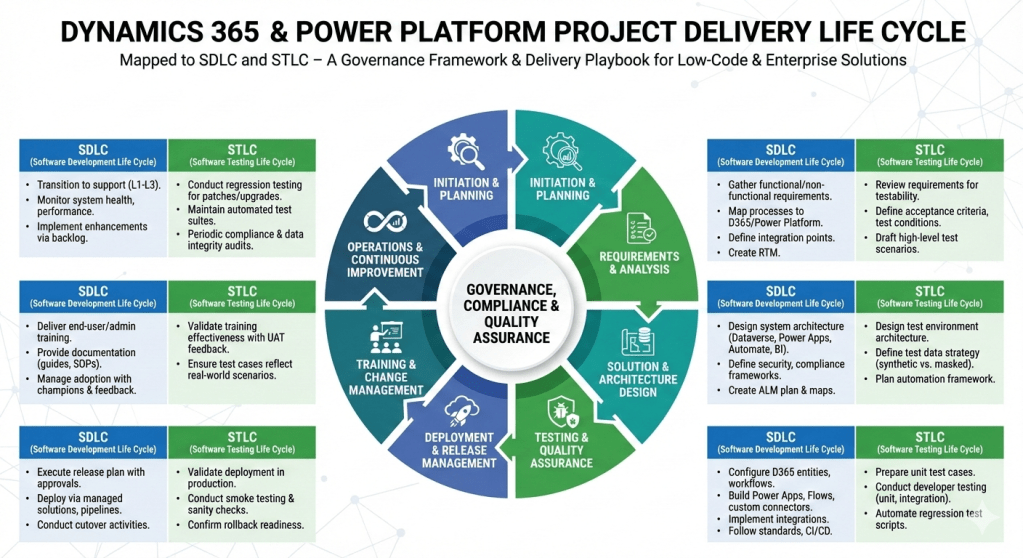
Step‑by‑step project delivery life cycle for Dynamics 365 & Power Platform projects

Here’s a step‑by‑step project delivery life cycle for Dynamics 365 & Power Platform projects, mapped to both SDLC (Software Development Life Cycle) and STLC (Software Testing Life Cycle). I’ve structured it so you can use it as a governance framework or a delivery playbook.

Dynamics 365 & Power Platform Project Delivery Life Cycle

1. Initiation & Planning

  • SDLC:
    • Define business objectives, scope, and success criteria.
    • Identify stakeholders, governance model, and compliance requirements.
    • Conduct feasibility study and ROI analysis.
  • STLC:
    • Define test strategy aligned with business goals.
    • Identify quality metrics, compliance standards, and risk areas.

2. Requirements & Analysis

  • SDLC:
    • Gather functional and non‑functional requirements (workshops, interviews, user stories).
    • Map business processes to Dynamics 365 modules and Power Platform capabilities.
    • Define integration points (ERP, CRM, CTI, external APIs).
    • Create requirement traceability matrix.
  • STLC:
    • Review requirements for testability.
    • Define acceptance criteria and test conditions.
    • Draft high‑level test scenarios.

3. Solution & Architecture Design

  • SDLC:
    • Design system architecture (Dataverse, Power Apps, Power Automate, Power BI, Dynamics 365 modules).
    • Define security, compliance, and governance frameworks.
    • Create ALM (Application Lifecycle Management) plan with environments (Dev, Test, UAT, Prod).
    • Prepare architecture maps and integration diagrams.
  • STLC:
    • Design test environment architecture.
    • Define test data strategy (synthetic vs. masked production data).
    • Plan automation framework (e.g., EasyRepro, Selenium, Power Automate test flows).

4. Development & Configuration

  • SDLC:
    • Configure Dynamics 365 entities, forms, workflows, and business rules.
    • Build Power Apps (Canvas/Model‑Driven), Power Automate flows, and custom connectors.
    • Implement integrations (Azure Functions, Logic Apps, APIs).
    • Follow coding standards, version control (GitHub/Azure DevOps), and CI/CD pipelines.
  • STLC:
    • Prepare unit test cases.
    • Conduct developer testing (unit, integration).
    • Automate regression test scripts.

5. Testing & Quality Assurance

  • SDLC:
    • Conduct system testing, UAT, performance testing, and security validation.
    • Validate integrations and data migration.
  • STLC:
    • Test Planning: Finalize test plan, entry/exit criteria.
    • Test Design: Create detailed test cases, test scripts, and data sets.
    • Test Execution: Run functional, regression, performance, and security tests.
    • Defect Management: Log, track, and resolve defects in Azure DevOps/Jira.
    • Test Closure: Document results, lessons learned, and sign‑off.

6. Deployment & Release Management

  • SDLC:
    • Execute release plan with governance approvals.
    • Deploy via managed solutions, pipelines, or release automation.
    • Conduct cutover activities (data migration, user provisioning, environment setup).
  • STLC:
    • Validate deployment in production.
    • Conduct smoke testing and sanity checks.
    • Confirm rollback strategy readiness.

7. Training & Change Management

  • SDLC:
    • Deliver end‑user training, admin training, and governance workshops.
    • Provide documentation (user guides, SOPs, governance playbooks).
    • Manage adoption with change champions and feedback loops.
  • STLC:
    • Validate training effectiveness with UAT feedback.
    • Ensure test cases reflect real‑world scenarios.

8. Operations & Continuous Improvement

  • SDLC:
    • Transition to support (L1, L2, L3).
    • Monitor system health, performance, and compliance.
    • Implement enhancements via backlog grooming.
  • STLC:
    • Conduct regression testing for patches and upgrades.
    • Maintain automated test suites for continuous validation.
    • Periodic audits for compliance and data integrity.

This framework ensures governance, compliance, and quality assurance are embedded throughout delivery. It’s especially powerful for Dynamics 365 & Power Platform projects where configuration, low‑code development, and integrations coexist with enterprise‑grade testing.

AI Foundry, architecture, copilot-studio

What’s New in Copilot Studio: September 2025 – Expanding Reach, Automation, and Analytics

What’s New in Copilot Studio: September 2025 – Expanding Reach, Automation, and Analytics

The September updates focused on three core areas: building richer agent experiences (specifically via Computer Use and WhatsApp), advanced developer tools like Code Interpreter, and deeper ROI/Analytics for measuring business impact.

Real-time User Journey: Computer Use (Public Preview)

The most innovative journey introduced is the ability for an agent to interact with UIs like a human:

  1. Scenario Discovery: A user needs to enter data into an old legacy desktop application that doesn’t have an API.
  2. Instruction: The user tells the agent, “Open the legacy ERP, look up invoice #123, and copy the total into this Excel sheet.”
  3. Vision & Reasoning: The agent uses its “vision” to see the screen and its “reasoning” to identify buttons and text fields.
  4. Execution: On a hosted Windows 365 browser or local device, the agent moves the virtual mouse, clicks, and types to complete the task.
  5. Completion: The agent confirms the data has been moved and provides a screenshot or log of the completed action.

Step-by-Step: How to Enable WhatsApp (General Availability)

With WhatsApp integration now GA, you can deploy agents to customers globally:

  • Step 1: Prerequisites: Ensure you have a Meta Business Account and a verified phone number for WhatsApp.
  • Step 2: Access Channels: In Copilot Studio, open your agent and go to the Channels tab.
  • Step 3: Select WhatsApp: Choose WhatsApp from the list of available channels.
  • Step 4: Connect to Meta: Follow the guided wizard to link your Copilot Studio agent to your Meta Business Manager.
  • Step 5: Configure Interactions: Set up how the agent should handle attachments (images/files) and authentication (via phone number).
  • Step 6: Go Live: Once connected, your agent is accessible to anyone messaging that verified WhatsApp number.

Infographic: Scaling and Measuring AI Impact

The September update introduced a suite of “Enterprise-Ready” tools to manage agents at scale:

CapabilityWhat it DoesBusiness Value
Code Interpreter (GA)Executes Python code directly within agents.Solves complex math, data visualizations, and CRUD operations on Dataverse.
ROI Analysis (GA)Tracks savings in time or money per agent run.Provides real-time data to justify AI investment and prioritize projects.
File Groups (GA)Organizes up to 12,000 files into 25 groups.Improves knowledge retrieval accuracy and reduces “context chaos.”
Agents Client SDKEmbeds agents in native Android, iOS, or Windows apps.Keeps users in their flow of work without switching to Teams or Web.

References

architecture, contact-centre, copilot-studio, Customer Experience, Customer-service, Power Apps

Architecture Description: An Intelligent, Multi-Platform Lead Management Ecosystem

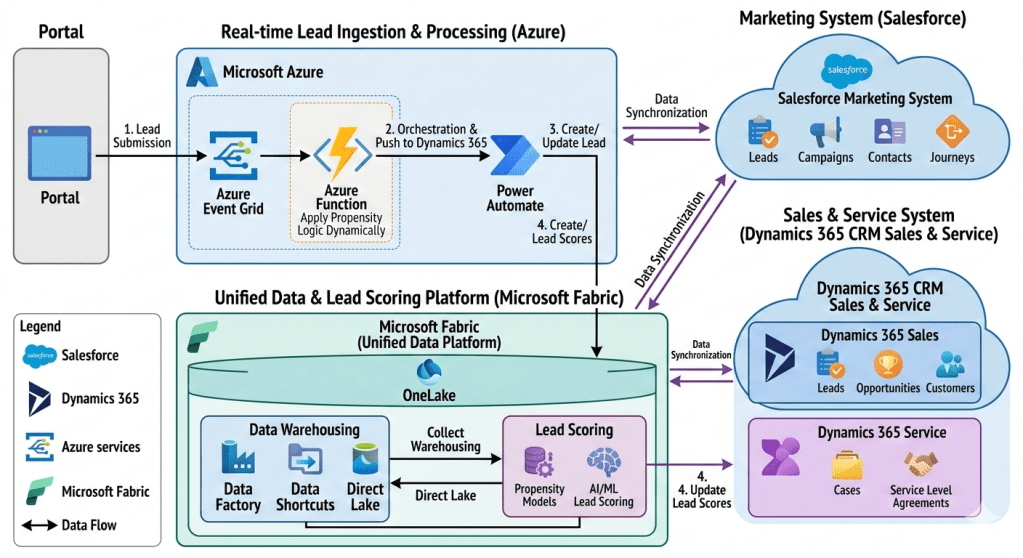
This document outlines the technical architecture of an advanced lead management and customer relationship ecosystem from one of my past implementations of an insurance company. The system integrates multiple SaaS and cloud platforms to create a seamless, real-time, and data-driven workflow for capturing, qualifying, and converting leads. At its core, it leverages the strengths of Salesforce for marketing orchestration, Dynamics 365 for core sales and service, Microsoft Azure for real-time lead ingestion and intelligent orchestration, and Microsoft Fabric as a unified data platform for comprehensive data warehousing and AI-powered lead scoring. The primary goal is to provide sales and marketing teams with a complete, 360-degree view of the customer while dynamically optimizing lead prioritization through sophisticated AI models.

Section 1: Architecture Overview

The architecture is structured into four main functional areas, connected by robust data flows and integration points:

  1. Lead Ingestion Point: Represented by the ‘Portal,’ this is the primary source for all incoming leads.
  2. Real-time Lead Ingestion & Processing (Microsoft Azure): This cloud-native layer captures lead data, applies initial dynamic logic, and orchestrates the creation of lead records in the CRM system.
  3. CRM Ecosystem (Salesforce and Dynamics 365): A best-of-breed CRM strategy where specialized systems manage distinct customer relationship lifecycle phases:
    • Salesforce Marketing System: Handles top-of-funnel marketing activities, campaign management, and customer journey orchestration.
    • Dynamics 365 CRM Sales & Service: Acts as the primary CRM for sales teams (managing leads, opportunities, and customers) and service teams (managing cases and SLAs).
  4. Unified Data & Lead Scoring Platform (Microsoft Fabric): The analytical heart of the system, consolidating data from all platforms into a single logical data lake (OneLake) for data warehousing and to fuel advanced AI/ML lead scoring.

Section 2: External Lead Ingestion

2.1 The Portal

The entire workflow begins at the ‘Portal’ block on the far left. The Portal is a public-facing web application, landing page, or external system where potential leads submit their information via a web form. This form captures essential details such as name, email address, company, job title, and the lead’s specific interests. This action is crucial as it creates the initial ‘digital footprint’ of the lead.

Section 3: Real-time Lead Ingestion & Processing with Microsoft Azure

Once a lead submits information via the Portal, the system transitions into real-time processing within the Microsoft Azure ecosystem. This section is designed for low-latency, event-driven operations, ensuring no lead is missed and initial classification is instant.

3.1 Step 1: Lead Submission (Portal to Azure Event Grid)

The first numbered step shows data flowing from the Portal to ‘Azure Event Grid’. When a lead form is submitted, the Portal generates a standard ‘Lead Created’ event. This event is published to an Azure Event Grid topic, which acts as a highly scalable, real-time event routing service. This decoupling is essential: it allows the Portal to submit the lead instantly without waiting for subsequent, potentially slower processing steps, making the portal highly responsive.

3.2 Intelligent Processing (Azure Event Grid to Azure Function)

Azure Event Grid routes the incoming ‘Lead Created’ event to a subscribing Azure Function. This Azure Function, the central processing unit of the ingestion layer, is serverless, running code only when triggered. It is annotated with ‘Apply Propensity Logic Dynamically.’

The Azure Function’s Role and Dynamic Propensity Logic:

This is a critical, intelligent component. The Azure Function performs several immediate tasks:

  • Data Validation and Transformation: It parses the JSON payload from the Portal, validating data types and transforming it into a canonical lead format.
  • Applying Propensity Logic Dynamically: This is the application of lightweight, dynamic rules or a small, pre-trained machine learning model designed for instant action. “Dynamically” implies that these rules are not hard-coded but can be updated or fetched from a configuration system on the fly.
    • What this means: For example, the function could check a rule like: “If company size > 100 AND location = ‘USA’ AND product interest = ‘ILP’, then direct-route to the enterprise sales team via a special field.”
    • Propensity: At this stage, it’s not the full-scale, historical data-driven scoring done later in Fabric, but rather an initial “fit” check. The logic decides how to process the lead immediately: whether to flag it for rapid follow-up, categorize it based on dynamic business rules, or prepare specific metadata. The result of this logic is embedded into the lead record’s data payload.
  • Orchestration Trigger: Once initial logic is complete, the function triggers the next stage.

3.3 Step 2: Orchestration & Push to Dynamics 365 (Azure Function to Power Automate)

The Azure Function, having applied its initial logic and enriched the lead data, pushes the processed lead record to Power Automate via an HTTP connector. Power Automate is the orchestration engine for this phase, providing a low-code/no-code interface to manage the integration between Azure and the downstream CRM.

3.4 Step 3: Create/Update Lead (Power Automate to Dynamics 365 Sales)

The Power Automate flow takes the enriched lead data and performs an upsert operation (update or insert) into the ‘Dynamics 365 Sales’ module within the Dynamics 365 cloud.

The Power Automate Flow’s Role:

  • Dynamics 365 CRM Connector: The flow uses the standard Dynamics 365 CRM connector to authenticate and perform actions.
  • Lead Record Creation: If the lead is new (e.g., email not found in Dynamics 365), it creates a new ‘Lead’ record. The initial classification and metadata derived from the Azure Function’s dynamic logic are populated into the record.
  • Existing Lead Update: If the lead already exists, the flow updates the existing lead record, perhaps adding a new campaign activity.

This step ensures that the sales team has immediate access to a centralized, validated lead record in their primary CRM (Dynamics 365 Sales), enriched with initial intelligence from the ingestion layer.

Section 4: Primary CRM Ecosystem

The core customer relationship management activities are split between Salesforce and Dynamics 365, connected by continuous data synchronization.

4.1 Dynamics 365 CRM Sales & Service

Dynamics 365 CRM, the central cloud container on the right, is the primary application suite for sales and service teams.

  • Dynamics 365 Sales: This module contains essential CRM entity blocks:
    • Leads: As detailed above, leads created via Power Automate are stored here. Sales reps manage the lead qualification process within this module.
    • Opportunities: Qualified leads are converted into Opportunities, where sales teams manage the sales pipeline, track deals, and forecast revenue.
    • Customers: Once an opportunity is won, the lead is converted into a full customer record, including primary Account and Contact details.
  • Dynamics 365 Service: This module supports the customer after the sale:
    • Cases: It tracks all customer support requests and issues, providing service reps with a structured workflow to resolve problems.
    • Service Level Agreements (SLAs): It defines and manages the agreed-upon performance metrics for customer service (e.g., initial response time, resolution time), ensuring customer support meets predefined standards.

The combination of Sales and Service data within the single Dynamics 365 instance provides a foundational customer view for sales reps, showing them both pipeline activity and post-sales service interactions.

4.2 Salesforce Marketing System

The Salesforce cloud, in the upper right, is dedicated to advanced marketing operations. A “Data Synchronization” arrow shows continuous data exchange with the main Dynamics 365 Sales & Service container.

  • Marketing Data Entities:
    • Leads & Contacts: Salesforce Marketing maintains its own view of Leads and Contacts for marketing activities, synchronized from Dynamics 365. This includes historical lead behaviour.
    • Campaigns: This module manages marketing campaigns across various channels (email, social, web).
    • Journeys: This represents Salesforce Marketing Cloud’s “Journey Builder,” a powerful tool for designing and automating multi-channel customer journeys (e.g., welcome series, re-engagement campaigns) that deliver personalized messages at scale.

Salesforce is used because of its specialized marketing capabilities, while the actual sales process (opportunities, final customer conversion) resides in Dynamics 365. The data sync ensures that when a new lead is created in Dynamics 365, it flows to Salesforce to be nurtured; conversely, when a marketing campaign achieves a significant milestone (e.g., a lead hits a nurture goal), that information can be synchronized back to Dynamics 365 to update the lead’s status.

Section 5: Unified Data & Lead Scoring Platform (Microsoft Fabric)

This is the analytical foundation and most innovative section of the architecture. Microsoft Fabric acts as a single, unified analytics platform, consolidating data from all other systems into a single logical data lake to power both traditional reporting and advanced AI.

5.1 Data Ingestion into Microsoft Fabric (Sync Arrows and Ingestion Paths)

The diagram shows multiple arrows feeding data into Microsoft Fabric from Salesforce, Dynamics 365, and the lead ingestion stream.

  • Data Synchronization (Salesforce/Dynamics 365 <-> Microsoft Fabric): Arrows indicate data synchronization from both CRM systems into Fabric’s central OneLake. This provides the unified “360-degree view” by pulling marketing, sales, service, and lead history data into a single location.
  • Data Warehousing (Data Factory, Data Shortcuts, Direct Lake): These components illustrate how data is moved and unified:
    • Data Factory: Used to create complex ELT (Extract, Load, Transform) data pipelines, moving large volumes of data from various sources (perhaps legacy databases or other APIs) into OneLake.
    • Data Shortcuts: This is a crucial Fabric feature, allowing data to be left in its source location (like Azure Data Lake Storage Gen2 or AWS S3) while creating a “shortcut” that makes it appear as if it’s stored directly within OneLake. This eliminates the need for data duplication and extra movement.
    • Direct Lake: A high-performance capability in Microsoft Fabric that enables large data volumes stored in OneLake (in Delta Parquet format) to be loaded and queried directly by analytics tools (like Power BI) without intermediate data processing or caching, ensuring performance and “freshness.”
    • These tools combine to populate the unified OneLake with all relevant, normalized customer data.
  • Real-time Ingestion Path (Power Automate and Azure Function -> OneLake): In addition to the main sync, the diagram implies (via “Lead Ingestion” and “Direct Lake”) that real-time data from the initial lead ingestion (from the Azure Function/Power Automate flow) can be fed directly into OneLake, making new leads immediately available for the complex scoring process.

5.2 OneLake: The Unified Data Lake

At the center of Fabric is ‘OneLake.’ This is the foundational logical data lake, acting as the single source of truth for the entire organization. By implementing ” shortcuts,” OneLake physically might span multiple cloud locations, but it looks like a single, structured file system to any analytical service within Fabric. Data from Salesforce, Dynamics 365, and the real-time ingestion stream are all stored here.

5.3 Lead Scoring within Microsoft Fabric

This module is the core application for advanced, AI-powered lead scoring, which differs significantly from the initial “Propensity Logic” in the Azure Function. The full process within Fabric involves:

  • Data Unification: Aggregating data from OneLake, including:
    • Historical marketing campaign engagement (from Salesforce sync).
    • Sales history (closed-won/lost opportunities from Dynamics 365 sync).
    • Customer service case history (from Dynamics 365 Service sync).
    • Real-time lead behaviour and attributes (from ingestion).
  • Propensity Models: Building and training advanced machine learning models (e.g., a predictive “propensity to buy” model) using historic data from OneLake.
  • AI/ML Lead Scoring: Applying these models to new leads. These sophisticated models can process hundreds of variables and identify non-obvious patterns to generate a highly precise, predictive lead score (e.g., from 1 to 100). This provides sales reps with a truly data-driven prediction of a lead’s likelihood to convert, which is far more powerful than the rules-based “propensity check” done at the ingestion point.

5.4 Step 4: Update Lead Scores (Fabric Lead Scoring to Dynamics 365 Sales)

The final numbered step closes the loop. After the AI/ML Lead Scoring process in Fabric generates an enhanced score, it pushes this score back to ‘Dynamics 365 Sales.’ This is done via an API connector or a scheduled data pipeline within Fabric (e.g., using Data Factory or a Spark job). The updated score populates a dedicated ‘Lead Score’ field on the original lead record in Dynamics 365 Sales.

This ensures sales teams work with the absolute best intelligence. A sales rep will now see a lead, created instantly from the portal, enriched with dynamic classification from the Azure Function, and continuously optimized with an AI-driven lead score from Fabric, allowing them to prioritize high-value opportunities with incredible precision.

Conclusion and Architecture Benefits

This detailed multi-cloud and multi-SaaS architecture provides several compelling advantages:

  • Best-of-Breed Specialization: It uses specialized platforms (Salesforce for marketing, Dynamics 365 for CRM core) without sacrificing data visibility, as both are integrated via bidirectional sync.
  • Intelligent, Real-time Ingestion: The combination of Azure Event Grid, Azure Functions (for dynamic logic), and Power Automate ensures all leads are captured, processed, and available in the CRM instantly, while immediately receiving a first pass of classification based on business rules.
  • Unified Customer View with Microsoft Fabric: The central OneLake provides a true “360-degree view,” consolidating data from Salesforce and Dynamics 365 (including sales and service) in one location, removing data silos.
  • Advanced AI Optimization (Continuous Improvement): The key differentiator is the AI-driven lead scoring within Fabric. It moves beyond simple rules and leverages historic data across the entire customer lifecycle to provide highly accurate, predictive prioritization, closing the loop with a score update in Dynamics 365. This ensures sales teams are always working on the leads with the highest dynamic and predictive propensity to buy.
  • Data Freshness and Efficiency: The use of Data Shortcuts and Direct Lake in Microsoft Fabric provides real-time access to large datasets without costly data movement or duplication, ensuring analytics are always based on current data.
AI Foundry, architecture, contact-centre, copilot-studio, Customer-service

Automate intent discovery and resolution with Customer Intent Agent in Dynamics 365 Contact Centre

Automate intent discovery and resolution with Customer Intent Agent (A specialized AI agent that proactively identifies emerging customer needs and builds the necessary logic to resolve them).

Real-time User Journey

This journey highlights how the agent transitions from “Discovery” to “Resolution” without manual administrative work:

  1. Passive Discovery: The Customer Intent Agent continuously scans thousands of historical transcripts and real-time interactions across voice and chat.
  2. Pattern Identification: The AI identifies a new, rising trend: many customers are asking about “Loyalty Point Expiration” following a recent policy change—a category that didn’t exist in the current routing rules.
  3. Intent Proposal: The agent alerts the supervisor: “I’ve discovered a new intent: ‘Loyalty Inquiry.’ Would you like me to create a resolution path for this?”
  4. Autonomous Training: Upon approval, the agent automatically maps relevant phrases to this new intent and suggests the best knowledge articles or automated bot topics to address it.
  5. Closing the Loop: The next customer who asks, “When do my points vanish?” is immediately recognized by the new intent and routed to the correct automated resolution, bypassing the general “Other” queue.

Step-by-Step: How to Enable This Feature

The Customer Intent Agent is part of the Agentic Contact Center suite. Follow these steps to activate it:

  • Step 1: Admin Center Access

Sign in to the Contact Center admin center or Customer Service admin center.

  • Step 2: Access the Agent Hub

Navigate to Operations > Agent Hub. This is the centralized control center for all autonomous agents.

  • Step 3: Enable Intent Discovery

Locate the Customer Intent Agent card and select Manage. Toggle the Discovery setting to On. This allows the agent to begin analyzing historical and live data.

  • Step 4: Configure Data Sources

Specify which channels (Voice, Chat, Email) the agent should monitor. You can also point it toward specific historical timeframes (e.g., the last 30 days) to find recent trends.

  • Step 5: Set Approval Workflows

Choose between Semi-autonomous (the agent suggests new intents for your approval) or Fully autonomous (the agent creates and applies the intent logic automatically). Microsoft recommends Semi-autonomous for the first 30 days.

  • Step 6: Link to Copilot Studio

Ensure the agent is connected to your Copilot Studio environment so it can automatically suggest or create new bot topics based on the discovered intents.

Infographic: The Customer Intent Agent Lifecycle

FeatureTraditional Manual DiscoveryCustomer Intent Agent
SpeedWeekly or monthly manual audits.Real-time continuous monitoring.
AccuracySubject to human bias/sampling.Data-driven across 100% of transcripts.
ImplementationManual rule-building & bot training.Auto-suggests phrases and resolution paths.
ScalabilityHard to track multiple minor trends.Captures long-tail and emerging issues instantly.
OutcomeReactive updates to routing.Proactive optimization of the service journey.

References